NETGEAR is aware of a growing number of phone and online scams. To learn how to stay safe click here.
Forum Discussion

John_Ba
Jan 10, 2021Luminary
Access to modem through Orbi
I have asked before but didn’t really get any solution. I have a Vigor 130 modem. When using Asus routers I could access it using its default address off http://192.168.2.1/. Since using a Orbi2 50 I...
John_Ba
Jan 11, 2021Luminary
Sensei
The guide to the UK 130, https://www.draytek.co.uk/support/downloads/vigor-130,
Used http://192.168.2.1” Which works OK direct bypassing the Orbi and worked OK with Asus routers befor.
In Router Information 192.168.1.1
Under Internet Port 212.69.54.84
Prodigy
You can’t turn off firewall disabled Armor via app and no connection still, direct address is OK.
Added the modem Mac address to Access Control but couldnt move it up from disconexted devices to allow or block as no responce to address.

CrimpOn
Jan 11, 2021Guru - Experienced User
John_Ba wrote:The guide to the UK 130, https://www.draytek.co.uk/support/downloads/vigor-130,
Used http://192.168.2.1” Which works OK direct bypassing the Orbi and worked OK with Asus routers befor.
In Router Information 192.168.1.1
Under Internet Port 212.69.54.84
I am "at a loss" to explain this. When the WAN port is a "public" IP address (212.69.54.84), that indicates to me that the Vigor is in "bridge mode". On the support site, I did not fiind a User Maual, but the Quick Start Guide contains this statements:
"The Vigor 130’s primary function is as a transparent bridge modem for
xDSL services – not as a router/firewall in itself. It connects a secondary
router or other device to your DSL line, where that device does not directly
support DSL itself.
As a bridge, the Vigor 130 only provides the physical conversion from
xDSL (ADSL or VDSL) to Ethernet and all firewalling, routing or other
advanced routing functions are managed by your secondary device (a
separate router, firewall etc.). The secondary device may also be a single
PC, a PC-based software router or an Apple Airport™ type device."
All I can think of is that the Orbi "knows" that anything beginning 192.168 is a private IP address, and thus cannot be found through the WAN port. Maybe the Asus knew, "it's not on the LAN, so the only place it can be is out the WAN port."
What a puzzle.
- John_BaJan 11, 2021Luminary
Its very frustrating that a device that depends on a further device (modem) to work is setup, it looks, to block access to the device. So the only way either basic or more advanced line device information can be got is by removing the Orbi and directly linking to the 130. When I had a line problem my ISP wanted a lot of line information (and told me how to get it from the 130 as its not shown by default) over more than a week. Anyone looking for how access the full information it is at https://www.draytek.co.uk/support/guides/kb-dsl-status-more. This was no problem with Asus but would be a real pain with the Orbi as at times we were communicating on line and once they took over my PC to show me how to get the detailed 130 data not possible with the Orbi!
 alokeprasadJan 11, 2021Mentor
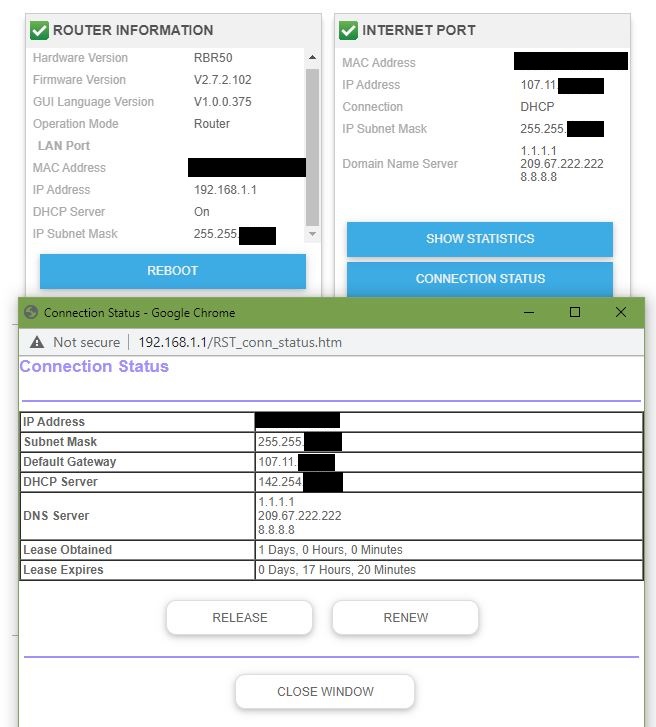
FWIW, This is what my info looks like.
My WAN IP address, DHCP server, Default gateway are all belong to my ISP.
If I recall correctly with the Nighthawk routers, the default gateway amd DHCP server for the LAN would be set to the router. Still looks that way w the Orbi.
So, everything looks normal.
Question: How do I find out my Cable modem's LAN-facing private IP address from the Orbi web interface? It is is not in the list of connected devices, but is pingable and reachable via the modem's web interface.
- John_BaJan 18, 2021Luminary
So Orbie/NG routers block modem access even if they are dependent on them being there. Clearly Asus manage these things very much better than nG, but I am beginning to see they do nearly everything better than NG but a bit late now I have moved over to Orbie.
- alokeprasadJan 18, 2021Mentor
The Orbi is not blocking access to may Arris cable modem from the LAN side. I can ping the cable modem and also get to the cable modem's web interface.
But that is because I knew (from my Nighthawk days) the cable modem's LAN-side IP address: 192.168.100.1. This is useful to check the cable modem status or to update it's firmware.
For those who don't know the cable modem's private IP address, how can they get that info from the Orbi's web interface?