NETGEAR is aware of a growing number of phone and online scams. To learn how to stay safe click here.
Forum Discussion

lowrisk
Apr 04, 2019Tutor
Can I force a satellite to connect to a another one?
I recently having some issue with my setup, would it be possible to force my satelitte to connect to the another satellite?
I attached some screenshot. Please not that the "Kitchen" satellite on th...
- Apr 04, 2019
Might try using just two of the satellites. Kind of depends on the size of the home as well...

FURRYe38
Apr 04, 2019Guru - Experienced User
What Firmware is currently loaded?
What is the Mfr and model# of the ISP modem the NG router is connected too?
Is the Orbi system operating in Router or AP mode?
What is the size of your home? Sq Ft?
What is the distance between the router and satellite(s)? 30 feet is recommended in between them to begin with depending upon building materials when wirelessly connected.
What channels are you using? Auto? Try setting manual channel 1, 6 or 11 on 2.4Ghz and any unused channel on 5Ghz.
Any Wifi Neighbors near by? If so, how many?
What WPA security modes are you using?
Try enabling Beamforming, Daisy Chain, and MIMO. Under Advanced Tab/Advanced Settings/Wireless Settings
Daisy Chain may help with getting satellites connected to each other. You can force them though.
- Chuck_MApr 04, 2019Mentor
What you are describing is Daisy Chain.... that provides a Satellite to act as "man in the middle" to another satellite -- presumably farther out.
The term you used of "Forcing"... the concept of Mesh is that RF connections will be made to "best fit" what devices -- and satellites see in the RF environment. If the satellite -- with daisy chain enabled -- only sees a good signal from another, then it will try that connection.
Long and short is that daisy chain allows passthrough of one satellite to another to extend reach.
Make sense?
- lowriskApr 04, 2019Tutor
yes thanks, but I dont get how the system believes that connecting both to the main AP.
the last AP can't possibly have a better link with the main AP than the middle satellite due to its emplacement:
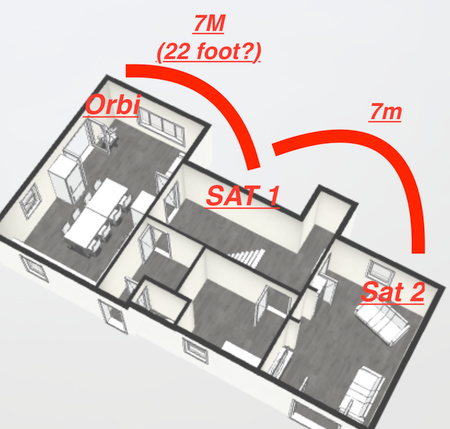
main orbi > 22feet in a straight(ish line) then > satellite 1 > 22feet satellite 2
- lowriskApr 04, 2019Tutor
Model Name Device Name Current Version Status Router RBR50 RBR50 V2.3.1.44 No new firmware version available. Satellite RBS50 Orbi Satellite Hall V2.3.1.44 No new firmware version available. Satellite RBS50 Orbi Satellite Kitchen V2.2.1.210 Waiting for connection Satellite RBS50 Orbi Satellite Living V2.3.1.44 No new firmware version available. I'm not sure about the total house sq / feet, Although I know that RBR50 > Orbi Satellite Hall = 7m (22feet I think) same from Orbi Satellite Hall >
Orbi Satellite Living. Also not sure that does anything but they all by windows.
Also I'm leaving in the country side, no other network interference (only fields).
Not sure what the NFR is but I'm using a Synology RT1900AC connected to my Optical terminal using PPPoE
Orbi is in AP mode, Settings :
20/40 MHz Coexistence, e WMM (Wi-Fi multimedia) settings, CTS/RTS Threshold 2347, Preamble Mode auto,Daisy-Chain Topology, Implicit BEAMFORMING, MU-MIMO, fast Roaming
2.4ghz chanel : auto, 5ghz :36 using WPA2-PSK [AES]
- FURRYe38Apr 04, 2019Guru - Experienced User
22 feet is a bit too close between the case RBR and satellites. 30 feet is recommended in between them to begin with depending upon building materials when wirelessly connected.
Also daisy chaing needs the placement of the satelites to be out in a line from the RBR and following satellites place after wards so they can piggy back of each other. The RBR being at the start of the line and the last satellite being at the far end.
I would also get that last satellite thats on v210 updated to v44. You can manually download and send the file to that RBS to update it and don't have to wait.
I presume the main host routters WiFi is disabled?
- lowriskApr 04, 2019Tutor
Thank you for the reply, yes the router wifi is turn off.
I'll try and will sent a update? do you think I should use all the satellites then ? I can add some upstairs alright
