NETGEAR is aware of a growing number of phone and online scams. To learn how to stay safe click here.
Forum Discussion

bcrooks
Oct 18, 2022Tutor
Can not update RBS50 or RBR50 firmware
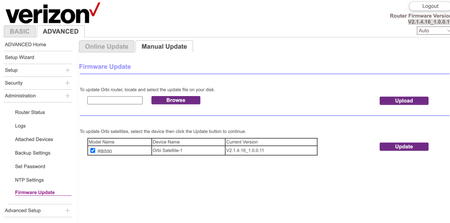
Hello all - I have been trying to update my firmware for days. I feel like I am about to loose my mind. I have followed the instructions I found in this community here: https://community.netge...
- Oct 18, 2022
Thats because you have a Verizon branded Orbi system. Verizon did there own FW for Orbi hard ware and thus put forth there own Orbi system using there FW. You'll need to contact Verizon for there help and support regarding FW updates they developed.

bcrooks
Oct 19, 2022Tutor
Per what FURRYe38 wrote above... My Orbi (and it sounds like yours) is a VERIZON branded orbi. And as such, it has VERIZON firmware, NOT netgear firmware. So in short, we cant update the firmware with Orbi firmware.
I also contacted Verizon and like your experience, they were equally as unhelpful.
I was reading on another forum about someone else who was dealing with the same thing. Basically, if it aint broke don't fix it. Since the Orbi was working, that person just stopped trying to update the firm ware.
Which is basically the stance I am now going to be taking. Not the one I want to take. But am not really seeing an alternative at this point.
However, if you find out how to update it, please share!!!
Best
bcrooks
Oct 19, 2022Tutor
Oh... here is the link to the thread I found on verizons forum...
Its basically circular reasoning...
- FURRYe38Oct 19, 2022Guru - Experienced User
And historical posts here as well:
https://community.netgear.com/t5/Orbi/Upgrading-ISP-branded-Verizon-Orbi-RBR50-and-Orbi-RBS50-to-new/m-p/1978380/highlight/true#M103180
https://community.netgear.com/t5/Orbi/Orbi-RBK50-upgrade-ISP-branded-old-firmware-to-latest-firmware/m-p/1920034/highlight/false#M93253