NETGEAR is aware of a growing number of phone and online scams. To learn how to stay safe click here.
Forum Discussion

trabba
Jul 25, 2022Tutor
Cannot Unblock Occulus Quest
I successfully connected the Occulus Quest 2 to the Orbi RBR50. It worked well for a couple of weeks. When I used the "block internet access" function via the app it would not recconnect. I have g...

CrimpOn
Jul 25, 2022Guru - Experienced User
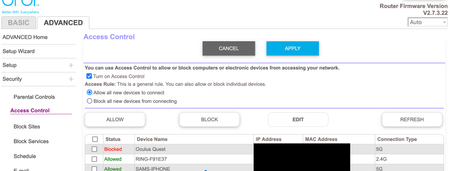
Sometimes I forget to follow through all the steps:
- Check the box next to the device that is blocked.
- Click the "Allow" Button.
- Click the "Apply" Button.
I understand that people are drawn to this Access Control feature, but (personally) I find that it seems to cause more problems than it is worth. If someone can guess my 20 character WiFi password, they are welcome to steal my WiFi, provided that they can get close enough to my house to get a good signal. I leave it turned off.
trabba
Jul 25, 2022Tutor
Thanks Crimp on. Yep have followed this steps. Also went into the edit function to try an alternate way. This does not work either.
- CrimpOnJul 25, 2022Guru - Experienced User
trabba wrote:
Thanks Crimp on. Yep have followed this steps. Also went into the edit function to try an alternate way. This does not work either.Have you tried disabling Access Control completely?
- trabbaJul 26, 2022Tutor
Sure Have...access control is turned off and still the device is blocked
 KevinLiTJul 27, 2022NETGEAR Moderator
Hello Trabba,
Welcome to the NETGEAR Community!
I understand that you are having difficulties changing the network access permissions on your RBR50 for your Occulus Quest. Please ensure that your device is not listed in the "view list of blocked devices not currently connected to the network" section.
If your Occulus is listed remove it by selecting "REMOVE FROM THE LIST" before following the instructions below.
Please follow the instructions listed below to resolve this issue:
- Select "Refresh" (Located on the right of "EDIT")
- Check the box of the Occulus Quest
- Select "Allow"
- Then select "Apply"
Best,
Kevin
Community Team
- trabbaJul 28, 2022Tutor
Hi Crimp on...this is the solution. I have disabled access control. I am assuming that devices still need a password to connect and that this function only gives me the ability to throttle / block devices once they are on the network.
- CrimpOnJul 28, 2022Guru - Experienced User
trabba wrote:
Hi Crimp on...this is the solution. I have disabled access control. I am assuming that devices still need a password to connect and that this function only gives me the ability to throttle / block devices once they are on the network.
I have a suspicion that if you ever (even once) use the Orbi app feature to "Pause" a device (any device), that will instantly activate Access Control again.
My appreciation for swear words increased exponentially when by accident I found Access Control ON. WTF? AlaKazam! etc. etc.
How did THAT happen????