NETGEAR is aware of a growing number of phone and online scams. To learn how to stay safe click here.
Forum Discussion

alokeprasad
Oct 27, 2023Mentor
Connect directly to satellites via web interface.
I can see the satellites as connected in the web interface of the router: However, the firmware update (in Administration) page of the router does not show the two satellites even after a long...
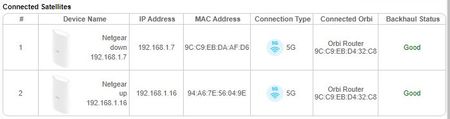
 Oct 30, 2023
The problems with the satellite connection and access was solved by unplugging the ethernet cables from the back of the satellites. That made the wireless connection between the RBR and the 2 RBS's unstable. The automatic updates through the web (or iOS app) did not detect the availability of the "new" firmware 8 moths after the release of the firmware.
That said, folks should bring the satellites one at a time into the same room as the RBR, reset the satellites and manually update the firmware using the downloaded .IMG files.

FURRYe38
Oct 27, 2023Guru - Experienced User
Has a power off for 1 minute then back ON with the ISP modem and router been performed?
Be sure to restart your network in this sequence:
Turn off and unplug modem.
Turn off router and computers.
Plug in and turn on modem. Wait 2 minutes for it to connect.
Turn on the router and wait 2 minutes for it to connect.
Turn on computers and rest of network.
Try a different browser, MS Edge or Firefox?
Be sure to clear out all browser caches as well.
- alokeprasadOct 27, 2023Mentor
Any preference in the order to power-on the RBK53 components?
Satellites first and then the router? or vice versa?- FURRYe38Oct 27, 2023Guru - Experienced User
Power ON the RBR first then RBS.
 KevinLiTOct 27, 2023NETGEAR Moderator
Hello alokeprasad ,
Welcome to the NETGEAR Community!
I understand that you would access to your satellites admin GUI because you would like to manually update your satellites. The good news is you can manually update your satellites from your router admin page. All you would need to do is select the manual update tab and then select the satellite to be updated. After, you would then need to select the firmware file that you would like to load on the device.
Please navigate to the link below for a walkthrough on how to manually update your RBS50:
How do I check and manually update the firmware on my Orbi satellite? - NETGEAR Support
Please navigate to the link below for the download file for your RBR50:
https://www.netgear.com/support/product/RBK50#downloadBest,
Kevin
Community Team
- alokeprasadOct 27, 2023Mentor
The problem is that while the satellites show (with their own IP addresses) up in the connected devices page (even if refreshed), the manual firmware update page shows them as “waiting for connection” forever. so, your suggested method doesn’t work.
I cannot ping those satellites’ IP address and cannot connect directly to the web interface of the satellites through their IP address using the browser.
I will power-cycle the router and the satellites after the workday. I need a functional PC (using Ethernet connection) till then.
aloke