NETGEAR is aware of a growing number of phone and online scams. To learn how to stay safe click here.
Forum Discussion

orbi_woes
Mar 21, 2019Aspirant
Constantly dropping connectivity
Hi All
I bought an Orbi RBR50 at end of November '18. The intention was to use the satellite to connect to an outside office I was building and also to an invertor I was installing once the bui...
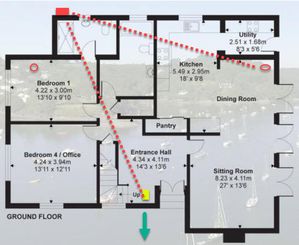
- Apr 06, 2019
The 2.4GHz is the backaul connection. The client still can make 5GHz connection to Satellite regardless of the backhaul back to the main Router. Since your max download speed is 45Mbps, it's still within the range of 2.4GHz bw and you won't benefit from 5Ghz bw in this case. A "Poor" backhaul connection in this case won't have performance impact on your setup unless you upgrade to Gbits download speed. If you are able to get 45Mbps in all area of interest, then you are golden.


FURRYe38
Mar 22, 2019Guru - Experienced User
You can see connected devices on the routers web page.
orbi_woes
Mar 23, 2019Aspirant
On occasion I can see the Solaredge invertor on the web app status page but NOT on the mobile app. What I meant with my last query was more relating to if there was a way to see the strength of the connection via the web page.
On related note, I've noticed some devices connecting to the master router, obtaining weak signal strength, rather than hooking on to the satellite, which would be closer to them offering a better signal. Is there a way to assign a device to a specific router?
Regarding the firmware version, it seems I am on an old version (V2.2.1.210). However, when I run the 'check' function via the web app it says it is up to date. Will try running it again.
Thanks.
- orbi_woesMar 23, 2019Aspirant
interesting development on the firmware upgrade. I checked NG site and it states the version is v2.3.0.32. The release notes for this state:
If you’re manually updating the firmware using a browser, you cannot update the firmware directly to v2.3.0.32. You must first update the firmware to v2.2.1.212. After updating the firmware v2.2.1.212, your Orbi router will reboot, and then you can update to v2.3.0.32.
However, when I try manually update the satellite with v2.2.1.212 I get knocked back, with error message telling me it is the incorrect version. It knocked me back 7 times. Eighth time it accepted it. Bonkers!!!
- Chuck_MMar 23, 2019Mentor
Now that you are on version .32, go to your web gui and click ADVANCED and then ADMINISTRATION and then FIRMWARE
It will then give you the opportunity to update to version .44 or something like that. Do it.
Will be interested in knowing if it resolved your issues.
Please let us know.
- orbi_woesMar 23, 2019Aspirant
Well that was painfully slow. Done. Both now on V2.3.1.44
Once I got updated to 2.3.0.32 the web app actually auto updated the main router. I only needed to kick off the update for the satellite.
- FURRYe38Mar 25, 2019Guru - Experienced User
Might try changing the host name on the device to something simple, just a few characters, if this is possible on the device.
orbi_woes wrote:
On occasion I can see the Solaredge invertor on the web app status page but NOT on the mobile app. What I meant with my last query was more relating to if there was a way to see the strength of the connection via the web page.
On related note, I've noticed some devices connecting to the master router, obtaining weak signal strength, rather than hooking on to the satellite, which would be closer to them offering a better signal. Is there a way to assign a device to a specific router?
Regarding the firmware version, it seems I am on an old version (V2.2.1.210). However, when I run the 'check' function via the web app it says it is up to date. Will try running it again.
Thanks.
- orbi_woesMar 26, 2019Aspirant
So I have updated all firmware, rebooted all modems etc, turned the satellite OFF to push the invertor over to the master router..... no joy. Although the Orbi app/website shows the Solaredge. Inverter connected, the SolarEdge portal stops updating straight away. As this did work previously I’m going to try a new approach. I’m going to try get an external antennae for the inverter to see if that will carry the signal to master router.
Back to the satellite. Riddle me this, Orbi gurus. When I had the satellite positioned on the north side of my house, towards the outside office, I received a waivering Wi-fi signal outside on my iPhone. As soon as I stepped inside my office the signal dropped off completely. Building to building it is exactly 23ft, with external cavity walls separating them. I have an old iPhone 5s so not the greatest. Before I go out and buy another satellite, is it reasonable to expect the two satellites to Ben able to communicate effectively with each other? If not, can anyone offer another solutions? Hard cabling unfortunately is not an option.
many thanks.
- FURRYe38Mar 26, 2019Guru - Experienced User
Depending upon building materials, the distance should be good for signal nowever placement is key and you maybe getting signal or trying to get connected to farthest satellite or router. Is this the only device that does this?
