NETGEAR is aware of a growing number of phone and online scams. To learn how to stay safe click here.
Forum Discussion

orbi_woes
Mar 21, 2019Aspirant
Constantly dropping connectivity
Hi All
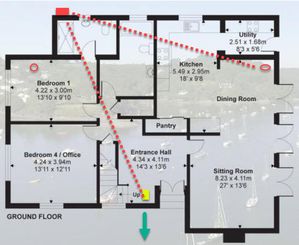
I bought an Orbi RBR50 at end of November '18. The intention was to use the satellite to connect to an outside office I was building and also to an invertor I was installing once the bui...
- Apr 06, 2019
The 2.4GHz is the backaul connection. The client still can make 5GHz connection to Satellite regardless of the backhaul back to the main Router. Since your max download speed is 45Mbps, it's still within the range of 2.4GHz bw and you won't benefit from 5Ghz bw in this case. A "Poor" backhaul connection in this case won't have performance impact on your setup unless you upgrade to Gbits download speed. If you are able to get 45Mbps in all area of interest, then you are golden.


FURRYe38
Mar 26, 2019Guru - Experienced User
Depending upon building materials, the distance should be good for signal nowever placement is key and you maybe getting signal or trying to get connected to farthest satellite or router. Is this the only device that does this?
orbi_woes
Mar 26, 2019Aspirant
Tbh the iPhone is the only one I’ve tried in the office. It’s a good point, will try laptop later.
This bring some me nicely back to a question further up the thread. Is there any way to assign a device to a specific router to prevent this happening? The web app has an ‘allow’ section in connected devices but I see nothing beyond that.
- FURRYe38Mar 26, 2019Guru - Experienced User
No, it's based upon the devices detection and handling of the signal and where it connects too....
- SW_Mar 26, 2019Prodigy
orbi_woes wrote:
>> If not, can anyone offer another solutions? ...
Not a solution, just someting that you could explore if you are out of other option.
1. Find the highest point/place in the house that you can place the Router/Satellite. This will allow signals to avoid going through all the walls so that both Router/Satellite signals can travel/spread further outward. Hopefully, one of these signals will reach the inverter that way.
2. Depending on your house electrical wring, you can try Powerline Ethernet adpaters. If the inverter is wireless only, find an old router or get cheap router to set it up as AP mode to bring WiFi signals closer to the inverter. Due to noise in the electrical wiring in the house, you can try connecting the powerline adapter to Satellite if the powerline connection to the Router does not give sufficient bandwidth to the inverter. That will be the simplest solution if you can't move the Router/Satellite easily.
Good luck!
- orbi_woesMar 26, 2019Aspirant
thanks all for feedback and suggestions.
It's a shame you can't allocate device to router. It seems the devices aren't smart enough to make the correct choice at times.
Tried moving satellite to upstairs bedroom - it was too far from the master router and had a poor backhaul.
The outside office is on a seperate consumer unit so Powerline won't work. I used Powerline previously and thought I was upgrading by chosing the Orbi option. The way things are at the moment, two Pepsi cans attached by a piece of string would offer a better solution than Orbi :-(
- SW_Mar 26, 2019Prodigy
Yeah, it's not possible with Mesh/Spoke&Hub setups to partition devices. One way to partition is to add new AP with separate/different SSIDs so that dedicated device can connect to the AP instead of Orbi in the desirable location. Since you can't run wire, this isn't an option for you.
However, if you can move Satellite closer, say to another room upstair in order to get "Good" backhaul connection. If the signal works for your inverter with that setup, then you can get a 2nd Satellite for your office.
- orbi_woesMar 26, 2019Aspirant
Give up? Never! I'm too stubborn for that :-)
- orbi_woesApr 01, 2019Aspirant
Evening all
I just wanted to give you an update on my issues. So, I dug deep in my pockets and bought two more RBS50 satellites (with the hope of only needing one and being able to return the other.)
I unboxed one RBS50, updated firmware, spent the next 20 mins syncing and resyncing and finally got it set up in daisy chain configuration. I positioned sat_1 just beside my front door, about 25 feet from main router, I then placed sat_2 in my new outdoor office. And, as if by magic, it worked. Interestingly though, the app said I had a good connection on sat_1 but poor on sat_2. I connected my laptop to both sats in turn, ran speedtest, absolutely no difference in returned results.
The web app showed this:
Note the 2.4Ghz connection type. Confusingly though, the mobile app was showing the only device connected, my iphone, as 5Ghz connection:
..... but also only showing a 2.4Ghz connection when I clicked on the sat_2 router:
Even more confusingly, sat_1 which listed as a 5Ghz connection in the web app, only showed 2.4Ghz in the mobile app:
It's hard to know which app lies most - mobile app or web app!!!
Having the 2 x sat routers now in daisy chain configuration I worked on moving sat_1 to various positions around my house for optimum performance (slow and boring process). Ground floor worked best.
Whilst moving the sat_1 router around I realised my Solaredge inverter had made a connection to the main router:
However, a few hours later, it had dropped that seeminly strong connection and hooked on to sat_1:
This is really weird. If a ddevice should connect to the strongest signal then surely it should connect to the main router. It is for situations like this that it would be really useful to have the functionality to assign devices to particular routers because the current loigic doesn't work.
A continous ping to that device now returns awful results:
Ping statistics for 10.0.0.3:
Packets: Sent = 100, Received = 69, Lost = 31 (31% loss),
Approximate round trip times in milli-seconds:
Minimum = 5ms, Maximum = 228ms, Average = 16msTo giove you some comparison on the ping results, from London, UK I can ping some servers in Chicago in 90-100ms.
I positioned my ipad which is connected to main router, next to the inverter, within the IP65 metal enclosure and did similar ping test:
Ping statistics for 10.0.0.5:
Packets: Sent = 100, Received = 100, Lost = 0 (0% loss),
Approximate round trip times in milli-seconds:
Minimum = 2ms, Maximum = 10ms, Average = 4msMuch better results. Of course this connectivity problem could be related to the solaredge inverter rather than the Orbi satellite so for giggles I pinged another device connected to sat_1:
Ping statistics for 10.0.0.14:
Packets: Sent = 100, Received = 100, Lost = 0 (0% loss),
Approximate round trip times in milli-seconds:
Minimum = 5ms, Maximum = 1572ms, Average = 374msThe response times were yet again pretty awful. But at least there were no dropped packets.
To conclude, I think I'm going to return the unused satellite because I don't think there is much to be gained by having a third satellite. I am still waiting on the solar panel install team to return to site and fit an external antenna on to the inverter, though I'm not convinced that is going to make much of a difference. It's not the end of the world though because the inverter caches data and when it does make its sporadic connection it will update that app with the cached data. I am however pleased and impressed at the results achieved by installing sat_2 in the outside office. I am able to browse and stream tv channels without any buffering. Speedtest returns results very close to what I achieve via main router. This is despite the apps telling me I have a poor connection.
If anyone has any views on what I could do to boost the performance on sat_1 and increase the response times, or any feedback on the notes from above, I'd be grateful to hear back from you.
Regards!
- SW_Apr 03, 2019Prodigy
Congrat on your latest success!
It seems that sat_2 was not able to establish good backhaul to sat_1 due to weak signal. Therefore, sat_2 switches over to 2.4G.
What were speedtest results?
Were they above 2.4G bw limit?
v210 has stronger and better signal. You can give that a shot and downgrade from v44 to v210 and see if backhaul signals improve.
- SW_Apr 04, 2019Prodigy
If you haven't already tried, give this a shot as well.
If you have Preamble Mode set to Automatic, change it to "Short Preamble", which can improve performance.
- orbi_woesApr 05, 2019Aspirant
Speedtest results were between 35 - 45Mbps. From the master router they were about 45Mbps so I was pretty pleased with the outcome.
There's not a significant difference in the sppedtest results for be to roll back the FW versions. Here in the UK, 45Mbps over wifi is pretty good.
As the sat-2 was showing a 2.4Ghz connection in the web app, I was surprised to see my iphone showing as 5Ghz, whilst connecting through the sat-2.
Solar guys came this afternoon and moved the inverter antenna outside my IP65 cab so I will mess about with that over the weekend, to see if I can get it hooked up to my master router.
Outside office should be ready by Monday so I'll start moving kit into there and report back later on performance via sat-2.
Have a great weekend y'all.
- SW_Apr 06, 2019Prodigy
The 2.4GHz is the backaul connection. The client still can make 5GHz connection to Satellite regardless of the backhaul back to the main Router. Since your max download speed is 45Mbps, it's still within the range of 2.4GHz bw and you won't benefit from 5Ghz bw in this case. A "Poor" backhaul connection in this case won't have performance impact on your setup unless you upgrade to Gbits download speed. If you are able to get 45Mbps in all area of interest, then you are golden.