NETGEAR is aware of a growing number of phone and online scams. To learn how to stay safe click here.
Forum Discussion

gregvi
Aug 19, 2024Aspirant
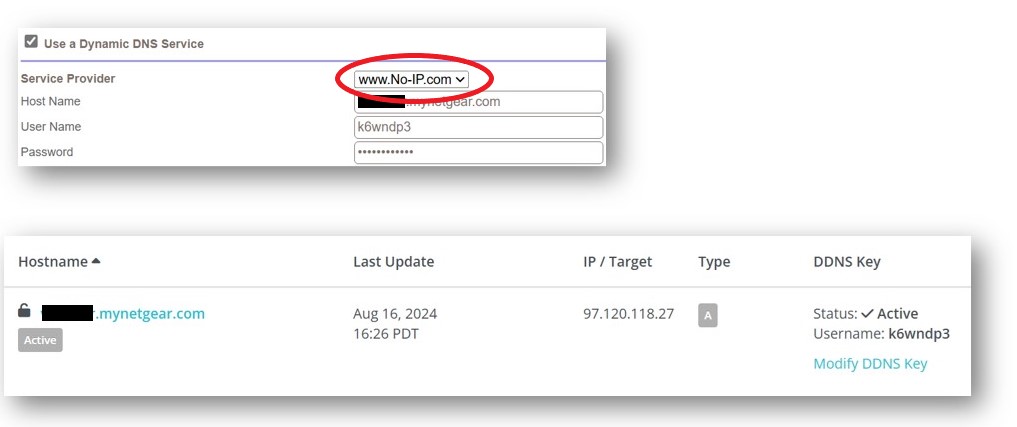
DDNS setting not working with No-IP. They've changed their domain name.
I’m trying to figure out a way to file a bug for a RBR50 running V2.7.5.4 firmware. The Orbi DDNS settings in the firmware still has www.No-IP.com listed in the pull-down and it no longer works...
- Aug 19, 2024
The Orbi AC series is EoL. So most likely won't see a FW update.
Something you can try is Voxel's 3rd party FW:


CrimpOn
Aug 19, 2024Guru - Experienced User
More puzzled.....
Have an RBR750 used for testing and set up DDNS on it select ing No-IP.com. (Doesn't have a public IP address, so totally uncertain what will happen). Notice that the 750 also uses "No-IP.com"
After several failure messages, the Orbi log shows Updated Successfully!
Perhaps it would be useful to ask what prompted the original post?
- Did the Original Poster (OP) attempt to create a DDNS with No-IP.com on the RBR50 and the process failed?
A screen shot of the error message would be helpful. - Did the OP discover that No-IP.com had become NOIP.com and assume that this invalidates the DDNS signup or maintenance process?
It seems to me that there must be a gadzillion (computer nerd term) users around the world who have established DDNS with No-IP.com Would the company really make a change that would immediately render their DDNS inoperative? Would the various companies who have included No-IP.com in their router firmware not notice and react?
This forum provides occasions to explore technical topis that most of us never consider. This appears to be one of those occasions.
gregvi
Aug 20, 2024Aspirant
I have setup my RBR50 with VPN services enabled. I use the DDNS service from NoIP to keep my hostname up to date for when my public IP address changes. FYI, my daughter uses the VPN from college. I also use it because Dish requires that you be on the home network when setting up a future TV recording.
It used to work very reliably for several years until No-IP changed to NoIP. In fact, I started using it back when Netgear hosted the mynetgear.com services. Unfortunately, they discontinued that free service and I was forced to go to NO-IP. Dyn which is the 3rd service provider on the pull down is a FOR FEE service only. so, NoIP is the only free service available.
I'm not sure how you got the log entries for the DDNS attempts shown below. I've checked my local Log and I see no attempt or denials. (Every checkbox checked)
nslookup gives me two different IP address for no-ip.com and noip.com. I'm not sure that makes a difference.
It's not a huge issue. I will just need to manually update the DNS entry when my public IP address changes which isn't more than a couple times a year. If you ever update the firmware for the RBR50, it would be nice if it was on the fix list.
NSLOOKUP
C:\Users\gregv>nslookup
Default Server: UnKnown
Address: 10.0.0.1
> set type=a
> no-ip.com
Server: UnKnown
Address: 10.0.0.1
Non-authoritative answer:
Name: no-ip.com
Address: 158.247.7.199
> noip.com
Server: UnKnown
Address: 10.0.0.1
Non-authoritative answer:
Name: noip.com
Address: 158.247.7.200

- CrimpOnAug 20, 2024Guru - Experienced User
gregvi wrote:
It used to work very reliably for several years until No-IP changed to NoIP.
This is my confusion. I also have had DDNS defined with No-IP.com for at least 5-6 years. Just tried it with my cell phone, and OpenVPN connects correctly. I found those Orbi log entries from July 27 because I have the Orbi email the log every time it fills up and then keep them (until I get annoyed with the number of emails and delete some). It appears that as recently as July 27, the Orbi was able to check in with No-IP.com and confirm that the DDNS entry is correct.
When I click the Status button on the DDNS page, it says that the last time the DDNS entry at No-IP.com was changed was at 12:09AM on 12/01/2022. Spectrum has not changed my public IP for a long time!
What was the specific indication that the DDNS entry was not being updated correctly?
gregvi wrote:
It's not a huge issue. I will just need to manually update the DNS entry when my public IP address changes which isn't more than a couple times a year. If you ever update the firmware for the RBR50, it would be nice if it was on the fix list.
Alas, even if I worked at Netgear, there is very little chance that I would be assigned to update firmware for the RBR50. There has not been new firmware since Feb, 2023.
The main benefit of defining DDNS though the Netgear interface is that Netgear built in mechanisms to automatically detect and update when the public (WAN) IP address changes. That removes the need for the user to create a process to detect when it changes.