NETGEAR is aware of a growing number of phone and online scams. To learn how to stay safe click here.
Forum Discussion

CaraBethP
Apr 26, 2022Tutor
Desktop Computer connection
I don't see my desktop computer listed as a connected device in the admin section of the orbi admin either in my app or online logged into orbilogin. Can I assume that I AM logged into the orbi on my...
CaraBethP
Apr 26, 2022Tutor
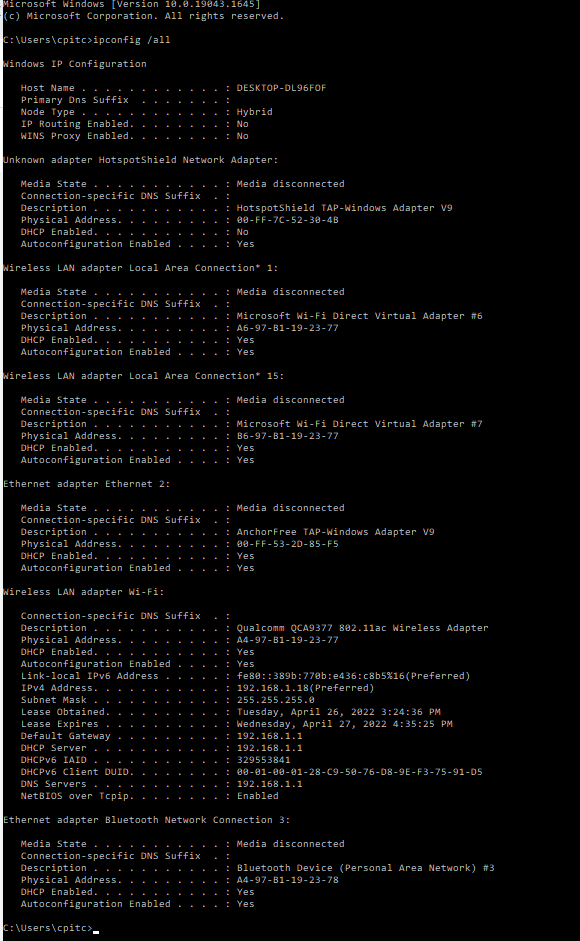
Attached the IpConfig

CrimpOn
Apr 26, 2022Guru - Experienced User
Thanks for providing the ipconfig output. It clearly shows the computer connected via WiFi.
This report is saying that the Ethernet port does not detect a cable connection. It is also a rather unusual description of an Ethernet adapter (anchorfree tap-windows adapter v9), which is related to a VPN service (specifically a 'tap' VPN). My HP computer, for example, describes the Ethernet port as:
Ethernet adapter Ethernet:
Connection-specific DNS Suffix . : peakview.rr.com
Description . . . . . . . . . . . : Realtek PCIe GBE Family Controller
Physical Address. . . . . . . . . : 20-25-64-0F-BA-CD
DHCP Enabled. . . . . . . . . . . : Yes
Autoconfiguration Enabled . . . . : Yes
Does this desktop have VPN software?
Sorry not to be more help (so far)
- CaraBethPApr 27, 2022Tutor
I appreciate your input. Thanks!
I do have Dashlane password manager and downloaded their VPN a couple months ago which I only use occasionally. It has been disabled through all this "trying to find the answer" problem solving. I installed it because I worry about my access to the charitable organization's website. If uninstalling made things better I would but I had this problem before I installed the VPN.
Today I have a second face to face with Spectrum support. Could be the Spectrum setup has caused all of this. The Spectrum modem is right here by my desk. The setup is a black screw in cable going into it from the wall and an ethernet cable (plugged into a port that says 2.4) feeding out of it into the wall.
Last week the Spectrum guy suggested I install a switch so I could run my desktop with an ethernet cable. So, I set one up. I ran the coax coming from the wall into the "in" port of the switch. I ran a coax out of the switch back into the modem.
These are all the “tests” I have run:
- Ethernet from switch to my computer- the computer doesn’t even identify that there is an ethernet port working.
- I also tested the same coax to my husband’s computer and he was able to switch from wireless to the ethernet connection. The signal only ran at 45mbps but he has a really old Mac. I can see his computer on the network via the Orbi app.
- Our Orbi is setup in the living room under the tv set. It is fed by a coax that comes into it. I took my computer into the living room and hooked the coax that was feeding into it into my computer. The network card woke up and I had huge fast speed from the coax. That has been the only way I can get the network card to work.
Attached is a pic of 1. what it looked like when I plugged in from the switch and 2. what it looked like when I plugged in from the ethernet that was used to "feed" the Orbi.
- CrimpOnApr 27, 2022Guru - Experienced User
There may be a terminology issue.
Spectrum typically provides television, telephone, and internet service through a single coax cable, which ends in a screw on connector (which looks nothing like a typical telephone cord or Ethernet cable). It is common for the coax cable to be 'split' so that it can appear in multiple locations within the house.
When the customer subscribes to internet service (and possibly phone service), a cable modem is connected to one of the coax cables in the house and an Ethernet cable connects the modem to the customer's equipment.
I am not aware of any computer equipment that will accept a coax (screw in) connection. No switches. No computers. (There are a couple of Orbi models which are combination modem/router models, but they are not common.)
Exactly which Orbi model do you have? (from the product label on the bottom of the case)
- CaraBethPApr 27, 2022Tutor
Yes, a terminology problem- The spectrum modem is connected via a coax. It feeds out via an ethernet cable through the wall (or floor) to the ethernet cable that connects the Orbi in the living room.
It is an RBR50. There is a satellite upstairs.
