NETGEAR is aware of a growing number of phone and online scams. To learn how to stay safe click here.
Forum Discussion

Burakiosaurus
Dec 17, 2020Aspirant
Disappointing Orbi Wi Fi Speed with Virgin Media M500
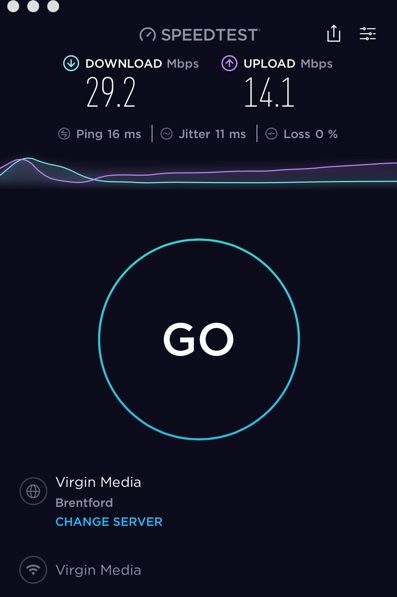
Hi All, Had my Orbi RBK50 since Sunday and am using it with ISP provided Router, which I have put into Modem mode. My ISP is Virgin Media in the UK on their M500 package. Their Minimum Guara...
Burakiosaurus
Dec 18, 2020Aspirant
Firmware for the NetGear RBR50 is V2.5.2.4
The ISP's modem is apparently based off Arris’s Touchstone TG3492 Telephony Gateway router.
I've found these details online about it (I hope it helps)
"So far as we’ve been able to confirm the Hub 4 also features an Intel Puma 7 (CE2752) CPU, can handle 32×8 bonded channels on DOCSIS 3.0 and 2×2 OFDM and OFDMA on DOCSIS 3.1, supports 3×3 MIMO on 2.4GHz WiFi (802.11n) and 4×4 MIMO on 5GHz (802.11ac Wave 2 – 1.3Gbps), 512MB of NAND flash memory and 1GB of DDR3L random access memory. Apparently it has a total of 10 or 11 internal antennas (we’ve seen both figures stated)"
They go on to say:
"Judging by these specs the Gigabit Connect Box (Hub 4) is a very close match for Arris’s TG3442 router (except for the inclusion of a USB 3.0 port and a few other smaller differences – design etc.)"
Any other settings on the NetGear / ISP Modem I could look to change?
I have gotten speeds of 400 mbps + ovwe WiFi since installing the NG last weekend, but right now it's hovering around the 100 mbps mark.

FURRYe38
Dec 19, 2020Guru - Experienced User
You ISP modem already has a build in router and wifi, This would be a double NAT (two router) condition which isn't recommended. https://kb.netgear.com/30186/What-is-Double-NAT
https://kb.netgear.com/30187/How-to-fix-issues-with-Double-NAT
Couple of options,
1. Configure the modem for transparent bridge or modem only mode. Then use the Orbi router in router mode. You'll need to contact the ISP for help and information in regards to the modem being bridged correctly.
2. If you can't bridge the modem, disable ALL wifi radios on the modem, configure the modems DMZ/ExposedHost or IP Pass-Through for the IP address the Orbi router gets from the modem. Then you can use the Orbi router in Router mode.
3. Or disable all wifi radios on the modem and connect the Orbi router to the modem, configure AP mode on the Orbi router. https://kb.netgear.com/31218/How-do-I-configure-my-Orbi-router-to-act-as-an-access-point and https://www.youtube.com/watch?v=H7LOcJ8GdDo&app=desktop
You might also update to v40:
Factory reset and setup from scratch after RBS and RBR have been updated...
Burakiosaurus wrote:Firmware for the NetGear RBR50 is V2.5.2.4
The ISP's modem is apparently based off Arris’s Touchstone TG3492 Telephony Gateway router.
I've found these details online about it (I hope it helps)
"So far as we’ve been able to confirm the Hub 4 also features an Intel Puma 7 (CE2752) CPU, can handle 32×8 bonded channels on DOCSIS 3.0 and 2×2 OFDM and OFDMA on DOCSIS 3.1, supports 3×3 MIMO on 2.4GHz WiFi (802.11n) and 4×4 MIMO on 5GHz (802.11ac Wave 2 – 1.3Gbps), 512MB of NAND flash memory and 1GB of DDR3L random access memory. Apparently it has a total of 10 or 11 internal antennas (we’ve seen both figures stated)"
They go on to say:
"Judging by these specs the Gigabit Connect Box (Hub 4) is a very close match for Arris’s TG3442 router (except for the inclusion of a USB 3.0 port and a few other smaller differences – design etc.)"
Any other settings on the NetGear / ISP Modem I could look to change?
I have gotten speeds of 400 mbps + ovwe WiFi since installing the NG last weekend, but right now it's hovering around the 100 mbps mark.
- BurakiosaurusDec 19, 2020Aspirant
FURRYe38 wrote:You ISP modem already has a build in router and wifi, This would be a double NAT (two router) condition which isn't recommended. https://kb.netgear.com/30186/What-is-Double-NAT
https://kb.netgear.com/30187/How-to-fix-issues-with-Double-NAT
Couple of options,
1. Configure the modem for transparent bridge or modem only mode. Then use the Orbi router in router mode. You'll need to contact the ISP for help and information in regards to the modem being bridged correctly.I've got my ISP provided Modem in modem only mode right now. Weird thing is, when I plug directly into the back of my ISP Router in modem mode via etherhet, I can't connect to the internet. Is this normal?
FURRYe38 wrote:You might also update to v40:
Factory reset and setup from scratch after RBS and RBR have been updated...
I will try this. When I try to update via the app, it says I have the latest version. Shouldn't it update to latest firmware from there?
- FURRYe38Dec 19, 2020Guru - Experienced User
Something to ask your ISP about.
If your modem is bridged, then you should only be needing the Orbi router for any router needs.No. Some updates are not notified on the routers web page or Orbi apo.
- sprog1033Dec 20, 2020Tutor
Burakiosaurus wrote:
FURRYe38 wrote:You ISP modem already has a build in router and wifi, This would be a double NAT (two router) condition which isn't recommended. https://kb.netgear.com/30186/What-is-Double-NAT
https://kb.netgear.com/30187/How-to-fix-issues-with-Double-NAT
Couple of options,
1. Configure the modem for transparent bridge or modem only mode. Then use the Orbi router in router mode. You'll need to contact the ISP for help and information in regards to the modem being bridged correctly.I've got my ISP provided Modem in modem only mode right now. Weird thing is, when I plug directly into the back of my ISP Router in modem mode via etherhet, I can't connect to the internet. Is this normal?
FURRYe38 wrote:You might also update to v40:
Factory reset and setup from scratch after RBS and RBR have been updated...
I will try this. When I try to update via the app, it says I have the latest version. Shouldn't it update to latest firmware from there?
Yes, when in Modem mode, the Virgin Router will take the first connection it detects in one of the LAN ports and passes the public IP to that device. The other ports will then effectively be deactivated.
I am surprised you have the Hub4 and not the Hub3 considering you are on the 500Mb package and not the 1Gb package. Either way, modem mode works in the same way.
My thoughts on your WiFi speed is that your device (assuming these tests are over WiFi) is connecting to the 2.4GHz frequency at that time and not the 5GHz frequency. You don't have a lot of control over that. My iPhone XS was always prone to this. What I did was reduce my 2.4GHz Wifi to 25% power and left my 5GHz WiFi at 100% power. My iPhone XS now sticks to the 2.4GHz WiFi every now and then, as opposed to daily before.
- BurakiosaurusDec 22, 2020Aspirant
Re: the Hub 4, they offered it to me as an upgrade and I took it, even though, like you say, I am on the M500 package.
The performance had been the same on the Hub 4 as it was on the Hub 3. Sometimes I'd get WiFi speeds of 500 mbps in my home offce upstairs and sometimes I'd get below 100 mbps.
Before upgrading to the NetGear Orbi, I had basic TP Link powerline adapters which didn't give great WiFi outside in the garden or good ethernet to my TV, PS4 or Amazon Box in the room where I had the TP Link extender.
The NetGear Orbi was supposed to fix all of this and give stable speeds all over the house on WiFi, which I know it can give me (e.g. I have got 500 mbps upstairs since installing the Orbi and in other areas of the house and even 300 mpbs outside in the garden).
It's the inconsistency which really worries me, so trying to detect whether it's a Virgin Media issue or a NetGear Orbi issue is my main task.