NETGEAR is aware of a growing number of phone and online scams. To learn how to stay safe click here.
Forum Discussion

nickcage49
Jul 13, 2019Tutor
Firmware update
Since these a**holes don't have support I wanted to know if anyone knows where to download the latest firmware update for this product? All I can find is stupid release notes. Thanks in advance. ...
- Jul 14, 2019
nickcage49 wrote:
Unfortunately I get this error message when I try to open it on my Mac. This may be for a PC and not a mac.
You are trying to open a img file?
That is not how it works.
As CrimpOn explained, you extract the img file from the zip file and upload the img file you are trying to open to the router.
I gather that even Macs come with a built-in extraction feature.
There is support for the Orbi WiFi System, including a manual, somewhere at the end of this link:
>>>> Orbi RBK50 | WiFi System | NETGEAR Support <<<<
See the section Manually Update Firmware.
Take a deep breath. Calm down and work through the process a step at a time in the procedure described there. It really is that simple.

nickcage49
Jul 13, 2019Tutor
Nope. That's my point. There is no update there. Just instructions and a useless file. See the screenshot.
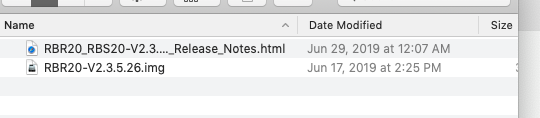

CrimpOn
Jul 13, 2019Guru - Experienced User
Although I have a different Orbi, the process might be the same. i.e.
- Download the file from Netgear.
- Extract the .img (image) file from the zip archive to someplace on the hard drive that you can find easily.
- Use a web browser to navigate to Orbi's Firmware Update page and select Manual.
- When it asks for the file, browse to the location where the .img file is and click on it.
- nickcage49Jul 14, 2019Tutor
Unfortunately I get this error message when I try to open it on my Mac. This may be for a PC and not a mac.
- michaelkenwardJul 14, 2019Guru - Experienced User
nickcage49 wrote:
Unfortunately I get this error message when I try to open it on my Mac. This may be for a PC and not a mac.
You are trying to open a img file?
That is not how it works.
As CrimpOn explained, you extract the img file from the zip file and upload the img file you are trying to open to the router.
I gather that even Macs come with a built-in extraction feature.
There is support for the Orbi WiFi System, including a manual, somewhere at the end of this link:
>>>> Orbi RBK50 | WiFi System | NETGEAR Support <<<<
See the section Manually Update Firmware.
Take a deep breath. Calm down and work through the process a step at a time in the procedure described there. It really is that simple.
- nickcage49Jul 14, 2019Tutor
You know what guys, if it's going to be that complicated I'd prefer to just pass.
Last time I was able to download the firmware automatically and it worked fine.
The router is working. I'm not going to fix what isn't broken.
Thanks for the advice anyway.
