NETGEAR is aware of a growing number of phone and online scams. To learn how to stay safe click here.
Forum Discussion

AkoreJepade
Dec 11, 2020Tutor
How to upgrade firmware on RBR50?
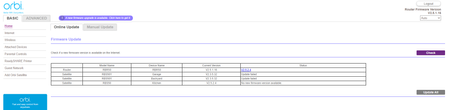
It will not let me upgrade the main router to the latest firmware... can't even do it manualy, It shows the new firmware but as you can see it this screenshot the Update all button is grayed out. ...
AkoreJepade
Dec 11, 2020Tutor
| Model Name | Device Name | Current Version | Status | |
| Router | RBR50 | RBR50 | V2.5.1.16 | V2.5.2.4 |
| Satellite | RBS50Y | Garage | V2.3.5.32 | Update failed |
| Satellite | RBS50Y | Backyard | V2.3.5.32 | Update failed |
| Satellite | RBS50 | Kitchen | V2.5.2.4 | No new firmware version available. |
Using Chrome

FURRYe38
Dec 11, 2020Guru - Experienced User
Well v4 has been superseded by v40:
If you download the FW file for the RBR, and unpack the .zip file, using IE11, Edge, Firefox or Opera, the RBR should accept the FW upate file.
- FURRYe38Dec 11, 2020Guru - Experienced User
You might want to downgrade the RBS to v16. v16 seems to be the most stable version FW.
Up to you though.- AkoreJepadeDec 11, 2020Tutor
Yeah I might have to roll them back to 16, they are acting funny for firwmare update. not sure why they show this:
Satellite RBS50Y Backyard V2.3.5.32 Update failed - FURRYe38Dec 11, 2020Guru - Experienced User
Ya the RBSY doesn't have more updated FW. No idea if or when they will get an update.