NETGEAR is aware of a growing number of phone and online scams. To learn how to stay safe click here.
Forum Discussion

AkoreJepade
Dec 11, 2020Tutor
How to upgrade firmware on RBR50?
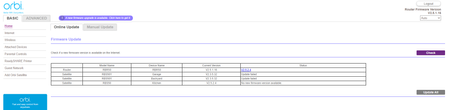
It will not let me upgrade the main router to the latest firmware... can't even do it manualy, It shows the new firmware but as you can see it this screenshot the Update all button is grayed out. ...

CrimpOn
Dec 11, 2020Guru - Experienced User
AkoreJepade wrote:It will not let me upgrade the main router to the latest firmware... can't even do it manualy, It shows the new firmware but as you can see it this screenshot the Update all button is grayed out.
In-line pictures do not show up until approved by a forum moderator. (attachments can be opened immediately. no idea why this is.)
"Manual" update is a different process:
- Connect to the Netgear Support site for the specific model
https://www.netgear.com/support/ - Click on Downloads
- Locate the desired firmware version.
- Click on the download link.
- After the "zip" file downloads, extract the "img" file to a place on the hard drive
(I often use the Desktop) - On the Orbi web interface, navigate to
Advanced Tab->Administration->Firmware Update - Click on the tab labelled "Manual Update"
This tab appears "gray" because it is not the active tab. Once clicked on, it will become the focus and the Online Update tab will be grayed out. - On the Manual Update page, click on the Browse button to locate the "img" file on the hard drive, then click on the "Upload" button (on the FAR right)
When manually updating firmware on satellites, the steps are the same, except that you must connect directly to the satellite web page (by IP address) and select the menu item "FIrmware Update".
Sorry if I misunderstood the question.
- AkoreJepadeDec 11, 2020Tutor
To update Orbi satellites, select the device then click the Update button to continue.
Model Name Device Name Current Version
RBS50Y Garage V2.3.5.32
RBS50Y Backyard V2.3.5.32
RBS50 Kitchen V2.5.2.4Never mind, now I see... the router does not have to be selected as it automaticly knows to update it with the file. Duh. :-)