NETGEAR is aware of a growing number of phone and online scams. To learn how to stay safe click here.
Forum Discussion

SdeGat
Dec 11, 2020Apprentice
Infamous RBR/RBS50 Firmware Upgrade issue
I have one of those RBR/RBS 50 setup which was stuck on firmware version 1.4 something. I followed the advice from this forum as follows: Manual update of Satellite and then Router in this order...
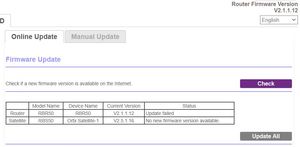
- Dec 12, 2020
Hopefully TFTP method will force something on the RBR> :smileytongue:

FURRYe38
Dec 11, 2020Guru - Experienced User
Try 2.3.0.32 on the RBR after v212

SdeGat
Dec 11, 2020Apprentice
FURRYe38 wrote:Try 2.3.0.32 on the RBR after v212
That one did not go through either... :manfrustrated:
- FURRYe38Dec 12, 2020Guru - Experienced User
Hopefully TFTP method will force something on the RBR> :smileytongue:
- FURRYe38Dec 19, 2020Guru - Experienced User
So seems you got this working?
FURRYe38 wrote:Hopefully TFTP method will force something on the RBR> :smileytongue:
- SdeGatDec 19, 2020Apprentice
Well, thanks to you FURRYe38 I am now at V2.5.2.4 on both router and satellite. :smileyvery-happy:
The RBR50 firmware status indicates "No new firmware version available" but it basically always indicated that.
I did 2.6.1.40 manually.
FURRYe38 wrote:So seems you got this working?
FURRYe38 wrote:Hopefully TFTP method will force something on the RBR> :smileytongue: