NETGEAR is aware of a growing number of phone and online scams. To learn how to stay safe click here.
Forum Discussion

sweatsockpimp
Dec 24, 2016Follower
NAS not found
Since two days I have a Netgear Orbi up and running. The WIFI-coverage is improved dramatically, but I have some problems finding my NAS in my homenetwork.
In my old setup I had a Experiabox modem with a TP-link router who delivered the wifi-coverage. The NAS was wired to the TP-link.
In the new setup the NAS is directly wired to the Experiabox-modem and the Netgear Orbi is wired to the Experiabox through to a switch in the living room.
I'm living in the Netherlands, so any Dutchies outthere can discuss with me in our native language. I read something about connection problems which were solved by switching off some router settings and letting the orbi work as an accesspoint, but I don'nt know how to get into the orbi's settings. The app I have don't let me get into any settings at all....???....
1 Reply
- RonV42Luminary
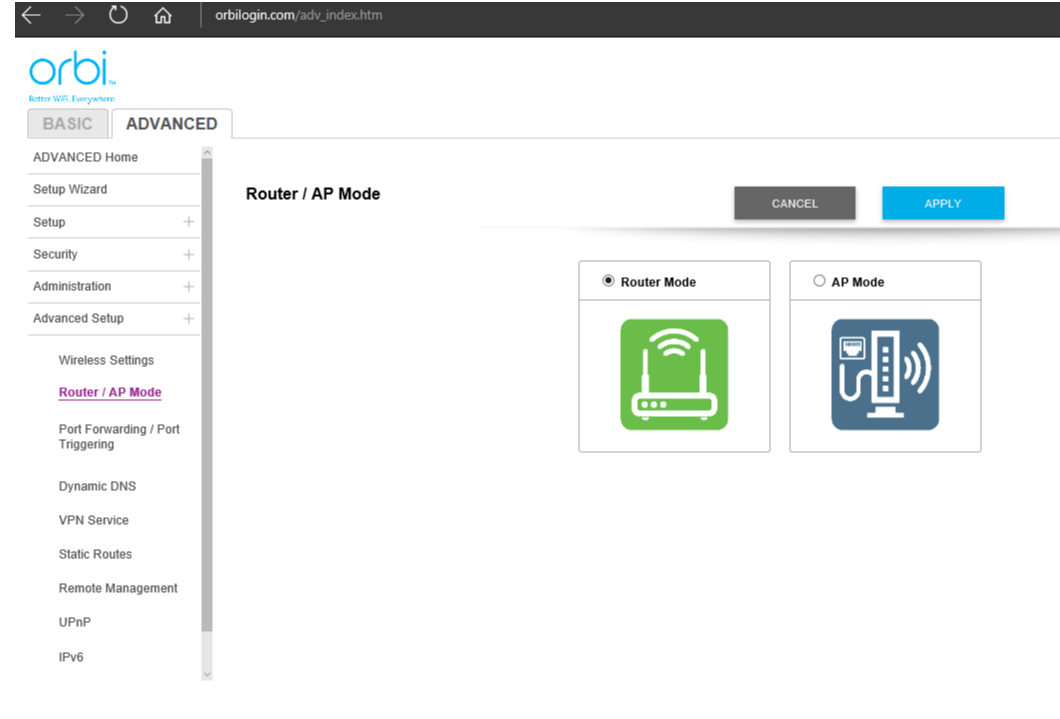
Yes you can turn the Orbi into an access point. To log into the Orbi you need to go to this address from a computer:
Then go into advanced tab, Advanced settings setup menu, router / ap mode. See the image below: