NETGEAR is aware of a growing number of phone and online scams. To learn how to stay safe click here.
Forum Discussion

ddcc001122
Nov 01, 2020Aspirant
Newly bought RBK50 constantly lose internet, after setting up "Block services", "Schedule"
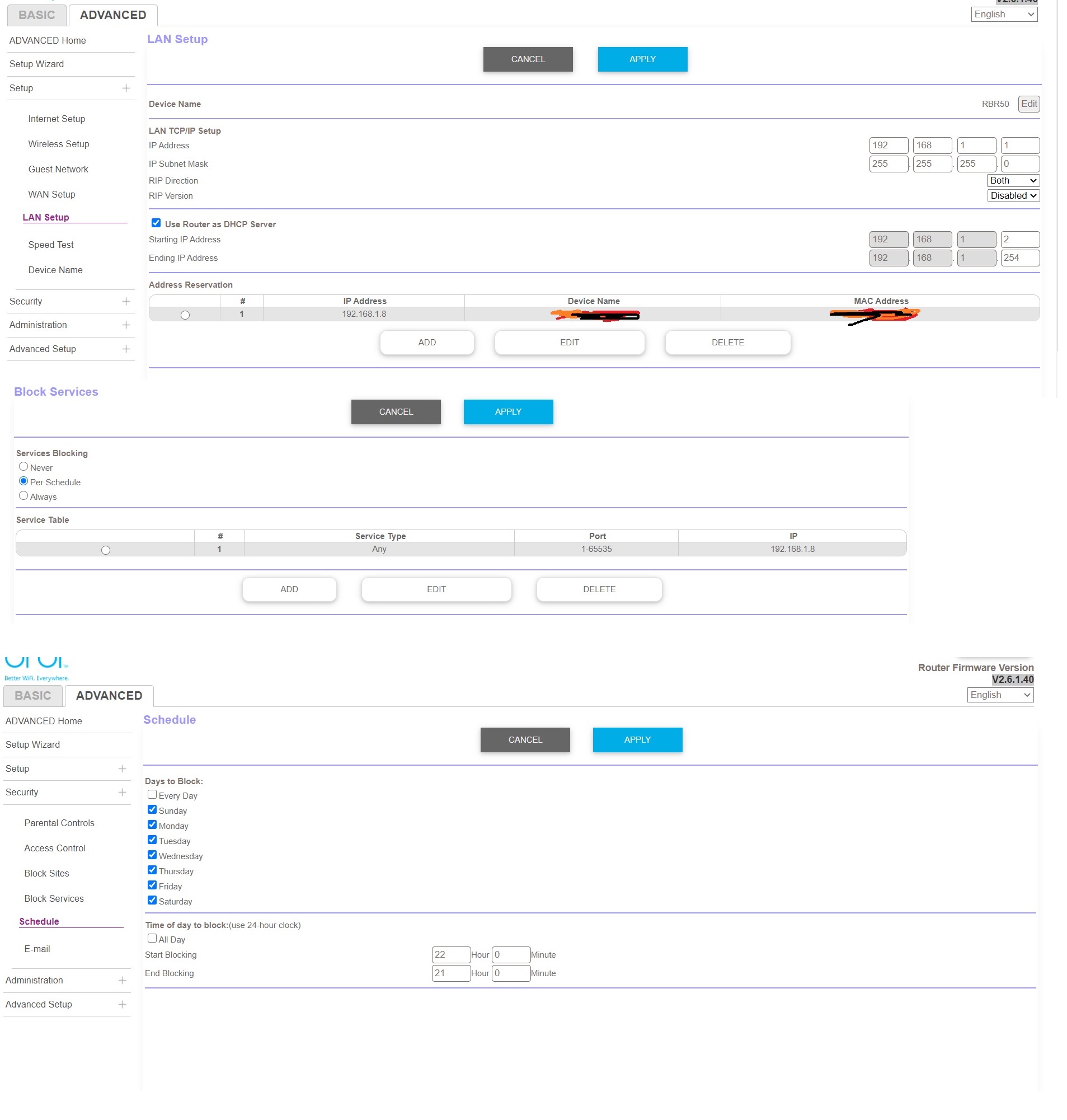
Hi all, I have bought a RBK50 set few days ago. I have set time limit access on one of the device in the network (My kid's), by the following steps: 1. Under the advance setting, I assigned a...

FURRYe38
Nov 01, 2020Guru - Experienced User
What Firmware version is currently loaded?
What is the Mfr and model# of the Internet Service Providers modem/ONT the NG router is connected too?
ddcc001122
Nov 01, 2020Aspirant
Firmwire is V2.6.1.40
Internet Service Provider modem: Huawei EchoLife HG8240H
Just wonder anyone see similar issue, or is it because I set up something wrong...
Attached my setup pages of the router
Thanks
- ddcc001122Nov 01, 2020Aspirant
so every night 10pm, all the devices are still connected to the Orbi wifi network, but all lose internet connection.
10pm is the start of the "block services" for that particular 192.168.1.8 device only in advance setting
thanks.- FURRYe38Nov 01, 2020Guru - Experienced User
What mode is your modem working in? Router or bridge mode? If router mode, This would be a double NAT (two router) condition which isn't recommended. https://kb.netgear.com/30186/What-is-Double-NAT
https://kb.netgear.com/30187/How-to-fix-issues-with-Double-NAT
Couple of options,
1. Configure the modem for transparent bridge or modem only mode. Then use the Orbi router in router mode. You'll need to contact the ISP for help and information in regards to the modem being bridged correctly.
2. If you can't bridge the modem, disable ALL wifi radios on the modem, configure the modems DMZ/ExposedHost or IP Pass-Through for the IP address the Orbi router gets from the modem. Then you can use the Orbi router in Router mode.
3. Or disable all wifi radios on the modem and connect the Orbi router to the modem, configure AP mode on the Orbi router. https://kb.netgear.com/31218/How-do-I-configure-my-Orbi-router-to-act-as-an-access-point and https://www.youtube.com/watch?v=H7LOcJ8GdDo&app=desktopHave the ISP check the signal and line quality UP to the modem. Be sure the ISP provisions the modem correctly.
Be sure there are no coax cable line splitters in the between the modem and ISP service box.
Be sure your using good quality RG6 coax cable up to the modem.
Be sure to power OFF the modem for 1 minute them back ON.
https://community.netgear.com/t5/Cable-Modems-Routers/General-info-and-Troubleshooting-for-Cable-Modems/m-p/1530376#M12853- ddcc001122Nov 08, 2020Aspirant
Hi,
Thanks. I confirm that the modem is in bridge mode, not router mode.
Just wonder anyone experienced this?
Thanks
Regards,
Daniel