NETGEAR is aware of a growing number of phone and online scams. To learn how to stay safe click here.
Forum Discussion

poekie68
Jul 15, 2017Initiate
No more wifi schedule in firmware 1.12.0.18
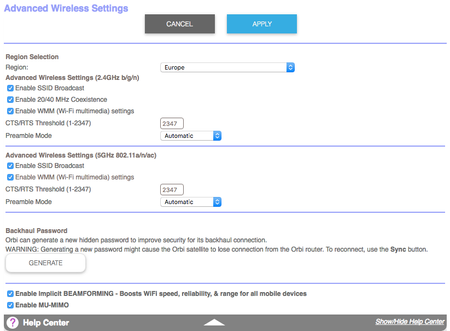
Hi all, Since the firmware update to 1.12.0.18 the possibility to schedule the wifi signal to turn off is not more available. Previously this could be found in Advanced > Advanced Setup > Wirele...

DarrenM
Oct 26, 2017Sr. NETGEAR Moderator
Here is the current way to block the wireless on a schedule
- Log into Orbi UI
- Go to Advanced -Security - Schedule
- Setup the time frame and days on which they want to block internet access. See example below:
- Click Apply.
- Once schedule has been set go to Advanced - Security- Block Services
- Under Service Table section click on the Add button.
- On the Block Services Setup page use the setup below. If you want to block all but 1 IP you can configure the IP Address Range option and specify the entire IP range you want to block just make sure your IP is not part of that range if you do not want that specific IP blocked.
- Click Add, you will be taken back to Block Services page.
- On Block Services page select Per Schedule option under the Services Blocking section
- Click Apply.
- You internet access should now be blocked based on the schedule you set.
Perts
Dec 14, 2017Tutor
Hi Darren
Wifi Scheduling is an essential function that should be urgently reinstated. Many of your customers want to be able to "turn off" the wifi signal only for a scheduled period of time. Currently my only option is to shut down all Orbi devices manually (overnight) then start them up in the morning. I would like to keep fixed wire running. The Orbi products are premium products that customers have invested good money into and some of them, including myself, have expected this function to be active. I'd apprecaite it if you could push again for this function to be reissued as a priority.
Note: This has nothing to do with Block Services setup.
- Marco_BEDec 16, 2017TutorDear Darren,
The issue has been explained all possible ways by users on this forum without any proper answer to solve it , neither plan to get a fix.
It is very clear now that netgear has purposely removed this feature from the product and this without prior notification to their customers.
So, if after the many complaints addressed to technical support thru this forum, there is still no plan to reintegrate this feature into the product, I’m afraid the last remaining possibility is to contact consumer magazines and make it highly visible on the market.
Maybe you can make this reaching your marketing / sales team to hopefully trigger a bit more attention to customer voice.
Sorry Netgear, you don’t deserve your customer’s trust anymore. - DarrenMDec 18, 2017Sr. NETGEAR Moderator
Hello Marco_BE
I have been aware of the need of this feature since it was removed and have been asking about it. I have been informed that it is on the engineers road map to be added back in a future firmware but I do not have a ETA on when.
DarrenM
- DThorsonDec 18, 2017Aspirant
As a new user of the Orbi system I want to also log my concern that this function is gone. I need to schedule a stop to wifi service in the middle of the night to limit use by a child who will stay up all night and game. He has agreed with this direction but your removing this from the firmware is preventing us from doing what we need to do.