NETGEAR is aware of a growing number of phone and online scams. To learn how to stay safe click here.
Forum Discussion

Stinky_W_Teats
May 25, 2023Aspirant
Orbi AC3000 generally unhappy
hi, I am struggling with a few issues with wifi on my Orbis: I have six Phorus PR5 receivers (these are hard-wired to an amp which is connected to wired ceiling speakers around the house and al...
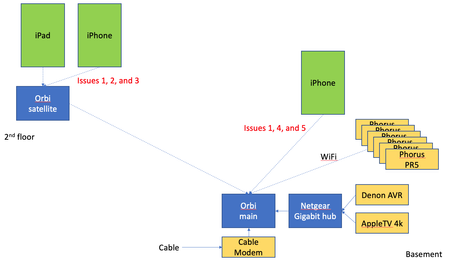
- Jun 14, 2023
Final update: I bought the Nintendo Ethernet adapter (above) for all the PR5s and they have been rock solid since.
Given that the MBP does not always appear in the list of AirPlay devices, plus the iPad issue when connected to the Orbi satellite, plus the drop outs on signal on the Orbis, I will lay the blame on the Orbis, but it is not 100% proven.
Done messing with this, and shame i had to throw money at the issues.

FURRYe38
May 25, 2023Guru - Experienced User
What is the Mfr and model# of the Internet Service Providers modem/ONT the NG router is connected too?
Be sure your using a good quality LAN cable between the modem and router. CAT6 is recommended.
What is the size of your home? Sq Ft?
What is the distance between the router and 📡 satellite(s)? 30 feet or more is recommended in between RBR📡 and RBS🛰️ to begin with depending upon building materials when wirelessly connected.
https://kb.netgear.com/31029/Where-should-I-place-my-Orbi-satellite 🛰️
What channels are you using? Auto? Try setting manual channel 1, 6 or 11 on 2.4Ghz and 40 to 48 channel on 5Ghz.
Any Wifi Neighbors near by? If so, how many?
One User Experience/Configuration:
https://community.netgear.com/t5/Orbi/Most-Stable-Orbi-Configuration/m-p/1941087/highlight/true#M97026
Be sure that phones and pads have any MAC Address randomizers disabled while at home:
- Stinky_W_TeatsMay 25, 2023Aspirant
> What is the Mfr and model# of the Internet Service Providers modem/ONT the NG router is connected too?
The cable modem is not involved in several of these issues, e.g., phone to Phorus is entirely local. i.e., stream music from iOS Music app to the Phorus.
> Be sure your using a good quality LAN cable between the modem and router. CAT6 is recommended.
Yep, I was a network engineer for many years (but on large corporate gear; consumer stuff is a little alien since they implemented some of this differently (e.g., what Netgear considers a DMZ).
>What is the size of your home? Sq Ft? What is the distance between the router and 📡 satellite(s)? 30 feet or more is recommended in between RBR📡 and RBS🛰️ to begin with depending upon building materials when wirelessly connected.
https://kb.netgear.com/31029/Where-should-I-place-my-Orbi-satellite 🛰️The distance between them is around 50'. From the satellite to the iPad is around 15'. The house is typical wood I-joists between floors, 2x4 and 2x6 wood studs, with wood flooring or drywall.
>What channels are you using? Auto? Try setting manual channel 1, 6 or 11 on 2.4Ghz and 40 to 48 channel on 5Ghz.
Any Wifi Neighbors near by? If so, how many?11 and 48, respectively. I used a scanner to see who else in the neighborhood is using what channels and I am the only on these.