NETGEAR is aware of a growing number of phone and online scams. To learn how to stay safe click here.
Forum Discussion

Stinky_W_Teats
May 25, 2023Aspirant
Orbi AC3000 generally unhappy
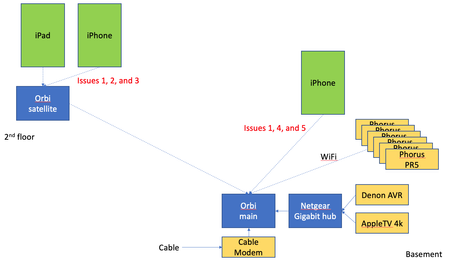
hi, I am struggling with a few issues with wifi on my Orbis: I have six Phorus PR5 receivers (these are hard-wired to an amp which is connected to wired ceiling speakers around the house and al...
- Jun 14, 2023
Final update: I bought the Nintendo Ethernet adapter (above) for all the PR5s and they have been rock solid since.
Given that the MBP does not always appear in the list of AirPlay devices, plus the iPad issue when connected to the Orbi satellite, plus the drop outs on signal on the Orbis, I will lay the blame on the Orbis, but it is not 100% proven.
Done messing with this, and shame i had to throw money at the issues.

CrimpOn
May 27, 2023Guru - Experienced User
The Phorus PR5 arrived and had been installed. Not the most "user friendly" setup app I have seen, but eventually got through it. The PR5 is on the network and the Phorus app works as expected. (Streams Amazon Music to the PR5, etc.)
Note: there was none of that "Must be 2.4G WiFi" nonsense with the Phonus. Kudos to them.
Was a bit of a "learning experience" finding an Android App (besides Phorus) that will stream to an AirPlay speaker system. Found that AirMusic works on one of my Android devices and streams music from TuneIn Radio to the PR5 receiver.
Conclusion: I'm stumped. I see no reason why Phorus PR5 receivers should appear inconsistently on the WiFi network. Maybe having six of them in close proximity to each other might be an issue? (Can't imagine why.)
Had hopes of concluding, "This is what you're doing wrong." No such luck. Sorry.
Stinky_W_Teats
May 30, 2023Aspirant
Thanks CrimpOn. Glad you got your working.
I got my Apple TV working well - the issue was the remote was not recognized so i was trying to set it up from my iPhone and it is much easier from the remote. It was sort of a Catch-22 - the BT didn't work with the iPhone so i couldn't look at the settings for the remote, and i couldn't get the remote to work either. There is a procedure to reset the remote then repair it with the Apple TV and that did the trick.
The Denon also started working after a bit more fiddling with it, plus realizing Airplay is audio-only, whereas i was trying to do video.
I am going to contact Phorus again, but the other issues still remain too, so i kinda suspect the answer is going to be the Orbis are not working 100% correctly. The remaining issues are mostly when one device (iPad or iPhone) is connected to the satellite Orbi and the PR5s are connected to the main Orbi.
Event just using my iPad on the satellite to the internet (across satellite to main Orbi) is still flakey. Given that, I suspect the issue is Netgear, not Phorus. Still, Phorus may have seen this before so will check with them.
I looked at settings like QoS and UPnP and those are correct. Rebooted everything. No joy still.
- Stinky_W_TeatsMay 30, 2023Aspirant
Also: all the PR5s always show up as Connected 5G on the admin console on the main Orbi. They are there even when my iPhone does not show them as available AirPlay devices.
They also don't show up in the Phorus app when they are not visible in AirPlay, so thinking this is not an AirPlay issue per se.
Will need to see if there is a setting for protocols and ports forwarded between the satellite and main Orbi.
Or if there are any settings on the iPhone for Airplay that may be a factor. But these things are pretty well locked down n terms of being able to do that kind of thing. Frustrated with the consumer gear 😀
- CrimpOnMay 30, 2023Guru - Experienced User
Stinky_W_Teats wrote:
Will need to see if there is a setting for protocols and ports forwarded between the satellite and main Orbi. 😀
There are no settings. Every protocol and port destination go across the router to satellite link.
When there are issues with the PR5s, is it always the same units which are not visible to either Air Play or the Phorus app?
Are there some that always appear?
- Stinky_W_TeatsMay 30, 2023Aspirant
It is inconsistent. Often they all disappear. Other times 1 or 2 of them will be visible. I often got the PR5 that streamed to outdoor speakers, but not always consistently. Lately the one showing up more often has been the ceiling speaker for the master bath.
Actually, my MacBook Pro (MBP) has been showing up in the list of AirPlay devices most or all of the time even when the PR5s vanish form the list. The main Orbi shows the MBP as connected to it, not the satellite, so it should theoretically be the same situation as the PR5s.
Wait... the MBP is connected to the main Orbi at 2.4G, whereas the PR5s are 5G to the main Orbi. I wonder if there is anything possibly amiss with the AirPlay devices connected at 5G?
The satellite Orbi uses 5G back to the main one, but I don't think that would make a difference (especially since the one AirPlay device that usually is visible is 2.4G)
The PR5s will do both 2.4G and 5G but I haven't found out how to switch them' might need to set up 2 different WiFi networks on the main Orbi and limit one to 2.4 as a test.
Also, the PR5s are supposed to support Ethernet via a USB to Ethernet adapter. might need to try that, since I have a gigabit hub in the rack the PR5s and main Orbi sit on top of.
I emailed Phorus and will report back if they have any suggestions.