NETGEAR is aware of a growing number of phone and online scams. To learn how to stay safe click here.
Forum Discussion

Stinky_W_Teats
May 25, 2023Aspirant
Orbi AC3000 generally unhappy
hi, I am struggling with a few issues with wifi on my Orbis: I have six Phorus PR5 receivers (these are hard-wired to an amp which is connected to wired ceiling speakers around the house and al...
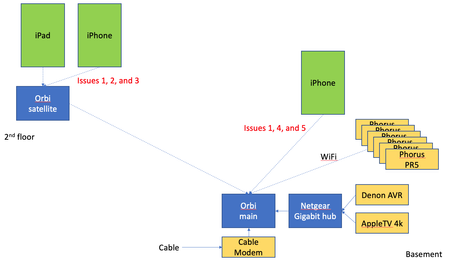
- Jun 14, 2023
Final update: I bought the Nintendo Ethernet adapter (above) for all the PR5s and they have been rock solid since.
Given that the MBP does not always appear in the list of AirPlay devices, plus the iPad issue when connected to the Orbi satellite, plus the drop outs on signal on the Orbis, I will lay the blame on the Orbis, but it is not 100% proven.
Done messing with this, and shame i had to throw money at the issues.

KevinLiT
May 30, 2023NETGEAR Moderator
Hello CrimpOn ,
"Phorus probably used 802.11n in the PR5 product because (a) the chip is less costly, and (b) they are receiving audio signals. The amount of bandwidth needed for audio is tiny. There is no need for the greater capacity of 802.11ac". This is the most probable reason why it doesn't stay on the 5Ghz network that is optimal with the 802.11 AC protocol. Maybe the best experiment approach will be to probe the PR5 and Orbi communication.
Best,
Kevin
Community Team

CrimpOn
May 30, 2023Guru - Experienced User
KevinLiT wrote:
it doesn't stay on the 5Ghz network that is optimal with the 802.11 AC protocol.
I believe this is where the OP started the discussion. Attached Devices shows all six PR5 units connected to the Orbi at 5G as well as a MacBookPro at 2.4G. Other devices wishing to use Air Play to send music to one (or more) of the PR5s cannot find them.
If they were disconnecting and reconnecting, then the Orbi log file would show them being assigned IPs over and over.
I agree that investigating the Air Play communications may be a good idea. First step is probably to find a document explaining how Air Play works. My guess is this involves devices sending some kind of broadcasts and other devices responding.
- Stinky_W_TeatsMay 31, 2023Aspirant
hi Kevin, thanks for your input, much appreciated!
Actually, it seems that the PR5s that are connected at 5G are the ones that are visible.
This may not be 100% consistent but since I noticed this seems to be one of the few consistent things around mid-day yesterday, I have checked several times and the only ones that are visible are connected at 5G.
e.g., first thing this morning i saw two PR5s, the one for the master bath ceiling speaker and one for the kids' bath speaker. Checking the Orbi console, both are connected to the main Orbi at 5G.
Now about 2 hours later, i only see the kids' bath and it is the only one connected at 5G.
I think this is validating CrimpOn's point that the various 5G standards are not the issue here.
My theory is that it is the devices switching from 5 to 2.4 that causes them to disappear form the AirPlay list.
- Stinky_W_TeatsMay 31, 2023Aspirant
Thanks for the reply Kevin, much appreciated! Great to see Netgear helping
To the broadcast point: I considered that as well as possible multicast issue yesterday, so enabled IGMP (the setting is only on the WAN side, so should not affect local traffic on WiFi). The box was checked, so it was disabled. I unchecked it so is now enabled. No difference in the last ~20 hours.
I have been limiting testing to music stored locally on my iPhone and using the Music app on the phone, so no WAN involved. Also, even before i try to stream music, the issue is in connecting to the devices. so absolutely no WAN involved with that.
But even if we have eliminated possible multicast issues, there may be a broadcast issue:
- I don't know how often the PR5s broadcast their presence as AirPlay devices
- I don't expect that the Orbi would store AirPlay broadcast information (but that is a question for Netgear, i.e., depending on the protocol AirPlay uses such as if it involves routes (admittedly a longshot))
- Theoretically, the iPhone refreshes the list of AirPlay devices when you pull down on the screen. That may be some sort of broadcast that says something like "where my AirPlay peeps at?"
- I don't know how the Orbi handles that broadcast. It SHOULD send it to all WiFi devices if it is a standard broadcast, but again, a question for Netgear if the Orbi somehow limits broadcasts in an attempt to optimize bandwidth
- Ditto for the PR5 broadcasts - the Orbi could be limiting those such as if it thinks it is seeing too many of those and quits repeating the broadcasts to WiFi. Are there any settings related to broadcast on the Orbi?
- Stinky_W_TeatsMay 31, 2023Aspirant
>If they were disconnecting and reconnecting, then the Orbi log file would show them being assigned IPs over and over.
I have been checking the log and it does not show any re-assignment of IPs. So when the PR5s switch from 5 to 2.4 they are not getting new IPs.
And speaking of addresses, one thing i learned early on in this troubleshooting is that Apple devices use private WiFi addresses (which IMHO should be called private MACs) so the MAC address on the iPhone and iPad can change. I disabled that on both a few days ago, and everything has been rebooted multiple times since then, so I highly doubt that could be the problem.
I wrote down the IPs and MACs of the PR5s and those are not changing for the last 2+ days since i started checking.
- Stinky_W_TeatsMay 31, 2023Aspirant
heh. the MBP is back again and it is on 2.4. Kids' bath PR5 is still visible and on 5.
As Charlie Brown would say: AAAAAAAAAAAAAAAAAAAARGH!
Wish I had a Sniffer.