NETGEAR is aware of a growing number of phone and online scams. To learn how to stay safe click here.
Forum Discussion

Stinky_W_Teats
May 25, 2023Aspirant
Orbi AC3000 generally unhappy
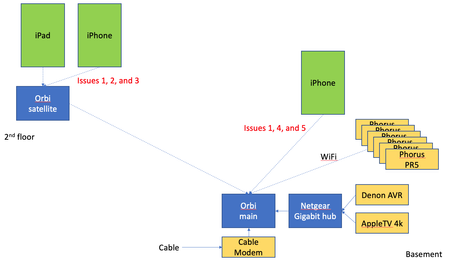
hi, I am struggling with a few issues with wifi on my Orbis: I have six Phorus PR5 receivers (these are hard-wired to an amp which is connected to wired ceiling speakers around the house and al...
- Jun 14, 2023
Final update: I bought the Nintendo Ethernet adapter (above) for all the PR5s and they have been rock solid since.
Given that the MBP does not always appear in the list of AirPlay devices, plus the iPad issue when connected to the Orbi satellite, plus the drop outs on signal on the Orbis, I will lay the blame on the Orbis, but it is not 100% proven.
Done messing with this, and shame i had to throw money at the issues.
Stinky_W_Teats
May 31, 2023Aspirant
Why use the 192.168.*.100 - 200 block of IPs?
It looks like the cable modem uses the 192.168.0.x network
Also, the neighbors are on the other 2.4 channels so i moved mine to 11. 48 is clear for 5G.

FURRYe38
May 31, 2023Guru - Experienced User
Stinky_W_Teats wrote:
Why use the 192.168.*.100 - 200 block of IPs?
I've found that having a smaller IP address pool is less the router has to deal with.
I got this from a different branded router mfr I used to use years ago. Always worked well. So just something I've used for NG and mention for uses who wanna try it. Not required of course. Not everyone has 250 devices on online and at most average is maybe 30-40. Why have a such a large pool size when it wouldn't be utilized fully.
It looks like the cable modem uses the 192.168.0.x network
What is the brand and model of this modem?
If your modem already has a built in router, you'd be in a double NAT condition. I would utilize the modems DMZ for the RBRs IP address it gets from the modem.
Also, the neighbors are on the other 2.4 channels so i moved mine to 11. 48 is clear for 5G.
Good.