NETGEAR is aware of a growing number of phone and online scams. To learn how to stay safe click here.
Forum Discussion

Stinky_W_Teats
May 25, 2023Aspirant
Orbi AC3000 generally unhappy
hi, I am struggling with a few issues with wifi on my Orbis: I have six Phorus PR5 receivers (these are hard-wired to an amp which is connected to wired ceiling speakers around the house and al...
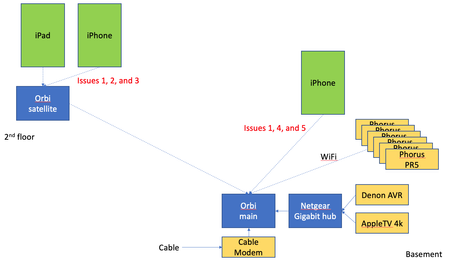
- Jun 14, 2023
Final update: I bought the Nintendo Ethernet adapter (above) for all the PR5s and they have been rock solid since.
Given that the MBP does not always appear in the list of AirPlay devices, plus the iPad issue when connected to the Orbi satellite, plus the drop outs on signal on the Orbis, I will lay the blame on the Orbis, but it is not 100% proven.
Done messing with this, and shame i had to throw money at the issues.
Stinky_W_Teats
Jun 01, 2023Aspirant
Update from overnight. I looked at the NetSpot signal readings overnight, thinking if there was interference from BT, microwaves, or other things that can cause interference that those would go away or be greatly reduced overnight. but the drops in 2.4G seemed to be more or less as frequent.
One interesting thing is there was a complete loss for 2.4 on the main Orbi that lasted about 10 minutes. 5G stayed rock solid.
This time it looks like the neighbors also lost 2.4 at exactly the same time. I looked at another neighbor too, and they lost at exactly the same times. There were 4 other blips where both they and us lost 2.4 for a minute at exactly the same time. This happened between about 1:40 - 2:30am. After that we went back to having different times for the drops.
Wondering if maybe the local power company was doing something that caused the power to fluctuate, and the 2.4 radios are more sensitive to that.
Or not saying it's aliens, but it's aliens.
Here's the 2.4 readings from that time, us in pink and one neighbor in green. (Adding all the 2.4 radios I can see gives the same result but the graph is harder to see.). Having the same drops at the same time seems significant.
Stinky_W_Teats
Jun 01, 2023Aspirant
LOL i think figured out why one of the neighbor's WiFi router keeps following me to the new 2.4 channel I change to, every time I change. I am pretty sure it is my Netgear Arlo base station. The SSID begins with "NTGR_VMB_" and the model of Arlo base station I have is the VMB4000.
That SSID is one of the "neighbors" WiFi that is dropping out at the same time as everyone else's. But I still see 2 other neighbors dropping at exactly the same time overnight.
My guess is that even though my Arlo base station is plugged in ethernet to my Netgear gigabit hub and I do not see it in the Attached Devices screen on my Orbi, the Netgear engineers programmed it to look for the same channel for WiFi as other Netgear routers are using.
I found an article that says that the older Arlos like I have use RF from the cameras to the base station, but it is not WiFi, just plain old RF. I was planning to move the base station farther away from the main Orbi (it is like 2' away now) since the 2.4 RF signals may have been interfering with 2.4 WiFi, but given the neighbors on what I am guessing are both sides are also having the issue, i kind of doubt it. Still, won't hurt to test this so i will move the base station when i get a break later this AM.
- Stinky_W_TeatsJun 01, 2023Aspirant
I think the drop in signal may be the cause. It has been stable for the last hour and all the PR5s and MBP show up. The complete drops stopped around 10:30AM and now at 11:46AM everything is in the AirPlay list.
I ordered one of these since if there are minor voltage fluctuations it would help (such as for the momentary blips in signal loss). Our town didn't invest anything in infrastructure for decades and now is doing a lot of power work, so if the root cause here is power stability, it would explain it.
The voltage data loggers all seem to be like $250 and up and require Windows, and while i could borrow a Windows laptop, for a single use it's too much money.
https://www.amazon.com/gp/product/B00009RA60
For ~$60 it will eliminate one variable, and potentially save me from spending a few hundreds on a new mesh WiFi setup
(Note: everything is already plugged into APC PDUs which do surge suppression, but this one will smooth out the voltage. A UPS is probably overkill)
- Stinky_W_TeatsJun 01, 2023Aspirant
Ordered one USB to Ethernet adapter for the Phorus PR5, to test. I saw the same guidance as CrimpOn did, to get an official Nintendo Switch or Wii one. Nintendo lists this one on their site so assuming this is officially supported:
https://www.nintendo.com/store/products/wired-internet-lan-adapter/
It's also available on Amazon, and with same day shipping I couldn't resist:
https://www.amazon.com/Nintendo-Internet-Officially-Licensed-wii-u/dp/B01N6S068R
- Stinky_W_TeatsJun 02, 2023Aspirant
Another overnight graph - looks like all 2.4 and 5 went down for almost exactly 25 minutes. Then it went back to the usual frequent cut-outs of 2.4.
Do the Orbis go to sleep if they see no WiFi traffic? Or was this more likely a power outage? Or aliens?
I see 2 PR5s at present and they are both on the Orbi satellite (despite all 6 of them physically being less than 2' from the main Orbi). I was going to say that maybe the main Orbi has a HW issue, but during that 25 min outage, the satellite was gone too (all 4 lines dropped to nothing).
- CrimpOnJun 02, 2023Guru - Experienced User
I see generally the same phenomenon of Net Spot reporting "no signal" for a short period. (Never for 25 minutes.) In using similar tools to observe WiFi signals, I have seen similar patterns.
Net Spot has a user support forum. However, the most recent entries in the forum are dated over five years ago. This gives the appearance that either the product has gone dormant or that non-paying users are active on the forum.
When I observe WiFi packets directly, there is a constant chatter of devices broadcasting and responding to discoveries of all sorts. It's hard to imagine the actual WiFi signal "going away" for 25 minutes. When my WiFi signals disappear temporarily as a result of simply changing Orbi parameters, my alarm system base unit almost instantly sends out a notice "lost WiFi".
In other words, how do we know whether:
- It's the WiFi system, or
- It's the tool?
- Stinky_W_TeatsJun 02, 2023Aspirant
Good points. I was wondering if there is a possibility of the MBP having some sort of issue, but it stays connected all the time and never seems to have a network hang such as during long conference calls.
It's possible the NetSpot SW is having its own issue, such as being swapped out of memory. However, my MBP has a good amount of memory plus I don;t do anything really heavy on it at all, so doubtful.
It looks like the APC voltage regulator didn't make any difference. I was really excited when I first hooked it up, moved the modem, main Orbi, and switch to it, and only saw one cut-out of 2.4G in the first 45 minutes. All 6 PR5s were visible in AirPlay.
But after coming back a couple of hours later, I am now seeing a lot of cut outs again.
Oh well, I will put my home theater AVR on it instead since I was meaning to get one for it anyway.
FWIW I still see five PR5s and they are still on the main Orbi. The one that is missing is still on the main Orbi per the console, but i can't see it from the iPhone. They are connected randomly on either 2.4 or 5.
MBP switched to 2.4G on the satellite. The satellite is like 3x (like 4' away) farther past the main Orbi (10 - 15' away). SMFH!
It looks like a reboot of the Orbi fixes everything but then it starts to gradually lose the plot and things move around.
I am running out of ideas so might buy a new mesh WiFi system and ditch the Orbis.
Here is what the 2.4 looks like on the main Orbi - still dropping a lot. 5G was solid the whole time, so not showing it:
- Stinky_W_TeatsJun 05, 2023Aspirant
Within a couple of hours after the last reboot, all of the PR5s had disappeared from the AirPlay list on my phone. So it seems frequent reboots of the Orbi are needed to keep them visible. I am not going down to the basement every few hours to reboot it... I gave it a couple of days to see if anything improved with the power regulator, and things are a bit better, but that is probably a random thing like so much of this seems to be...
So yesterday I connected the master bath PR5 with the Nintendo cable and cycled power on the PR5. It reconnected and was immediately visible. It stayed up all last night and this morning, but I didn't get a chance to look at the Orbi console to see what it showed as the connection type (again, given the randomness, it could just be luck that it was connected via WiFi and is staying visible, and something more was needed to make it use the Ethernet connection)
It looks like the PR5s automatically use the Ethernet connection if it is there. Here is how it shows up on the Orbi console:
Nintendo PLAYFI-MASTER-BATH0076A4 <IP address> <IP address> Wired Orbi Router<MAC address> - Stinky_W_TeatsJun 05, 2023Aspirant
I am going to keep an eye on the Ethernet-connected PR5 and if it stays visible, will buy more of the adapters. Shame I need to pay almost the same amount for the adapter as a new PR5 costs, but at this point i am so frustrated i will just throw money at the problem to make it go away.
Given I am out of spare Ethernet cables, it may actually cost more than than the PR5 for the adapter and a cable!
The iPad seems to be more stable lately when upstairs and going through the satellite Orbi, even though I didn't do anything that would improve that (although I rebooted everything several times as part of troubleshooting, so maybe that cleared it up).
So I guess 5 more adapters and cables at around $30 each will be cheaper than a new mesh WiFi system. Ugh.
- Stinky_W_TeatsJun 14, 2023Aspirant
Final update: I bought the Nintendo Ethernet adapter (above) for all the PR5s and they have been rock solid since.
Given that the MBP does not always appear in the list of AirPlay devices, plus the iPad issue when connected to the Orbi satellite, plus the drop outs on signal on the Orbis, I will lay the blame on the Orbis, but it is not 100% proven.
Done messing with this, and shame i had to throw money at the issues.
