NETGEAR is aware of a growing number of phone and online scams. To learn how to stay safe click here.
Forum Discussion

Juice2boost
Nov 12, 2019Follower
Orbi Assigning device to IP already Reserved
Today I went and reserved a couple of devices to an IP that way if I lose power, It will be assigned to that same IP when power is restored. Such things as my NAS and my Smart Home Hub.
I signed into orbilogin, went to the Advanced tab, Setup, LAN Setup and added the devices to the reservation list. Rebooted my Orbi and everything went pretty smooth. It assigned the 2 devices I set up to those IP addresses.
When I went to check what it did with my other devices, I noticed it set my Xbox to the same IP address as my NAS automatically. I didnt add the Xbox to my reservation list, the router automatically did it on its own. I tried unplugging the ethernet from the back of the router to the xbox, rebooting the router, waiting a couple of minutes and plugged the xbox back in. Still assigned the same IP again as my NAS reservation. Cant figure how to get it assigned to something else. Am i missing something?
9 Replies
- FURRYe38Guru - Experienced User
What happens if you assign an IP address to the xbox in the UI, using someting different than you used for the other devices.
It's possible that you coinsidently assigned the IP address after the xbox already had it Dynamically assigned. However after disconnecting the xbox and rebooting the RBR, the assignment should have been only seen with the reservation you setup for the other device. Possible that the xbox hasn't released it's cached networking info as well.
Be sure to press the xbox power button until the xbox turns off. Then let go. This will clear out the game consoles networking cached info. Keep it off, then reboot the RBR. First check to ensure your other IP address reservations are in place and working for those devices. If so, then power ON the xbox.
Juice2boost wrote:Today I went and reserved a couple of devices to an IP that way if I lose power, It will be assigned to that same IP when power is restored. Such things as my NAS and my Smart Home Hub.
I signed into orbilogin, went to the Advanced tab, Setup, LAN Setup and added the devices to the reservation list. Rebooted my Orbi and everything went pretty smooth. It assigned the 2 devices I set up to those IP addresses.
When I went to check what it did with my other devices, I noticed it set my Xbox to the same IP address as my NAS automatically. I didnt add the Xbox to my reservation list, the router automatically did it on its own. I tried unplugging the ethernet from the back of the router to the xbox, rebooting the router, waiting a couple of minutes and plugged the xbox back in. Still assigned the same IP again as my NAS reservation. Cant figure how to get it assigned to something else. Am i missing something?
- CrimpOnGuru - Experienced User
Juice2boost wrote:When I went to check what it did with my other devices, I noticed it set my Xbox to the same IP address as my NAS automatically. I didnt add the Xbox to my reservation list, the router automatically did it on its own. I tried unplugging the ethernet from the back of the router to the xbox, rebooting the router, waiting a couple of minutes and plugged the xbox back in. Still assigned the same IP again as my NAS reservation. Cant figure how to get it assigned to something else. Am i missing something?
Welcome to the fascinating world of DHCP. As you have learned, there is often a disconnect between the LAN Setup and the IP address that a device actually has. There's a great description here: https://en.wikipedia.org/wiki/Dynamic_Host_Configuration_Protocol
When a device comes on, it broadcasts a DHCP request and often says, "This is the IP I had before. Can I please have it again?", and the DHCP server looks at what is on the network, finds there is no conflict, and says, "Sure. Keep using it." To force a device to give up on the old IP and have the DHCP server (Orbi) look in the LAN table, there has to be a device already on the network with the address. I have had to do this several times. I get out an old mobile phone, define it to have the IP that my device is "stuck on". Turn off my device. Power on the phone. It gets the IP. Then, I turn the device back on. It asks for the IP, and the Orbi says, "Sorry kid. That's not available." PAIN IN THE "network".
The LAN assignment table is also not "exclusive". Orbi is happy to have someone set up multiple devices to get the same IP. Maybe you have several iPads, but only use one at a time.
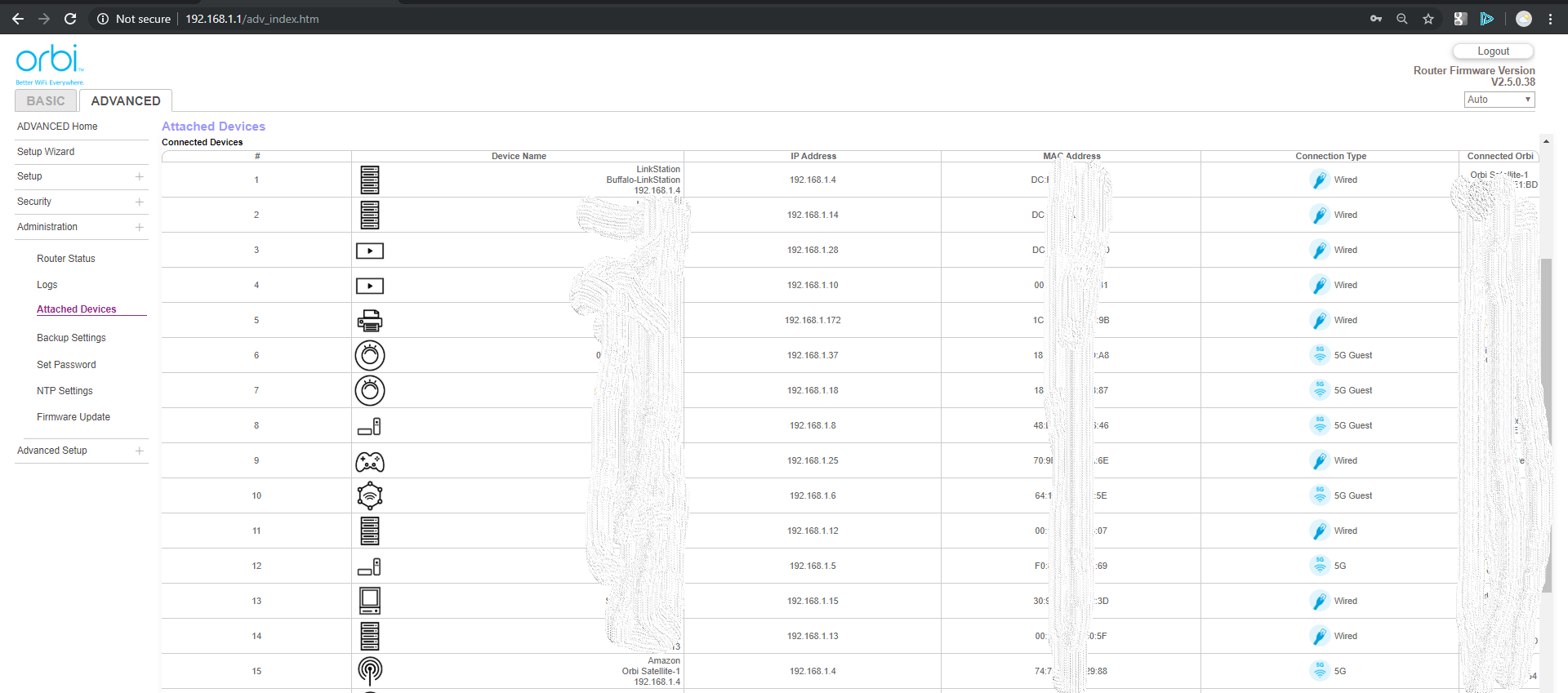
Anyway, what matters is what the Attached Devices page shows, not what the LAN reservation table shows. Do you actually have two devices on the network with the same IP? (I bet not.)
- SW_Prodigy
CrimpOn wrote:
Juice2boost wrote:When I went to check what it did with my other devices, I noticed it set my Xbox to the same IP address as my NAS automatically. I didnt add the Xbox to my reservation list, the router automatically did it on its own. I tried unplugging the ethernet from the back of the router to the xbox, rebooting the router, waiting a couple of minutes and plugged the xbox back in. Still assigned the same IP again as my NAS reservation. Cant figure how to get it assigned to something else. Am i missing something?
...
...
Anyway, what matters is what the Attached Devices page shows, not what the LAN reservation table shows. Do you actually have two devices on the network with the same IP? (I bet not.)
Yes, this also happened to me. Yes, there are two devices on the network with the same IP address, both showed up in the Attached Devices page. See attached picture or check out this thread. I had to reboot the network/clients to resolve this. It's one of the reasons I stop reserving IP addresses for clients, except for the two Orbi satellites.
- michaelkenwardGuru - Experienced User
Is it possible to tell an Xbox to use a particular RIP address and then to reserve that in the router?
Likewise the NAS?
- CrimpOnGuru - Experienced User
michaelkenward wrote:Is it possible to tell an Xbox to use a particular RIP address and then to reserve that in the router?
Likewise the NAS?
This is a cleaver idea. Most devices have the option of defining a static IP. Another technique is to assign IP's in a range that is outside of the DHCP "pool". Devices can still use DHCP to get an IP from the Obri, but devices that are not in the LAN setup will get one from the pool.
Thanks for posting the screen shot. I had thought the ARP mechanism would have flagged the duplicate IP's.