NETGEAR is aware of a growing number of phone and online scams. To learn how to stay safe click here.
Forum Discussion

jeffbr26
Dec 15, 2018Follower
Orbi Blocking Websites - Solved
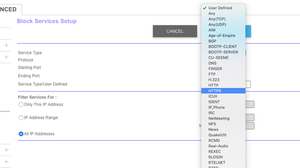
ORBI is blocking HTTPS websites that are not explicitly defined in URL.
To unblock any https website, do the following:
Log into to your router admin console (https://orbilogin.net)
Cli...
knmartin
Aug 21, 2019Initiate
I have read all the support and still can not figure out what to do... please keep answers simple as that was the whole reason i went with the orbi system.
it is an Orbi RBR40 with 3 satelites connected to att uverse - i cant even find this in the netgear drop down.
issue: Orbi is not connecting to websites - even the the orbilogin.net website is being blocked and asking for a password
background: i connected the orbi to my ATT uverse modem that was installed the previous day. Internet was running perfectly with the att router that was provided. I simply unplugged the att router and then plugged in the orbi router to expand the broadcast.
what is the step by step approach to fixing this? and please dont say "Configure the modem for transparent bridge mode"
- i have no idea what this means...
- i have the orbi app on my phone and thats about it. i cant seem to connect to the orbi on my computer, because of this issue.
- i have read about turn of double IP settings, or turn off this or that - but can not seem to find a simple step by step approach to fixing this problem that i was assured was an out of box solution for a simple person like me.
Please help.
lerij
Oct 28, 2019Aspirant
knmartin wrote:I have read all the support and still can not figure out what to do... please keep answers simple as that was the whole reason i went with the orbi system.
it is an Orbi RBR40 with 3 satelites connected to att uverse - i cant even find this in the netgear drop down.
issue: Orbi is not connecting to websites - even the the orbilogin.net website is being blocked and asking for a password
background: i connected the orbi to my ATT uverse modem that was installed the previous day. Internet was running perfectly with the att router that was provided. I simply unplugged the att router and then plugged in the orbi router to expand the broadcast.
what is the step by step approach to fixing this? and please dont say "Configure the modem for transparent bridge mode"
- i have no idea what this means...
- i have the orbi app on my phone and thats about it. i cant seem to connect to the orbi on my computer, because of this issue.
- i have read about turn of double IP settings, or turn off this or that - but can not seem to find a simple step by step approach to fixing this problem that i was assured was an out of box solution for a simple person like me.
Please help.
knmartin wrote:I have read all the support and still can not figure out what to do... please keep answers simple as that was the whole reason i went with the orbi system.
it is an Orbi RBR40 with 3 satelites connected to att uverse - i cant even find this in the netgear drop down.
issue: Orbi is not connecting to websites - even the the orbilogin.net website is being blocked and asking for a password
background: i connected the orbi to my ATT uverse modem that was installed the previous day. Internet was running perfectly with the att router that was provided. I simply unplugged the att router and then plugged in the orbi router to expand the broadcast.
what is the step by step approach to fixing this? and please dont say "Configure the modem for transparent bridge mode"
- i have no idea what this means...
- i have the orbi app on my phone and thats about it. i cant seem to connect to the orbi on my computer, because of this issue.
- i have read about turn of double IP settings, or turn off this or that - but can not seem to find a simple step by step approach to fixing this problem that i was assured was an out of box solution for a simple person like me.
Please help.
I need this help