NETGEAR is aware of a growing number of phone and online scams. To learn how to stay safe click here.
Forum Discussion

Starhub
May 31, 2017Follower
Orbi drops internet connection on AP Mode
I recently purchased a Netgear Orbi RBK50 AC3000 Tri-Band WiFi System Router + Satellite. This device works wonders in terms of the backhaul connection. My wireless coverage has increased even in dead spots. However there is a problem, internet on wifi keeps dropping
These are the things i had done to troubleshoot
1. Ensuring it was not a modem issue, i connected and did a ping -t to ensure constant connection. (no issue when on wired but wireless would drop ocassionaly. i am using a Samsung S8 and it shows no internet connection is available. This is intermitten and i will need to off my wifi in my phone and turn it on again)
2. i move may Satellite to a nearer location to my master bedroom. It is only 5M away. - I still get a drop in internet connection (intermitten)
3. i move it Satellite further away from my master bedroom to check if it could be interferance to my dining room which is 10 m away. (signal is still strong and satellite color is blue (however still drop in internet intermitten connection)
4. i had disable beam and MUMO as that is the default after the recent update. V1.9.1.12
I am now thinking if it is a hardware issue? Anyone faces this issue and some help or advice would be greatly appreciated.
12 Replies
 DarrenMSr. NETGEAR Moderator
Hello Starhub
I have sent you a PM.
DarrenM
- kenenosGuide
Darren - Any chance that you can PM me as well? I've had my Orbi system a few months now and lately the drops have become really bad, Thanks
- PBK123Aspirant
I’d like a PM on the Orbi dropping internet issue. Mine drops constantly. Was fine first couple of months, now is totally unreliable. Love it when it works. Would love ba resolution.
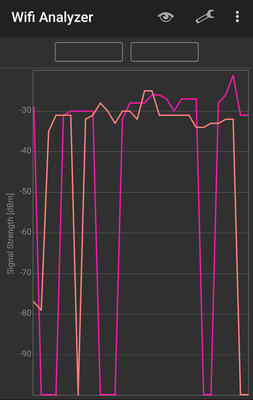
- Retired_MemberHi guys, just giving you a heads up it is a hardware issue. The backhaul connection from the router to the satellite drops constantly, sometimes it goes unnoticed but other times it is long enough to drop the connection. For a real eye opener, install the Wi-Fi analyzer app and you can watch the signal. The backhaul is coming from the router on both 2.4 and 5 GHz bands and will have no SSID. Please post your results so Netgear will reply, they refuse to address this or even say they are aware of it.
- Retired_Member
I don't think it's possible to maintain a stable connection when this is happening...
- kenenosGuide
This is really disappointing to hear. These units have been great to expand the wifi connectivity throughout my home, but lately the disconnects have been terrible - I'd prefer to have the deadspots back than deal with this. I actually had to just stop using my iPad last night because it wouldn't even reconnect.
What Wifi Analyzer is that? Thanks
- Retired_MemberIt's an app called Wi-Fi Analyzer, I'm using it on android so I'm not sure if Apple has it.
You could also use Netgear's own "Netgear Wi-Fi Analytics" app which does the same thing but isn't as easy to read. - wallersfInitiate
I constantly get drops. I will get ping time outs all day long when attached to Orbi. Interferes with my Citrix connection back to work. Testing constant ping to my work as well as to yahoo and I consistently see the timeouts to both.
- BeSimpleAspirant
Hi has your problem been sloved? I am also facing this issue after a RMA. previously my satellites are not able to connect to my router and now i am having intermittent connection.
- kenenosGuideNo, I eventually sold these on eBay. I just didn’t have time to deal with the headaches any longer. Sorry.
I recently purchased the Orbi RBK50. It worked great for a while, but now I have it lose the internet connection several times a day and have to reboot. I am running it in AP mode, off of a Comcast Router. The Comcast Router does not lose internet connectivity, only the Orbi. Any recommendations? Would I be better off giving up the Comcast Router and just getting a Comcast Modem, and using the Orbi in Router mode? Right now I find the way Orbi drops my internet connection to be intolerable. I am running the latest firmware for the Orbi.
- I’m having the exact same issue in AP mode and Router Mode. Have to restart Orbi multiple times a day. Local networking continues to work, but no internet and I can’t even login to the Orbi’s web interface. It just times out. I can’t work it out. Reset and everything back to normal till the next time.
Maybe it’s an issue with PPoe to the fibre modem. But I’m not buying a new Router to sit between the modem and the Orbi to check! Part of the point of the thing is that it is a good router.
It’s really beyond irritating for an expensive piece of kit.