NETGEAR is aware of a growing number of phone and online scams. To learn how to stay safe click here.
Forum Discussion

mgeorgy
Dec 15, 2017Tutor
Orbi Ethernet Backhaul causing broadcast storm
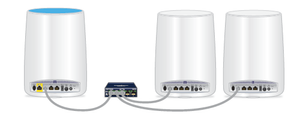
I have just upgraded my Orbi router and satellites to V2.1.1.12 hoping to take advantage of the recent Ethernet backhaul feature. I use the Orbi router as my main router with a 24 port switch servic...
BDubUT
Jun 06, 2018Aspirant
I can confirm the latest firmware, 2.1.4.16, enables spanning-tree (stp) on the Orbi router. This prevents loops, and therefore broadcast storms, from occuring. Wired backhaul is now stable for me, managed switch and all, even through multiple reboots.
Now if only Netgear could make it so the magenta LED doesn't glow in AP mode (since you're using the LAN port)...
Perhaps I'll keep my RBK23 afterall. Thanks FURRYe38.

FURRYe38
Jun 06, 2018Guru - Experienced User
Awesome, thanks for letting use know about the new FW and STP. Sounds like they finally fixed it and with managed switches. Will keep this on hand for future users.
Enjoy now. Hopefully. LOL.
BDubUT wrote:
I can confirm the latest firmware, 2.1.4.16, enables spanning-tree (stp) on the Orbi router. This prevents loops, and therefore broadcast storms, from occuring. Wired backhaul is now stable for me, managed switch and all, even through multiple reboots.
Now if only Netgear could make it so the magenta LED doesn't glow in AP mode (since you're using the LAN port)...
Perhaps I'll keep my RBK23 afterall. Thanks FURRYe38.
- RebelPeacockJul 17, 2018Star
Just upgraded to Firmware 2.1.4.16 today and now my ethernet bakchaul is back to crashing my whole network. I upgraded through the prompt in the web gui. Before today the network had been very stable and reliable with one RBS satellite connected wirelessly and one via ethernet. I have currently tried powering the system down. Turning on the Orbi RTR *5 mins*, turn on 1st satellite *5 mins*, turn on 2nd satellite w/o ethernet connection established *5mins*. At this point the network functions and is stable. after 5-10 mins, I establish the ethernet connection to the one satellite and the network crashes. All cables are newer and tested. System had been stable in this exact config for the last few months once they worked out the Ethernet backhaul issues.
Thanks.
- FURRYe38Jul 17, 2018Guru - Experienced User
Any network switches in between the router and satellites?
Power OFF the Orbi router and satellites for 1 minute. Then power ON the router and test for internet. Then power ON the satellites 1 at a time. You might disconnect ALL other LAN devices while you do this.
Try disabling Daisy Chain, apply and reboot the router. You should power off the satellite(s) as well then back ON after the router is back to ready.
Try 1 satellite directly connected to the router via LAN cable. Can test this out in same room as router.
RebelPeacock wrote:
Just upgraded to Firmware 2.1.4.16 today and now my ethernet bakchaul is back to crashing my whole network. I upgraded through the prompt in the web gui. Before today the network had been very stable and reliable with one RBS satellite connected wirelessly and one via ethernet. I have currently tried powering the system down. Turning on the Orbi RTR *5 mins*, turn on 1st satellite *5 mins*, turn on 2nd satellite w/o ethernet connection established *5mins*. At this point the network functions and is stable. after 5-10 mins, I establish the ethernet connection to the one satellite and the network crashes. All cables are newer and tested. System had been stable in this exact config for the last few months once they worked out the Ethernet backhaul issues.
Thanks.
- RebelPeacockJul 17, 2018Star
Thanks for the response. I have previously tried all your suggestions except only powering on 1 satellite (the one I wish to use cabled backhaul on). I will try that tonight, I will power everything down. Turn on the Router and let it settle and then I will fire up the satellite in question connected via cable. (This leaves one wireless backhaul satellite out of the picture for the testing period.)
Also, I will try tunring off daisy chain. However, that has not been an issue before and it won't be long unitl I deploy an outdoor satellite which of course will need to be daisychained. So I wouldn't really consider that a solution.
I'll let you know the results.