NETGEAR is aware of a growing number of phone and online scams. To learn how to stay safe click here.
Forum Discussion

mgeorgy
Dec 15, 2017Tutor
Orbi Ethernet Backhaul causing broadcast storm
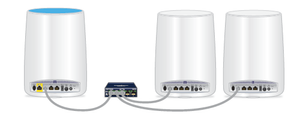
I have just upgraded my Orbi router and satellites to V2.1.1.12 hoping to take advantage of the recent Ethernet backhaul feature. I use the Orbi router as my main router with a 24 port switch servic...
RebelPeacock
Jul 17, 2018Star
Thanks for the response. I have previously tried all your suggestions except only powering on 1 satellite (the one I wish to use cabled backhaul on). I will try that tonight, I will power everything down. Turn on the Router and let it settle and then I will fire up the satellite in question connected via cable. (This leaves one wireless backhaul satellite out of the picture for the testing period.)
Also, I will try tunring off daisy chain. However, that has not been an issue before and it won't be long unitl I deploy an outdoor satellite which of course will need to be daisychained. So I wouldn't really consider that a solution.
I'll let you know the results.

FURRYe38
Jul 17, 2018Guru - Experienced User
Even though you can have mixed connections, I think daisy chain is for all satellites being wireless connected. So not sure if having mixed connected satellites with work with it enabled. You'll have to test it out.
RebelPeacock wrote:
Thanks for the response. I have previously tried all your suggestions except only powering on 1 satellite (the one I wish to use cabled backhaul on). I will try that tonight, I will power everything down. Turn on the Router and let it settle and then I will fire up the satellite in question connected via cable. (This leaves one wireless backhaul satellite out of the picture for the testing period.)
Also, I will try tunring off daisy chain. However, that has not been an issue before and it won't be long unitl I deploy an outdoor satellite which of course will need to be daisychained. So I wouldn't really consider that a solution.
I'll let you know the results.
- skirby67Sep 02, 2018Initiate
I have a broadcast storm situation as well. I had to power down both satellites (RBS50)s because they are too far away for the WIFI Backchannel to work reliably. Every time I power a satellite on, Wireshark shows a dramatic increase in broadcasts and the entire network becomes inoperable. My assumption is that the Wireless back channel is active while the Ethernet backchannel is active. In my topology the Orbi Satellites are close enough for intermittent connections which cause a loop intermittently. I believe that this is a bug in the software. There needs to be a way to disable the WIFI back channel or have the software disable the WIFI backchannel when the Wired backchannel is active.
- FURRYe38Sep 02, 2018Guru - Experienced User
What FW is currently loaded?
What is the Mfr and model# of the IP modem the Orbi is connected too?
What is the Mfr and model# of the ethernet switch if one is in the configuration.
What is the size of your home? Sq Ft?
What is the distance between the router and satellite(s)? 30 feet is recommended in between them to begin with depending upon building materials.
Try disabling the following and see:
MIMO, Daisy Chain, Fast Roaming, IPv6 and Set 20/40Mhz Coexistence to 40Mhz only. Save settings and reboot the router and satellite(s).
For wired back haul:
Set up IP address reservations for each satellite and devices on the router as you add them to the router. The satellites need to be set up via wireless first. Then connect 1 satellite at a time to the ethernet LAN cable. Wait 5 minutes and the top led on the satellite should turn on BLUE. Set up an IP address reservation for the 1st satellite. Continue to do the same thing for the 2nd satellite. Then follow up with your devices.