NETGEAR is aware of a growing number of phone and online scams. To learn how to stay safe click here.
Forum Discussion

TechToyTV
Dec 02, 2016Tutor
Orbi Guest Wifi Settings
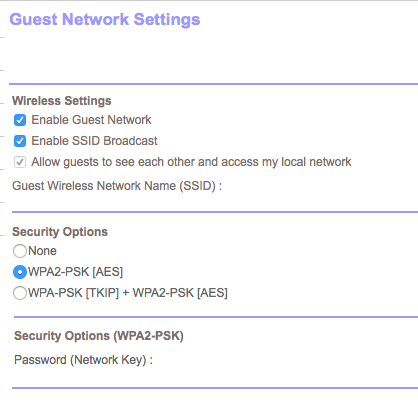
Anyone know why the option to allow guests access to network is greyed out? I would rather not have guest being able to access my local network (see photo below)

DarrenM
Dec 07, 2016Sr. NETGEAR Moderator
Hello TechtoyTV
I replicated the issue you are seeing and passed this on to the engineers.
DarrenM
Flash008
Dec 09, 2016Luminary
I am giving Orbi a try again after a few firmware releases and guest mode introduced. Funny, I was excited to see Orbi had guest mode, then I find no method of using it PROPERLY in AP mode. How hard is it to add a simple "advanced feature" called "VLAN".
I do not want to use the Orbi in router mode with DHCP. As I have my own firewall which handles DHCP assignment. But with both guest and non-guest WIFI networks having access to the same local network in AP mode REALLY defeats the purpose of a guest network. So what was your point Netgear?
Netgear only has 2 options:
1. Enable an internal DHCP server that can assign ONLY the guest network bridge, while allowing non-DHCP mode for the non-guest network bridge (Yes, this means you will need your internal DHCP server to be enabled/disabled per wireless network bridge). This allows the continued use of the customer's personal router/firewall. And in some cases this is required for FIOS and other ISPs which must assign the IP to a device for authorization.
2. Enable the abilty to assign 801.11q vLAN tagging to both guest and non-guest WIFI networks. This will allow our personal router/firewall to separate networks and create isolation. I PREFER THIS OPTION AND I AM SURE OTHERS WOULD AGREE.
Please Netgear, YOU HAVE THE BEST WIFI "ALMOST MESH" SETUP ON THE MARKET. You can easily add these basic abilities and secure the TOP SPOT. Other Wireless products already do this, and have for years now...ASUS. DLINK, LINKSYS....
- rhester72Dec 09, 2016Virtuoso
One thing I didn't pay attention to when I tried it in AP mode once - when you enable guest as AP, are DHCP client requests passed through to the upstream server on the same subnet as the regular WiFi network (i.e. are guests and normally-authenticated clients on the same subnet)?
Rodney