NETGEAR is aware of a growing number of phone and online scams. To learn how to stay safe click here.
Forum Discussion

SethOx
Nov 09, 2020Guide
Orbi RBK12 - question about setting up bridge mode on combined router/modem
Hi, I'm trying to set up bridge mode on my combined router/modem to use with my Orbi RBK12. My ISP isn't able (i.e. won't) help me to set up bridge mode, so in the end I successfully set up the DMZ s...
- Nov 10, 2020
Good to hear. Please mark your thread as solved so others will know.
Enjoy. :smileywink:

SethOx
Nov 09, 2020Guide
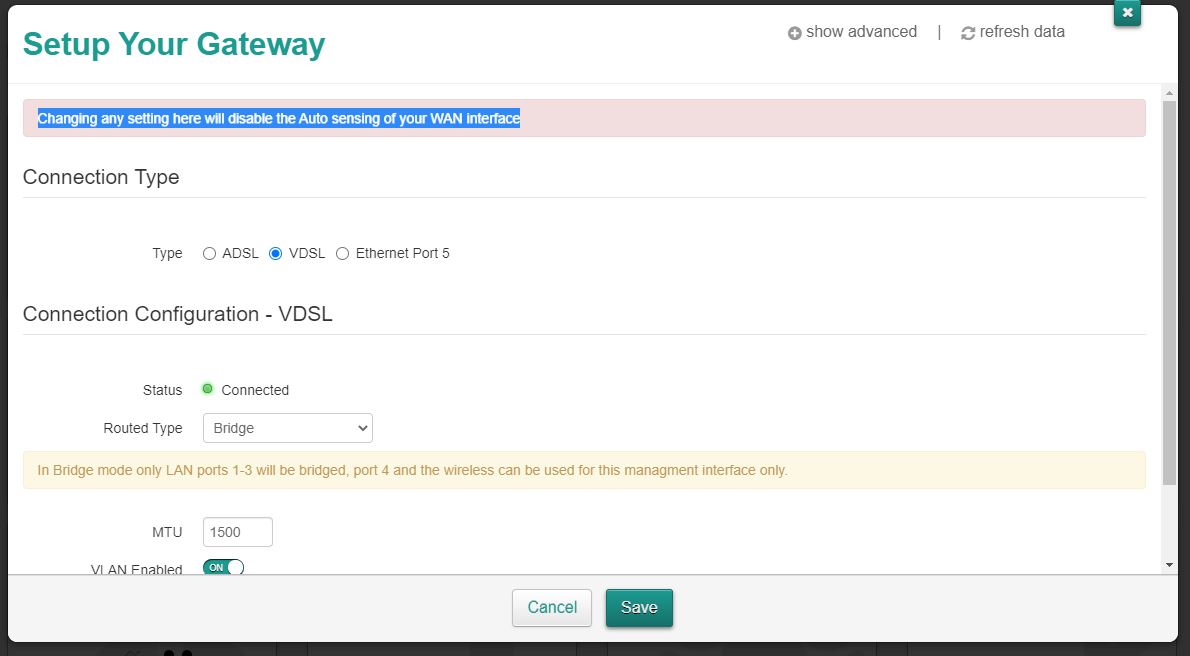
Hi, after Googling I found some instructions from a different ISP (Zen) for putting the Technicolor TG589vac router into bridge mode (apparently my router DWA0120 is a direct replacement for the TG589vac, so I guess these instruction also apply for mine?) I’ve attached a screenshot showing the relevant bits of the instructions. You can clearly see the same warning disabling the auto sensing of the WAN interface. If they say to go ahead despite this warning, does that mean it’s ok?
My question is generally whether or not disabling auto sensing of my WAN interface is going to mess anything up? I have no idea of what this means or what the implications are, and I’m just trying to check if I can safely do this
My question is generally whether or not disabling auto sensing of my WAN interface is going to mess anything up? I have no idea of what this means or what the implications are, and I’m just trying to check if I can safely do this

CrimpOn
Nov 09, 2020Guru - Experienced User
SethOx wrote:
My question is generally whether or not disabling auto sensing of my WAN interface is going to mess anything up? I have no idea of what this means or what the implications are, and I’m just trying to check if I can safely do this
(Don't we just love how menufacturers assume customers "know things"?)
An installation manual for the Technicolor DWA0120 is on the web:
https://www.manualslib.com/manual/1565576/Technicolor-Dwa0120.html?page=8#manual
Notice how there are two ways to connect the DWA0120 to ISP devices (DSL and ethernet). As no switches or configuration is required by the user, my assumption is that the DWA0120 "automatically senses" what the DWA0120 is plugged into except in bridge mode, where it goes by the setting on the web page. When you log into the device (192.168.1.1), the setting should be correct (already "sensed"). And, of course, it should be obvious which ISP device is being used (DSL or VDSL).
The "good news" (on the last page) is that if something goes horribly wrong when you change it to bridge mode, sticking a paperclip into that tiny "reset" hole will but it back to the Factory default, where it will "sense" again.
In other words, it appears to me that you have nothing to lose. GO FOR IT!