NETGEAR is aware of a growing number of phone and online scams. To learn how to stay safe click here.
Forum Discussion

SethOx
Nov 09, 2020Guide
Orbi RBK12 - question about setting up bridge mode on combined router/modem
Hi, I'm trying to set up bridge mode on my combined router/modem to use with my Orbi RBK12. My ISP isn't able (i.e. won't) help me to set up bridge mode, so in the end I successfully set up the DMZ s...
- Nov 10, 2020
Good to hear. Please mark your thread as solved so others will know.
Enjoy. :smileywink:


CrimpOn
Nov 09, 2020Guru - Experienced User
SethOx wrote:
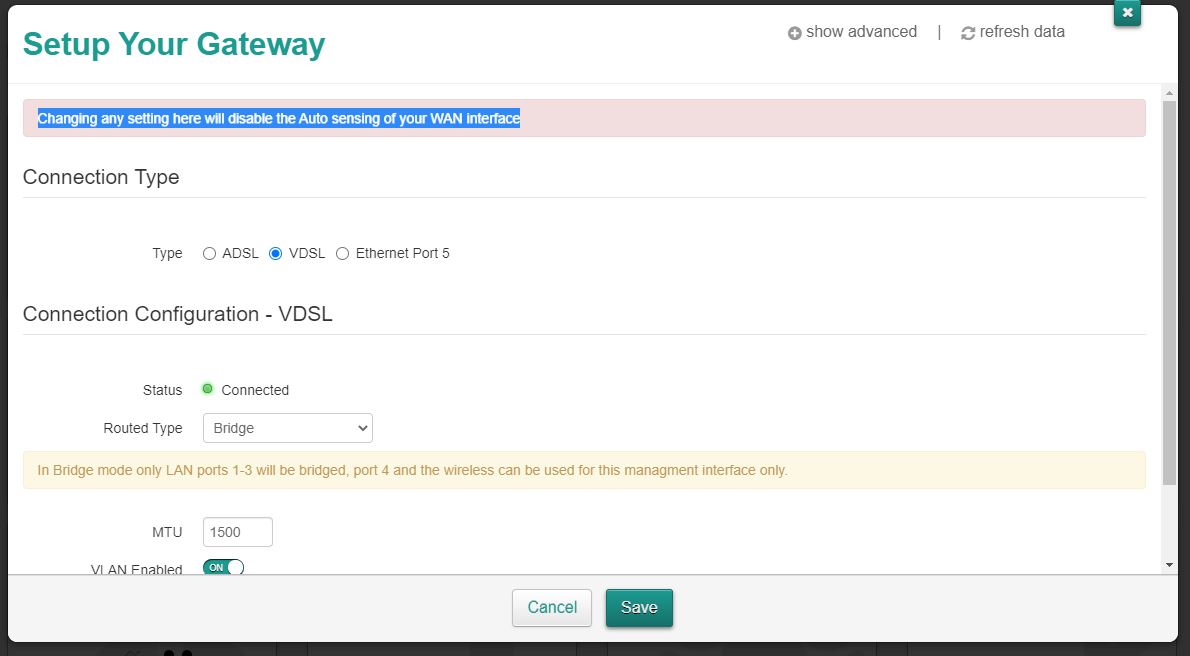
My question is generally whether or not disabling auto sensing of my WAN interface is going to mess anything up? I have no idea of what this means or what the implications are, and I’m just trying to check if I can safely do this
(Don't we just love how menufacturers assume customers "know things"?)
An installation manual for the Technicolor DWA0120 is on the web:
https://www.manualslib.com/manual/1565576/Technicolor-Dwa0120.html?page=8#manual
Notice how there are two ways to connect the DWA0120 to ISP devices (DSL and ethernet). As no switches or configuration is required by the user, my assumption is that the DWA0120 "automatically senses" what the DWA0120 is plugged into except in bridge mode, where it goes by the setting on the web page. When you log into the device (192.168.1.1), the setting should be correct (already "sensed"). And, of course, it should be obvious which ISP device is being used (DSL or VDSL).
The "good news" (on the last page) is that if something goes horribly wrong when you change it to bridge mode, sticking a paperclip into that tiny "reset" hole will but it back to the Factory default, where it will "sense" again.
In other words, it appears to me that you have nothing to lose. GO FOR IT!
SethOx
Nov 09, 2020Guide
Hi, thanks a lot for your reply. I tried putting the modem/router into bridge mode and the good news is that nothing catastrophic happened. However, the Orbi router had no internet so it didn't work as intended. Here's what I can see:
In bridge mode, the Gateway admin page says that only ports 1 to 3 will be bridged, and port 4 can be used to access the Gateway admin page. So I plugged the ethernet cable from the Orbi router into port 1 of the bridge-mode modem. However, when I went onto the Orbi app, the router had a magenta light and it said "Internet: Offline". In the Gateway admin page when I checked the port status it said that Port 1 was connected, but then when I looked at the list of connected Devices it couldn't see the Orbi router (which was connected to Port 1).
Is there anything obvious I'm missing here? From your comments it sounds like I might have to tell the modem where to find the Orbi router, is this right? Or do I need to do the Orbi setup again?
- CrimpOnNov 09, 2020Guru - Experienced User
SethOx wrote:In bridge mode, the Gateway admin page says that only ports 1 to 3 will be bridged, and port 4 can be used to access the Gateway admin page. So I plugged the ethernet cable from the Orbi router into port 1 of the bridge-mode modem. However, when I went onto the Orbi app, the router had a magenta light and it said "Internet: Offline". In the Gateway admin page when I checked the port status it said that Port 1 was connected, but then when I looked at the list of connected Devices it couldn't see the Orbi router (which was connected to Port 1).
Did the MAC address of whatever is connected to Port 1 match something?
I forgot to ask: the Orbi is in the default "router" mode, correct?
Found another really slick user manual on the web. Of course, it says nothing about Bridge Mode:
https://sse.tmtx.co.uk/en/topics/broadband_dwa0120wifirouter.html
One of my strategies for dealing with technical support iss to call more than one time. My Spectrum "tuning adapter" went whack-o one time and Spectrum rolled a repair truck Over the course of five hours, the tech replaced every inch of coax cable and swapped in four new tuning adapters (yes, four). Finally left in frustration, "I give up. Sorry." I made one more call to Spectrum and got a woman who said, "oh, on your account, this isn't right. Try it again." Fixed. During that five hours, the poor tech had to dial an 800 number every time and go through this elaborate process of repeating his employee number, case number, etc. A couple of times he was told, "we don't do that. Your need to call xxxxx. Can you transfer me? NO, you have to hang up and call them." 30 minutes later (after another swap), he called again and asked, "can you transfer me? Sure, no problem." The first guy was a jackass. The second wanted to help.
If there is more than one tech at your ISP, you might call a couple more times and hope to get someone who will help. "Hey, I followed the directions to put my DWA0120 into Bridge Mode and my router says there is no internet. What did I do wrong?"
Maybe you'll get lucky like I did.
- FURRYe38Nov 09, 2020Guru - Experienced User
After the modem is bridged, I would factory reset the RBR and walk thru the setup wizard and see if this helps.
Ask your ISP if your are on a PPPOE connection and if so, you may need the PPPOE user account log in information that may need to be input on the RBR.Also try the other LAN ports in back as well to check for internet connection, not sure which port will be used for the main connection, though mostly it should be Port #1.
- SethOxNov 10, 2020Guide
Thanks to both of you for all your help. FURRYe38, after reading CrimpOn's previous reply I logged on to orbilogin.net (after putting the modem in bridge mode) and went in to the settings page and saw the question about whether my internet connection needs a log in and thought "hmm, maybe it does" (the setting was on the "no" option). Then I saw the setup wizard and thought I might as well do that as an easier way of trying to sort everything out. And it turns out that the issue was that I hadn't put in the internet login information! Then I looked at my email and saw your reply telling me to do exactly that :). Anyway, it all seems to be working now. Thanks again!
- FURRYe38Nov 10, 2020Guru - Experienced User
Good to hear. Please mark your thread as solved so others will know.
Enjoy. :smileywink: