NETGEAR is aware of a growing number of phone and online scams. To learn how to stay safe click here.
Forum Discussion

KsNinga
Feb 24, 2017Aspirant
Orbi RBR 50 individual device time limits for teenagers
We are new to Orbi. Used an Apple Airport prior to needing more wifi coverage in our house. So, here is my issue, love the consistent wifi and speed, hate the parental features. This is the first wi...
- Feb 27, 2017
thedak wrote:To make the whole process easier you can assign the MAC address of the kids device(s) in question static IP(s). Then you won't have to worry about DHCP changing the IP of the device.
Yes you definitely want to assign a static IP to the MACs as thedak wrote above. It will make it easier to setup the Schedule and identify them.
gfrey
Feb 24, 2017Apprentice
It has been answered before but basically you go into the Advanced tab. Under I think Security (I am not at home) - Blocked Services and Schedule you can setup so per device limits. I have all my kids devices listed under Blocked Services on a Per Schedule basis. I start blocking under Schedule at 8pm every night. It works great. This is the closest I could find online about how to set it up: http://kb.netgear.com/24055/How-do-I-schedule-when-to-block-internet-sites-and-services-on-my-router-with-the-NETGEAR-genie-user-interface
KsNinga
Feb 26, 2017Aspirant
Thank you for the attempt to help me. I'm Sorry but......still confused.
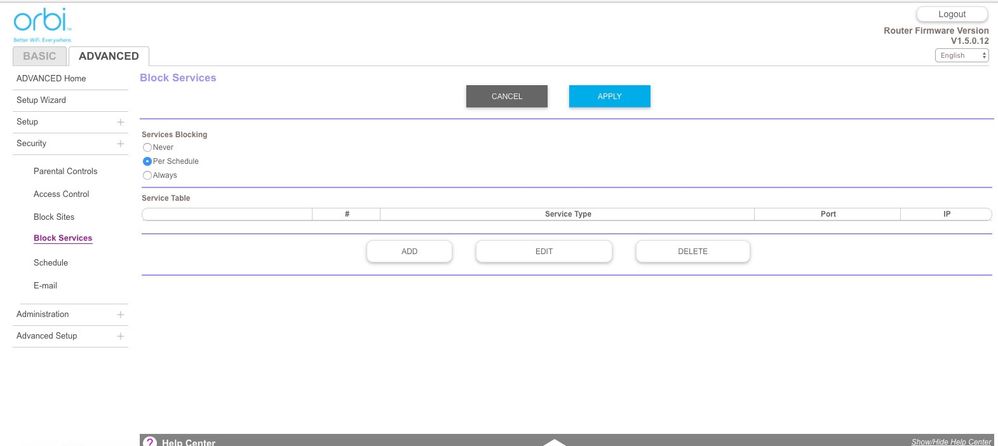
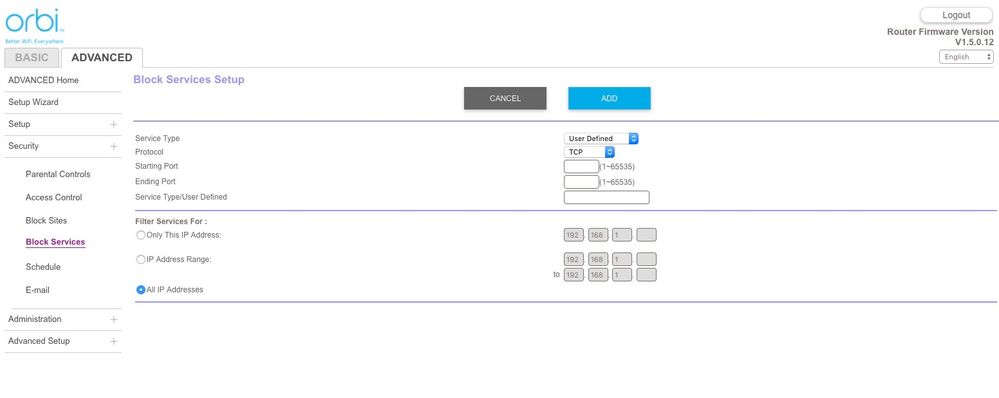
When I log into the router I see these images: I understand I need to input the device info. Usually all I needed was the device MAC address. I don't have a clue about the service type, protocol starting and ending port, service type/user defined. I do know the IP address, which is a big victory after trying to set these time limits.
It should be way easier than this to set time limits and not need an IT degree. I would greatly appreicate a walk through step by step for iphone and Mac book pro limits for my naughty stay up all night teenagers. Thank you ahead of time:-)