NETGEAR is aware of a growing number of phone and online scams. To learn how to stay safe click here.
Forum Discussion

duncanbell3
Oct 10, 2022Guide
Orbi RBR50 & Virgin Media
Hi all I'm a bit perplexed if I'm honest and would appreciate any help. As it says in the title I have an RBR50 and Virgin Media. I have been limited to 100MBPS package but just upgraded to ...
 Oct 11, 2022
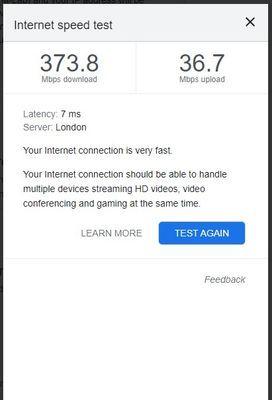
Right after all these software issues it was actually nothing of the sort!
Changed the ethernet cable to a CAT8 (which was still cheap) and it fixed the problem.
Wifi now flying at the correct speeds.Which actually begs the question, why do Netgear Orbi only supply low grade ethernet cables?
This should surely come as some sort of warning on all Orbi products.
Really frustrating but glad just £10 can resolve the problem.
Sorry for wasting all of your time but REALLY appreciate all the help.

CrimpOn
Oct 10, 2022Guru - Experienced User
(I have spent the afternoon watching an Air Conditioning repairman run up a tremendous bill making my house cool again, and just now saw this conversation....)
One thing that stands out to me is that 92MB/s is a suspicious number:
i.e. it is about the maximum possible throughput over a 100MB Ethernet connection.
Could you please open the Orbi web browser interface (http://orbilogin.net), Navigate to the Advanced Tab, and click on the blue item in the Internet section titled "Show Statistics"?
What does the router report for the WAN Port? Is it:
- 1000/Full, or
- 100/Full
These days, Ethernet devices "auto-sense" the maximum speed that each is capable of and agree to use that speed.
https://en.wikipedia.org/wiki/Autonegotiation
The Orbi WAN port is clearly 1GB/s, and one might expect the Virgin port to be the same. (would have to see the Product Data sheet for the specific Virgin model to be sure). Sometimes there can be something "off" about the cable that causes the devices to negotiate a lower speed than expected.
(or..... I remain frustrated and confused by an unexpected repair bill and 92MB/s is merely a coincidence.)
duncanbell3
Oct 11, 2022Guide
Hi!
Sorry to hear about your woes.
Try living in the UK, the gas and electricity bills are through the roof!
OK it seems its Limited to 100mbps
Ive also seen that the ethernet cable can restrict speeds so I've order at cat7 cable.
Maybe that will help. I'll try anything!
Screenshot for the WAN port here
REALLY appreciate your help.
Sorry to hear about your woes.
Try living in the UK, the gas and electricity bills are through the roof!
OK it seems its Limited to 100mbps
Ive also seen that the ethernet cable can restrict speeds so I've order at cat7 cable.
Maybe that will help. I'll try anything!
Screenshot for the WAN port here
REALLY appreciate your help.
- FURRYe38Oct 11, 2022Guru - Experienced User
That would indicate the that the ISP modem may only support 100Mpbs on its WAN port as the RBR is detecting this connection rate.
- CrimpOnOct 11, 2022Guru - Experienced User
This reference shows the Virgin Media Hub 3 as having 4 1GB Ethernet LAN ports:
http://en.techinfodepot.shoutwiki.com/wiki/Virgin_Media_Super_Hub_3
When the new cable arrives, please return to the forum and report what happened.
- FURRYe38Oct 11, 2022Guru - Experienced User
Hoping new cable will solve this. CAT6 is recommended.


