NETGEAR is aware of a growing number of phone and online scams. To learn how to stay safe click here.
Forum Discussion

Ph0t0bug
Mar 05, 2021Tutor
Orbi RBR50 and Spectrum - having strange issues.
To start here is the setup: Orbi -RBR50 w/1-sat. Updated to the latest Firmware Spectrum Device: E31N2V1 modem only updated to the latest Firmware (VOIP in modem but not used and the light does not...
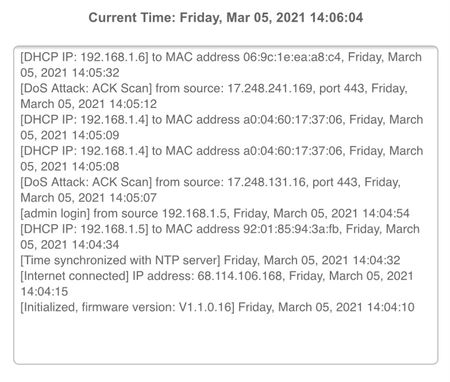

Ph0t0bug
Mar 08, 2021Tutor
Did you disable uPnP on the RBR before setting up any port forwarding configurations?
A: No, after disabling it and configuring can I turn it back on? The guy who is using the system really needs it to be on.
What FW version are you using?
A: The latest the update tab checks: Ver. 1.1.0.16
Has this configuration ever worked for you?
A: It did with another router. I believe it was the Nighthawk Router.
Ph0t0bug
Apr 22, 2021Tutor
I just found a page that says the latest Firmware is above 2.0 while the orbi its self is set for auto updates but still has the 1.1.0.16 version... what *IS* the latest version...(sigh)
- FURRYe38Apr 22, 2021Guru - Experienced User
Wow, v16 is the very first version released for Orbi.
You get beyond that you'll need to apply v74, then v212, then you can go to latest if you want to.
All version of FW for RBS and RBR 50 series is here:
https://www.netgear.com/support/product/RBK50.aspx#download
Update the RBS first then RBR lastly.
https://kb.netgear.com/31573/How-do-I-manually-upgrade-firmware-on-my-Orbi-router-using-orbilogin-com
https://kb.netgear.com/000037217/How-do-I-check-and-manually-upgrade-the-firmware-on-my-Orbi-satellite
Ph0t0bug wrote:I just found a page that says the latest Firmware is above 2.0 while the orbi its self is set for auto updates but still has the 1.1.0.16 version... what *IS* the latest version...(sigh)
- Ph0t0bugApr 23, 2021Tutor
Just so I make sure I dont mess things up.... I have the RBR50 Router and one indoor Sat. And one Outdoor Sat. Which is the RBS50Yv2.
If I get what your telling me I need to update the firmware of the indoor Sat. First then update the RBR50. After that I can connect the new RBS50Yv2 to the system and run the update for it.
The RBS50Yv2 dosent have the RJ45 connection and is not currently syncing to the RBR50 so there is no way to update the RBS50Yv2 until I can get it connected to the RBR50.
Did that sound correct?
Thanks again for your help!
- FURRYe38Apr 23, 2021Guru - Experienced User
Correct.
