NETGEAR is aware of a growing number of phone and online scams. To learn how to stay safe click here.
Forum Discussion

tiki-monster
Jun 23, 2021Aspirant
Orbi RBR50 asking for Password and Security Question that I never set up
Recently, upgraded (re-signed) Spectrum wifi, and they actually said I don't really need to rent the Spectrum router, and just plug into my Orbi router. Which I did, and it worked. Until certain si...
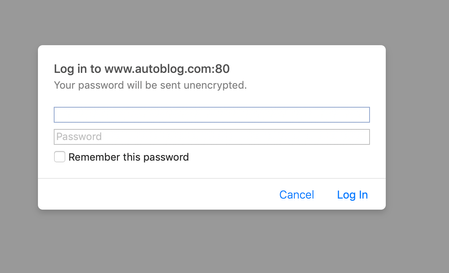
- Jun 23, 2021
tiki-monster wrote:How do I bypass this problem? Do I just hit reset?
A Factory Reset returns the Orbi to factory default settings:
- The WiFi SSID/password are set to the values on the product label (bottom of the case)
- The web browser administrative credentials are "admin" (which cannot be changed) and "password".
https://www.youtube.com/watch?v=cMw4ePACgc4
Open a web browser (Safari, Chrome) to http://orbilogin.net. Enter "admin" and "password" to set up the router.
During setup, there will ba a page where you can choose the security questions to unlock the router if the admin password is entered incorrectly three times in a row.

CrimpOn
Jun 24, 2021Guru - Experienced User
Sorry. I did not get the notice that the problem is resolved until after I sent the last message.
"My Bad"
tiki-monster
Jun 24, 2021Aspirant
No no no. I followed YOUR ADVICE and got it solved.
THANK YOU!!!
- FURRYe38Jun 24, 2021Guru - Experienced User
Be sure to save off a back up configuration to file for safe keeping. Saves tine if a reset is needed.
https://kb.netgear.com/000062080/How-do-I-back-up-the-configuration-settings-on-my-Orbi-WiFi-SystemEnjoy.
