NETGEAR is aware of a growing number of phone and online scams. To learn how to stay safe click here.
Forum Discussion

joel_smith
Apr 28, 2021Tutor
Orbi RBR50 Dropping Internet Connection Regularly
Hi, I have an RBR50 (V2.7.2.104) and two satellites - RBS20 (V2.6.2.104), RBS50 (V2.7.2.104) - in my mesh. The router is connected to the NBN Connection Box: Arris CM8200B Close to every 2 an...
- May 13, 2021
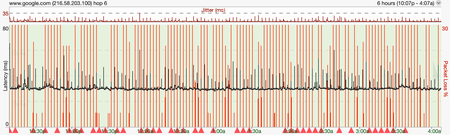
Arggh, I thought I had it with the DNS settings. Apparently not.
But today I have put the ISP modem into faux-bridge mode & connected the Orbi RBR50 to that, so far so good just need to tidy up the network rack now! Below is what I ended up with.

CrimpOn
May 03, 2021Guru - Experienced User
"not much luck" is an understatemet. I have (sometimes) had good luck will starting over with a different agent. (One time I and a service technicial battled a Spectrum issue for six hours - and at least a dozen phone calls. After he said, "I'm sorry" and left, I made one more call and a nice person said, "Oh, your account is misconfigured. Here, can you try it again?")
Maybe there is another way to get this information. The debug page has an option to start the debug log on boot up. (http://orbilogin.net/debug.htm) See attached image.
If that option is set and then the Orbi rebooted, maybe it will begin collecting LAN/WAN packets immediately If you let it go for 8-10 minutes and then save the file, the wan.pcap file might include the DHCP discussion between the Orbi and the ISP. Open wan.pcap with Wireshark and set a Display filter to dhcp and the packets should be obvious.
joel_smith
May 03, 2021Tutor
OK, I enabled Start Debug Log Capture when boot up but had to also enable Enable LAN/WAN Packet Capture to get the wan.pcap file.
Opening & filtering I get the following:
Expanding 4029 DHCP request
Dynamic Host Configuration Protocol (Request)
    Message type: Boot Request (1)
    Hardware type: Ethernet (0x01)
    Hardware address length: 6
    Hops: 0
    Transaction ID: 0xc219a742
    Seconds elapsed: 0
    Bootp flags: 0x0000 (Unicast)
        0... .... .... .... = Broadcast flag: Unicast
        .000 0000 0000 0000 = Reserved flags: 0x0000
    Client IP address: 49.187.236.114
    Your (client) IP address: 0.0.0.0
    Next server IP address: 0.0.0.0
    Relay agent IP address: 0.0.0.0
    Client MAC address: Netgear_76:b8:8a (a0:40:a0:76:b8:8a)
    Client hardware address padding: 00000000000000000000
    Server host name not given
    Boot file name not given
    Magic cookie: DHCP
    Option: (53) DHCP Message Type (Request)
        Length: 1
        DHCP: Request (3)
    Option: (61) Client identifier
        Length: 7
        Hardware type: Ethernet (0x01)
        Client MAC address: Netgear_76:b8:8a (a0:40:a0:76:b8:8a)
    Option: (12) Host Name
        Length: 5
        Host Name: RBR50
    Option: (60) Vendor class identifier
        Length: 11
        Vendor class identifier: udhcp 0.9.8
    Option: (55) Parameter Request List
        Length: 10
        Parameter Request List Item: (1) Subnet Mask
        Parameter Request List Item: (121) Classless Static Route
        Parameter Request List Item: (249) Private/Classless Static Route (Microsoft)
        Parameter Request List Item: (3) Router
        Parameter Request List Item: (6) Domain Name Server
        Parameter Request List Item: (12) Host Name
        Parameter Request List Item: (15) Domain Name
        Parameter Request List Item: (28) Broadcast Address
        Parameter Request List Item: (33) Static Route
        Parameter Request List Item: (43) Vendor-Specific Information
    Option: (255) End
        Option End: 255
    Padding: 000000000000000000000000000000
Expanding 4030 DHCP ACK
Dynamic Host Configuration Protocol (ACK)
    Message type: Boot Reply (2)
    Hardware type: Ethernet (0x01)
    Hardware address length: 6
    Hops: 0
    Transaction ID: 0xc219a742
    Seconds elapsed: 0
    Bootp flags: 0x0000 (Unicast)
        0... .... .... .... = Broadcast flag: Unicast
        .000 0000 0000 0000 = Reserved flags: 0x0000
    Client IP address: 49.187.236.114
    Your (client) IP address: 49.187.236.114
    Next server IP address: 0.0.0.0
    Relay agent IP address: 0.0.0.0
    Client MAC address: Netgear_76:b8:8a (a0:40:a0:76:b8:8a)
    Client hardware address padding: 00000000000000000000
    Server host name not given
    Boot file name not given
    Magic cookie: DHCP
    Option: (53) DHCP Message Type (ACK)
        Length: 1
        DHCP: ACK (5)
    Option: (51) IP Address Lease Time
        Length: 4
        IP Address Lease Time: (300s) 5 minutes
    Option: (54) DHCP Server Identifier (49.187.128.1)
        Length: 4
        DHCP Server Identifier: 49.187.128.1
    Option: (1) Subnet Mask (255.255.128.0)
        Length: 4
        Subnet Mask: 255.255.128.0
    Option: (3) Router
        Length: 4
        Router: 49.187.128.1
    Option: (6) Domain Name Server
        Length: 8
        Domain Name Server: 198.142.152.164
        Domain Name Server: 198.142.152.165
    Option: (15) Domain Name
        Length: 15
        Domain Name: optusnet.com.au
    Option: (255) End
        Option End: 255
I have bolded the lease time in the ACK above, but not sure what to do with that now??? Assume the IP for the DHSCP Server Identifier: 49.187.128.1 belongs to the ISP?
- CrimpOnMay 03, 2021Guru - Experienced User
I think you have evidence of two things:
- OptusNet is giving you an IP address with a lease time of 300 seconds (5 minutes), which is STUPID.
If this applies to all subscribers, that means the DHCP server will be constantly responding to DHCP requests.
Perhaps the next call to support would be, "Can you explain why Optus is assigning IP addresses with a 5 minute lease time?" - That parameter wan_lease is almost certainly the DHCP lease which Orbi provides to devices on the LAN, 86,400 seconds (one day). That is what my Orbi gives out to my devices.
Otherwise, there is something terribly wrong.The DHCP message says 300 seconds. The Advanced Tab says 5 minutes. I think the lease is 5 minutes, which is insane.
Please do not think "aha, this it the reason" I see it as something to be explained.
- OptusNet is giving you an IP address with a lease time of 300 seconds (5 minutes), which is STUPID.
- joel_smithMay 03, 2021Tutor
I ran a traceroute on the DHCP Server Identifier: 49.187.128.1 response below, as mentioned Optus is the ISP (for now).
traceroute to 49.187.128.1 (49.187.128.1), 64 hops max, 72 byte packets
 1  165.225.232.89 (165.225.232.89)  37.796 ms  30.855 ms  31.939 ms
 2  165.225.232.3 (165.225.232.3)  32.119 ms  74.063 ms  52.999 ms
 3  static-161.7.255.49.in-addr.vocus.net.au (49.255.7.161)  52.420 ms  28.987 ms  34.597 ms
 4  220.101.73.81 (220.101.73.81)  35.441 ms  28.620 ms  32.875 ms
 5  * * *
 6  * * *
 7  n49-187-128-1.rdl4.qld.optusnet.com.au (49.187.128.1)  47.684 ms  45.588 ms  54.485 ms
- CrimpOnMay 03, 2021Guru - Experienced User
Hmm. That is "interesting". Because DHCP is based on "broadcast" technology, the most common DHCP implementations have a DHCP server in the IP subnet. (Orbi, for example.) The device sends a broadcast, "Can I have an IP address?" and one (or more) DHCP servers respond. I honestly do not remember how my organization set this up when we implemented DHCP for 3,000-odd devices. I believe the switches forwarded the DHCP broadcasts somehow to a set of master DHCP servers. (It has been years.)
- joel_smithMay 03, 2021Tutor
Thanks again. I have followed up again with the ISP, without about as much luck.
Understand if the DHCP lease renewal is causing the issue, it is likely symptomatic rather than causal.
Figure I have two options remaining:
- Setup the Optus Sagecomm in faux bridge mode & connect the Orbi to that & hope that somehow insulates the Orbi
- Revert the firmware to a previous version and hope that helps
I don't have great confidence in either approach, but am running out of troubleshooting ideas.
- joel_smithMay 04, 2021Tutor
Hi,
Anyone have any suggestions of best approach here, or alternatives?
Cheers, Joel
- CrimpOnMay 04, 2021Guru - Experienced User
I would manually load firmware 2.5.2.4
The other suggestion is to see if you can capture the DHCP lease renewal packets.
The first IP lease offered was for 300 seconds (5 minutes). So, at about 150 seconds, the Orbi should have begun asking to renew the lease. Do you see those packets? (and the response packets from the ISP?)
- joel_smithMay 04, 2021Tutor
Thanks, I'll run some more tests now.
- CrimpOnMay 04, 2021Guru - Experienced User
I have mixed feelings about this situation.
- On the one hand, it should not matter how long a DHCP lease is. (300 seconds, 86,400 seconds (one day), or even a full week).
The device and the DHCP server should follow the protocol described in:
https://en.wikipedia.org/wiki/Dynamic_Host_Configuration_Protocol - On the other hand, I have real suspicions about how ISP's and Orbi handle DHCP.
I have documented that my Windows 10 PC does not use DHCP correctly when it wakes from 'sleep', but does when restarted.
Heaven knows what is going on between the ISP and Orbi.
- On the one hand, it should not matter how long a DHCP lease is. (300 seconds, 86,400 seconds (one day), or even a full week).
- joel_smithMay 06, 2021Tutor
Had some issues getting the log capture. Once I had captured a long enough period I can see the renewal packets.
- CrimpOnMay 06, 2021Guru - Experienced User
These are almost exactly 2:30 apart, which is what I would expect from a DHCP lease of 5:00.
If you use Wireshark to examine the DHCP packets, it will probably spell that out (in seconds).
Although what I consider "definitely absurd", I believe this is legitimate and may even be the default value. (Maybe these folks, "don't have a clue" and never changed the DHCP default?)
Alas, this does not explain internet service being interrupted. (Have I taken us off on a tangent?)
With logging working now, can you record traffic until there is an interruption and then dump the log when it resumes? (maybe while that ping trace is running?)
- joel_smithMay 06, 2021Tutor
I captured the following drops ~10:22:18-10:22:24am.
I can see the DHCP Renewal Request & ACK slightly before the dropped connection at 10:21:59
I have captured the log files from the DHCP request through to the end of the dropped connection. I'm not really sure what to look for in these logs? And Netgear Community won't let me upload the file. As an alternative I have uploaded the log capture.
- CrimpOnMay 06, 2021Guru - Experienced User
What a bizzare situation. Can you do two things:
- Try to ping dnsany02.optusnet.com.au
- Change the Orbi DNS entry on the Internet page from "Get automatically from ISP" to Use these DNS servers, and put in
1.1.1.1 and 8.8.8.8
- Try to ping dnsany02.optusnet.com.au
- joel_smithMay 07, 2021Tutor
- Try to ping dnsany02.optusnet.com.au
Response received - Change the Orbi DNS entry on the Internet page from "Get automatically from ISP" to Use these DNS servers, and put in 1.1.1.1 and 8.8.8.8
I can't select the "Use these DNS Servers" radio button unless I select the "Use Static IP Address" radio button above & I don't have a static IP address.
It is getting weirder.
- Try to ping dnsany02.optusnet.com.au
- CrimpOnMay 07, 2021Guru - Experienced User
Is Parental Controls enabled? I believe that interfers with the ability to set DNS servers. I seem to remember a post where someone said he turned off Parental Controls, was then able to set DNS servers, and turned Parental Controls back on again.
- joel_smithMay 09, 2021Tutor
Ah yes, Parental Controls are turned on. I turned off Parental Controls and was able to set the DNS servers. However, I couldn't turn Parental Controls back on without reverting to Get Automatically from ISP. Note, I am using Circle.
When the DNS servers were manually defined there were no issues with dropped connections, as soon as I reverted the frequent dropped connections returned. Oddly the Lease Renweal times were unchanged ie. 5 minutes.
- CrimpOnMay 09, 2021Guru - Experienced User
I have no understanding of Parental Controls.... and no idea who could explain how enabling Parental Controls would create this situation.
It is understandable why people want Parental Controls on the network. This seems like a ("hobson's choice"?)
- joel_smithMay 10, 2021Tutor
Yes, Parental Controls was defnitely a factor in our purchase decision, more for device control rather than site blocking in our case.
Does anyone from Netgear monitor these forums? Seems there is a legitimate issue here & one I am loathe to pay support just to report.
In happier news, these frustrations have prompted me to finally get my ethernet backhaul working.
Thanks for all your help. I assume I have now hit a dead end.
- CrimpOnMay 10, 2021Guru - Experienced User
joel_smith wrote:Yes, Parental Controls was defnitely a factor in our purchase decision, more for device control rather than site blocking in our case.
Does anyone from Netgear monitor these forums? Seems there is a legitimate issue here & one I am loathe to pay support just to report.
In happier news, these frustrations have prompted me to finally get my ethernet backhaul working.
Thanks for all your help. I assume I have now hit a dead end.
In the four years I have been following this forum, I cannot recall a single instance of anyone presenting themselves as a Netgear employee. The closest I can recall is when we had the "Traffic Meter Fiasco" in March when one of the forum moderators commented that "Netgear engineers have identified the problem...." So, no. I think the community forum is exactly that. For the community.
I have been tempted to pay for a Gearhead subscription, but have never felt confident that (a) whoever works at Gearhead would know much, or (b) have a way to contact someone in Netgear engineering who does.
I have this strong memory of someone commenting that they disabled Circle, changed to user defined DNS servers, and then enabled Circle again and their choices were not erased. (My memory is not always correct.) There is no reason for Circle to care which DNS servers are being used. If the ISP DNS servers are OK, then certainly OpenDNS or Cloudflare would be fine as well.
Netgear has a "new & improved" Parental Controls which is taking the place of Disney Circle. They offer a free trial. Maybe that product will do what you want and not interfere with DNS?
- joel_smithMay 10, 2021Tutor
Wowsers! I'm not sure what has happened, but while investigating OpenDNS, CloudFlare offerings, I thought I'd try re-enabling Parental Controls again, and.... it worked this time.
Maybe it was the reboots disabling Daisy Chain while configuring ethernet backhaul.
I am still seeing regular packet loss ~2.30 but only for one second as opposed to 5-7, this is tolerable if not ideal.
CrimpOn thanks again.
- FURRYe38May 11, 2021Guru - Experienced User
Netgear has set up a community forum specifically for the Circle product. Most of the people who watch that forum are more likely to have experience with Circle and know how to work it better than those of us who follow this "general Orbi" forum. Might be more likely to find someone who has a solution if the question is posted there:
https://community.netgear.com/t5/Circle-Smart-Parental-Controls/bd-p/en-home-circlehttps://www.netgear.com/home/services/smart-parental-controls/
https://community.netgear.com/t5/NETGEAR-Smart-Home-Parental/bd-p/en-home-smart-parental-controlsGood Luck
- joel_smithMay 11, 2021Tutor
Thanks FURRYe38
- joel_smithMay 13, 2021Tutor
Arggh, I thought I had it with the DNS settings. Apparently not.
But today I have put the ISP modem into faux-bridge mode & connected the Orbi RBR50 to that, so far so good just need to tidy up the network rack now! Below is what I ended up with.


