NETGEAR is aware of a growing number of phone and online scams. To learn how to stay safe click here.
Forum Discussion

completely
Oct 14, 2018Guide
Orbi RBR50 USB external hard drive server can't be accessed. Used it as a NAS Help plz!
Attached a WD Element to my Orbi RBR50 via USB port as NAS. Mainly used as music library for SONOS.
Was working fine.
Now I can't see anything on Netgear app Readyshare menu.
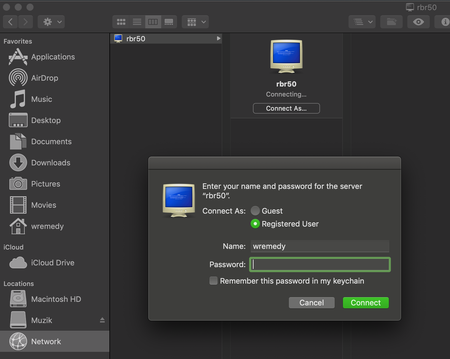
Tried on my Mac G...

FURRYe38
Oct 15, 2018Guru - Experienced User
Does the drive appear on the Routers web page UI?
Was the FW recently updated? What version of FW is currently loaded?
completely
Oct 15, 2018Guide
FURRYe38, thank you so much for your reply!
Unfortunately, I don't see the USB option on router web page (screenshot attached. I've searched online before, some people say they change USB settings on Advanced page, but mine doesn't have that option.)
The FW is:
Router Firmware Version
V2.2.1.21
it's the most updated ver.
Any suggestions? Appreciate it!

- FURRYe38Oct 16, 2018Guru - Experienced User
Something that NG hasn't really officially released as of yet.
I think you should look into a USB to LAN adapter for your external USB drive until NG comes out with something for the Orbi.
- completelyOct 16, 2018Guide
It was working fine though. Hopefully they will have some update to fix this problem.
But do you know the "default" name and password to the ReadyShare server?
I've tried Mac user account name and password, no luck.
Also tried "admin"+"password", didnt work either...
What a bummer to be asked name and password while I've never set it up...
- FURRYe38Oct 17, 2018Guru - Experienced User
I don't. Maybe a moderator can chime in.