NETGEAR is aware of a growing number of phone and online scams. To learn how to stay safe click here.
Forum Discussion

TAC57
Jul 20, 2021Aspirant
Orbi RBR750 Speed test vs Asus Mesh?
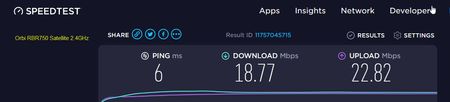
Might anyone give me any insight on the following? I was planning on updating my home network with the Orbi RBR750 WiFi 6 system. My existing system is two Asus routers setup in an AiMesh. I got t...

FURRYe38
Jul 20, 2021Guru - Experienced User
Netgear has set up a community forum specifically for the Orbi AX (WiFi 6) products. Most of the people who watch that forum are more likely to have experience with Orbi AX and know how to work it better than those of us who follow this "general Orbi" forum. Might be more likely to find someone who has a solution if the question is posted there:
https://community.netgear.com/t5/Orbi-AX/bd-p/en-home-orbi-ax
Thank you.
- TAC57Jul 20, 2021Aspirant
Thanks FURRYe38 I'll post the same post over there. I don't know why my screen shots of the speed tests didn't show up. They did show up just fine in the other post. The speed tests were about 4 times faster on my Asus routers. :-(
- FURRYe38Jul 20, 2021Guru - Experienced User
- CrimpOnJul 20, 2021Guru - Experienced User
TAC57 wrote:I don't know why my screen shots of the speed tests didn't show up. They did show up just fine in the other post.
One of the sad features of Netgear's community forum package is that images placed "in-line" using the Photos icon in the menu bar above do not appear to other users until they are approved by a forum moderator (which can take hours, or days?) Images "attached" using the Browse button in the lower left are available immediately. In my opinion, this makes the Photos icon basically worthless because it gives users the false impression that they are putting an image in their post when they are really making more work for forum moderators.
