NETGEAR is aware of a growing number of phone and online scams. To learn how to stay safe click here.
Forum Discussion

AIRgauge
Mar 10, 2020Aspirant
Orbi RBR/RBS50 not syncing and connected devices not showing
I'm currently running firmware version 2.5.1.8 on both the router and the satellite. Up until recently they were working reliably and the system has been great. Two things may have affected that and ...
-Malux-
Mar 10, 2020Tutor
There's definitely a problem with the 2.5.1.8 firmware. I'm having the same issue with the backhaul status and with the number of connected devices. Here are a few more data points:
- The Orbi app shows the satellite connected
- The web interace into the router at 192.168.1.1 shows the satellite as disconnected
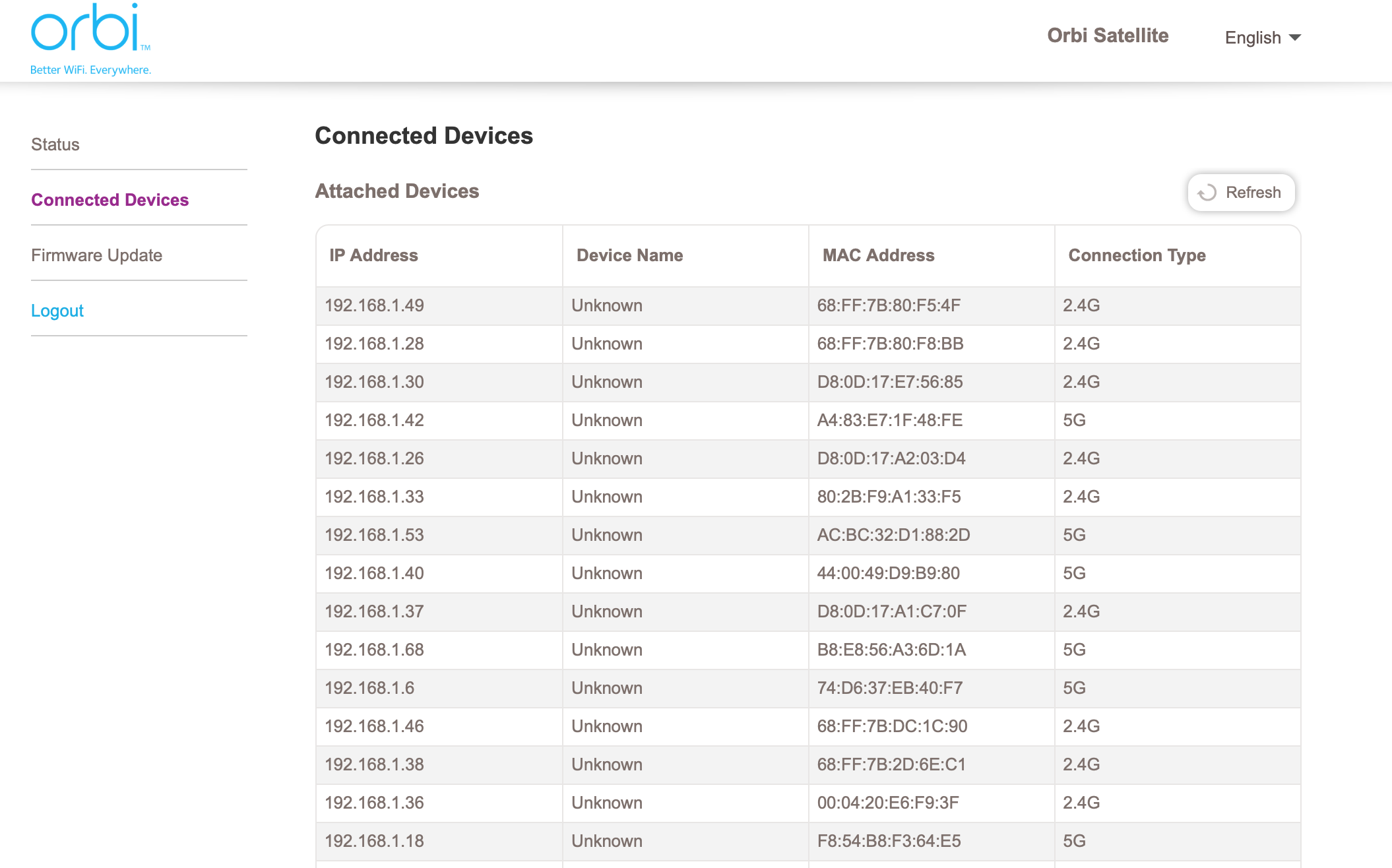
- Logging into the satellite (192.168.1.54) shows a long list of devices connected to it.
Like the OP, i've had this setup working just fine until this weekend. By the way:
- I'm a software dev who has worked with networks for a long while
- I factory reset the router AND the satellite
- I flashed the firmware on both the satellite and router to a clean 2.5.1.8
- I setup the network again from scratch.
- Like the OP, I did not manually install 2.5.1.8 firmware.
Right now, everything works save for the UI issues and the fact that the router does not identify the devices on the network.

theoak
Mar 11, 2020Luminary
-Malux- wrote:There's definitely a problem with the 2.5.1.8 firmware. I'm having the same issue with the backhaul status and with the number of connected devices. Here are a few more data points:
- The Orbi app shows the satellite connected
- The web interace into the router at 192.168.1.1 shows the satellite as disconnected
- Logging into the satellite (192.168.1.54) shows a long list of devices connected to it.
Like the OP, i've had this setup working just fine until this weekend. By the way:
- I'm a software dev who has worked with networks for a long while
- I factory reset the router AND the satellite
- I flashed the firmware on both the satellite and router to a clean 2.5.1.8
- I setup the network again from scratch.
- Like the OP, I did not manually install 2.5.1.8 firmware.
Right now, everything works save for the UI issues and the fact that the router does not identify the devices on the network.
-Malux- I was experience the EXACT same issues as you.
I got my Orbi system. Out of the box it was on an older firmware, so I manually updated it to 2.5.1.8. Things seemed to be working, but internet was off and on, so I factory resetted. This is when I experienced the same. I downgraded to 2.3.5.20. Things were great. Because I am a sucker for punishment, I decided to upgrade to 2.5.1.8 again. Long story short - it is working now.
I can only conclude that my original firmware upgrade had "issues" and that by downgrading and upgrading again, those issues were corrected.
So you can try downgrading and then upgrading again? Yes, a pain - sorry :(
Depending on how complex your configuration is, while you are on 2.5.1.8, take a backup of your settings; hence, when you get back on 2.5.1.8, you can just restore your settings back.
With all of the above being said, when I was on 2.3.5.30, it seemed to be stable and regardless of the GUI used, satellites and attached devices list was accurate. You might just want to sit on 2.3.5.30 also.
- numetheusMar 11, 2020AspirantOkay ... so I was having the same issue. Nothing was being updated with the new firmware. Unplugging the satellite and leaving it like that for 30 minutes and it still shows it was good with devices connected. Lol. New devices never show up. I tried returning satellite to factory setting by depressing the reset pin hole button, then the router, then setting up from scratch. Same issue. It only found 8 devices and ignored updates from there. Downgraded to 2.3.5.30 and now everything is working normally. I can confirm that this is a problem with the latest firmware release. I’m going to try re-updating to the new release just for funsies but I don’t have much hope it will work. I’ll report back.
- numetheusMar 11, 2020AspirantUpdated again to the new version. Yep. Problem with the firmware. This time it is only recognizing 7 devices. I should have 19. Confirmed that all of my IP cameras are available, and none showing in the device list. I have two devices wired to satellite and the device list for it shows as blank.
- FURRYe38Mar 11, 2020Guru - Experienced User
Has a factory reset and setup from scratch been performed since last FW update?
What happens if you disable Daisy Chain?
numetheus wrote:
Updated again to the new version. Yep. Problem with the firmware. This time it is only recognizing 7 devices. I should have 19. Confirmed that all of my IP cameras are available, and none showing in the device list. I have two devices wired to satellite and the device list for it shows as blank. - numetheusMar 11, 2020AspirantFactory reset was performed directly after the first upgrade. Re-configured from scratch and tested for a while and rebooted router and satellite. Confirmed it did not work after leaving devices off then activating some time after everything was powered on. Did not recognize devices. During one test, the satellite was flagged as down despite no lights and the computer physically connected to satellite was online and functioning. If it was down, computer would not work. I have no WiFi card. Downgraded and performed the same test. Devices showed up after refresh and immediately recognized all 19 devices after allowing time for them to re-connect. Working. Performed upgrade and tested again. Same result as broken state. Only 7 devices recognized. Physically unplugged satellite. Page still shows the satellite is good after a while despite being unplugged. It’s not updating.
I do not see how another factory reset will yield different results because a factory reset was performed after the first upgrade to new version. Although I will try it anyways to settle this. - Retired_MemberMar 11, 2020
numetheus wrote:
I do not see how another factory reset will yield different results because a factory reset was performed after the first upgrade to new version. Although I will try it anyways to settle this.it won't
leave your FW alone
- numetheusMar 11, 2020AspirantI upgraded again just to test daisy chain setting. I’ve turned daisy chaining off, which caused a reboot. Now it shows satellite is disconnected and 6 total devices. Yet all of my devices connected directly to satellite are working. So clearly the satellite is connected. I’m done with this version now. Going to downgrade. My prognosis is the devs failed at testing. Lol
- Retired_MemberMar 11, 2020
numetheus wrote:
I upgraded again just to test daisy chain setting. I’ve turned daisy chaining off, which caused a reboot. Now it shows satellite is disconnected and 6 total devices. Yet all of my devices connected directly to satellite are working. So clearly the satellite is connected. I’m done with this version now. Going to downgrade. My prognosis is the devs failed at testing. LolNow think of all the time wasted. Do not perform manual FW updates.