NETGEAR is aware of a growing number of phone and online scams. To learn how to stay safe click here.
Forum Discussion

HenryXia05
Apr 28, 2023Aspirant
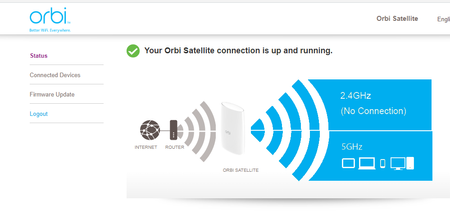
Orbi RBS50v2 showing only connected devices and firmware update
Hello, I would like to know how to fix when I'm connected to my orbi's WIFI it only shows connected devices and firmware update, I cannot change the SSID or password since there's no setting for ...

FURRYe38
Apr 28, 2023Guru - Experienced User
What FW is currently loaded?
Be sure to scroll down on the RBS web page to show more details on the status page.
Check different browsers for differences. MS Edge or Firefox.
Has a factory reset and setup from scratch been performed since last FW update? A complete pull of the power adapters for a period of time after the factory reset then walk thru the setup wizard and setup from scratch with a wired PC and web browser. Recommend setting the default DHCP IP address pool range to the following after applying and a factory reset: 192.168.#.100 to 192.168.#.200.
https://kb.netgear.com/24089/How-do-I-specify-the-pool-of-IP-addresses-assigned-by-my-Nighthawk-router
I would power OFF the ISP modem for 1 minute. Factory reset the Orbi router and power it off. Power ON the ISP modem and let it sync. Then power ON the Orbi router and walk thru the setup wizard again using a wired PC and a web browser.
Press the back reset button for 15 seconds then release.
https://kb.netgear.com/31486/How-do-I-reset-my-Orbi-system-to-factory-default-settings
https://kb.netgear.com/000062081/How-do-I-erase-the-configuration-settings-on-my-Orbi-WiFi-System