NETGEAR is aware of a growing number of phone and online scams. To learn how to stay safe click here.
Forum Discussion

HenryXia05
Apr 28, 2023Aspirant
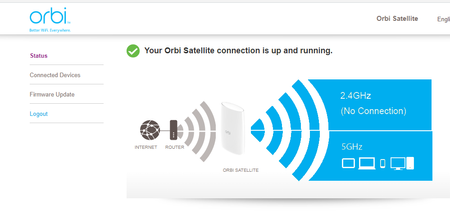
Orbi RBS50v2 showing only connected devices and firmware update
Hello, I would like to know how to fix when I'm connected to my orbi's WIFI it only shows connected devices and firmware update, I cannot change the SSID or password since there's no setting for ...

plemans
Apr 30, 2023Guru - Experienced User
The orbi satellite ssid is tied into the primary routers ssid. Its why its a mesh system and its why you can't change it on the satellite.
It has to be changed on the router.
HenryXia05
Apr 30, 2023Aspirant
So I am using the fios router and the Orbi as an access point, though they are on the same network, I would still like to be able to change the SSID and the password. I went to my verizon router and I couldnt change it either
- CrimpOnApr 30, 2023Guru - Experienced User
The Verizon router management screens can be used to manage the Verizon router itself, not devices connected to the router.
Find the IP address of the Orbi base unit (RBR50) and open a web browser to that IP address.
The Wireless menu item is where the WiFi SSID and password are set.
Or, the Orbi 'app' can be used to change these settings.
- HenryXia05Apr 30, 2023Aspirant
That is what I did, I typed the IP address and there are no settings for SSID, I think it might be because its a mesh as mentioned before.
- CrimpOnApr 30, 2023Guru - Experienced User
HenryXia05 wrote:
That is what I did, I typed the IP address and there are no settings for SSID, I think it might be because its a mesh as mentioned before.
The IP address for the Router, not the satellite. My router web administration Home Page looks like this:
Click on on Wireless.
