NETGEAR is aware of a growing number of phone and online scams. To learn how to stay safe click here.
Forum Discussion

Chuck_M
Jan 14, 2019Mentor
Orbi Remote Management INOP
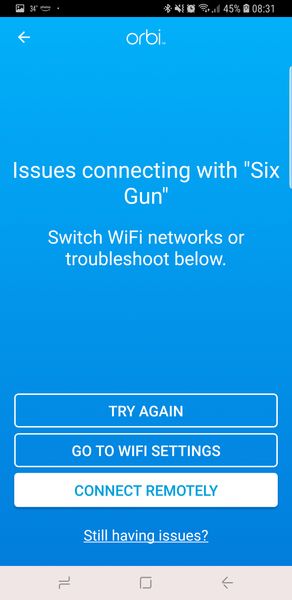
I am having issues through the Orbi App with enabling and conducting remote management
W hen I run the orbi app outside of my LAN, here is the initial screen:
In this case I am on a exte...
- Jan 14, 2019
Interestingly enough, after multiple reboots and turning on and off remote management... it started working through the Orbi App.
Thanks much.... have no clue why it suddenly came alive!

ekhalil
Jan 14, 2019Master
Chuck_M wrote:
The App has it (and had it) enabled as well as the GUI... but it says it is disconnected as per the image above.
The serial number is correct but there is a red dot next to the router name (RBR50).
I CAN web access the router GUI remotely but the Orbi App doesnt work.
Any other thoughts?
1. Can you please also try from the Genie app. Go to Remote Management --> Enter your netgear account email and password and then enable Remote Management.
2. Please also check under >>ADVANCED>>Administration>>Logs>> if you see any remote access activity events when you try to login so we know if the remote login attempt was at all reaching to Orbi.

Chuck_M
Jan 14, 2019Mentor
Interestingly enough, after multiple reboots and turning on and off remote management... it started working through the Orbi App.
Thanks much.... have no clue why it suddenly came alive!
- schumakuJan 14, 2019Guru - Experienced User
Chuck_M wrote:
Interestingly enough, after multiple reboots and turning on and off remote management... it started working through the Orbi App.
The remote access is established through an intermediate system in the cloud. It can happen the device (Orbi, Nighthawk, ...) is loosing the connection or fails to re-establish the connection. In a few occurrences, it can be a temporary outage in the cloud systems involved for the remote access.
