NETGEAR is aware of a growing number of phone and online scams. To learn how to stay safe click here.
Forum Discussion

SaimenK
Jan 09, 2022Aspirant
Orbi satelite firmware hanging on installation
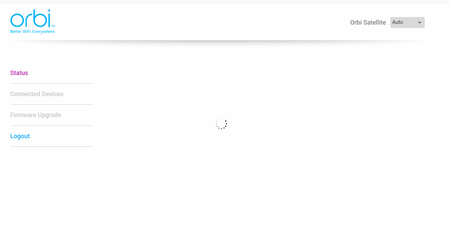
Hello, I got the RBK53 mesh system installed. The thow satelites are connected via backhaul ethernet to the router. One of them is working fine, the other one didnt came up correct. Its not showi...

FURRYe38
Jan 10, 2022Guru - Experienced User
Can you select the FW Upgrade menu item at all?
Press the reset button for 15 seconds then release.
What happens if you disconnect the ethernet cable and sync the RBS wirelessly to the RBR first? Its recommended to first wirelessly sync the RBS and let them come to ready, then ethernet connect them one at a time.
What CAT# cable are you using? CAT6 is recommended.
Try swapping RBS locations with each other to see if the problem follows.
SaimenK
Jan 10, 2022Aspirant
Hello FURRYe38,
Thank you for your answer. I can't access the firmware page in the RBS. While opening the browser and visit the RBS, the loader keeps loading. I'm only able to change the language, no other options respond in the menu.
I tried resetting the RBS, with no cable (CAT5) connected. Did help a little bit, it showed up in the RBR as a disconnected sattelite.
It didnt get an ip address, or what so, and reconnecting to cat5 didnt work either.
After that i removed the satelite from the list and tried to add it again, this didnt work (no RBS found)
Also tried swapping the both RBS from places. The one that works, also works on the spot where the other RBS doesnt work so it doesnt look like a network issue.
I still think the this RBS is stuck on his firmware, and resetting it doesnt work.
Any ideas? Thanks in advance!
- WanshunJan 10, 2022Tutor
My orbi is purple. There is no internet
- FURRYe38Jan 10, 2022Guru - Experienced User
Might try forcing FW to the RBS using TFTP:
https://kb.netgear.com/000059634/How-to-upload-firmware-to-a-NETGEAR-router-using-Windows-TFTP
Need to press the reset button for 30 seconds then release, then it send to PUT the command and upload the FW.Try nmrpflash:
https://github.com/jclehner/nmrpflashIf any of this fails, you'll need to contact NG support and ask for help on this one RBS and see what your RMA options are.
SaimenK wrote:
Hello FURRYe38,
Thank you for your answer. I can't access the firmware page in the RBS. While opening the browser and visit the RBS, the loader keeps loading. I'm only able to change the language, no other options respond in the menu.
I tried resetting the RBS, with no cable (CAT5) connected. Did help a little bit, it showed up in the RBR as a disconnected sattelite.
It didnt get an ip address, or what so, and reconnecting to cat5 didnt work either.
After that i removed the satelite from the list and tried to add it again, this didnt work (no RBS found)
Also tried swapping the both RBS from places. The one that works, also works on the spot where the other RBS doesnt work so it doesnt look like a network issue.
I still think the this RBS is stuck on his firmware, and resetting it doesnt work.
Any ideas? Thanks in advance!