NETGEAR is aware of a growing number of phone and online scams. To learn how to stay safe click here.
Forum Discussion

Themooingman
Mar 11, 2017Tutor
Orbi speed
Hi after reading many reviews got an orbi and 1 satellite today. Using it with an asus ac68u modem router. Orbi was a breeze to set up. Wifi coverage in the house is good and generally stronger ...

Mikey94025
Mar 11, 2017Hero
Can you check your devices and see if they're connected via 5Ghz or 2.4Ghz? If the latter, that's why the speed is slow so we need to get them to connect using 5Ghz. If they're already connected 5Ghz but only getting 8Mbps/2Mbps then that's a different issue.
You may also be able to use http://orbilogin.net/DEV_show_device.htm and see what wifi connection type they're using. You may have to go to http://orbilogin.net/debug.htm and enable the extra connection info.
Themooingman
Mar 11, 2017Tutor
Hi Mikey thanks the response how can I tell what ghz they are connecting at ? My old router I would tell to connect to 2.4 or 5 ghz as you could have the 2 ssid being broadcast ? On the orbi I just have one orbi being broadcast ?
Sorry if if I am missing something obvious. Your further help appreciated
thanks
- st_shawMar 12, 2017Master
Themooingman wrote:how can I tell what ghz they are connecting at ?
Go to http://orbilogin.net/DEV_show_device.htm The column at the right side of the table should show what connection type is in use for each device: wired, 2.4G, 5G.
- Butch1326Mar 12, 2017Star
Food for thought. I do this with my Netgear R8500 router.
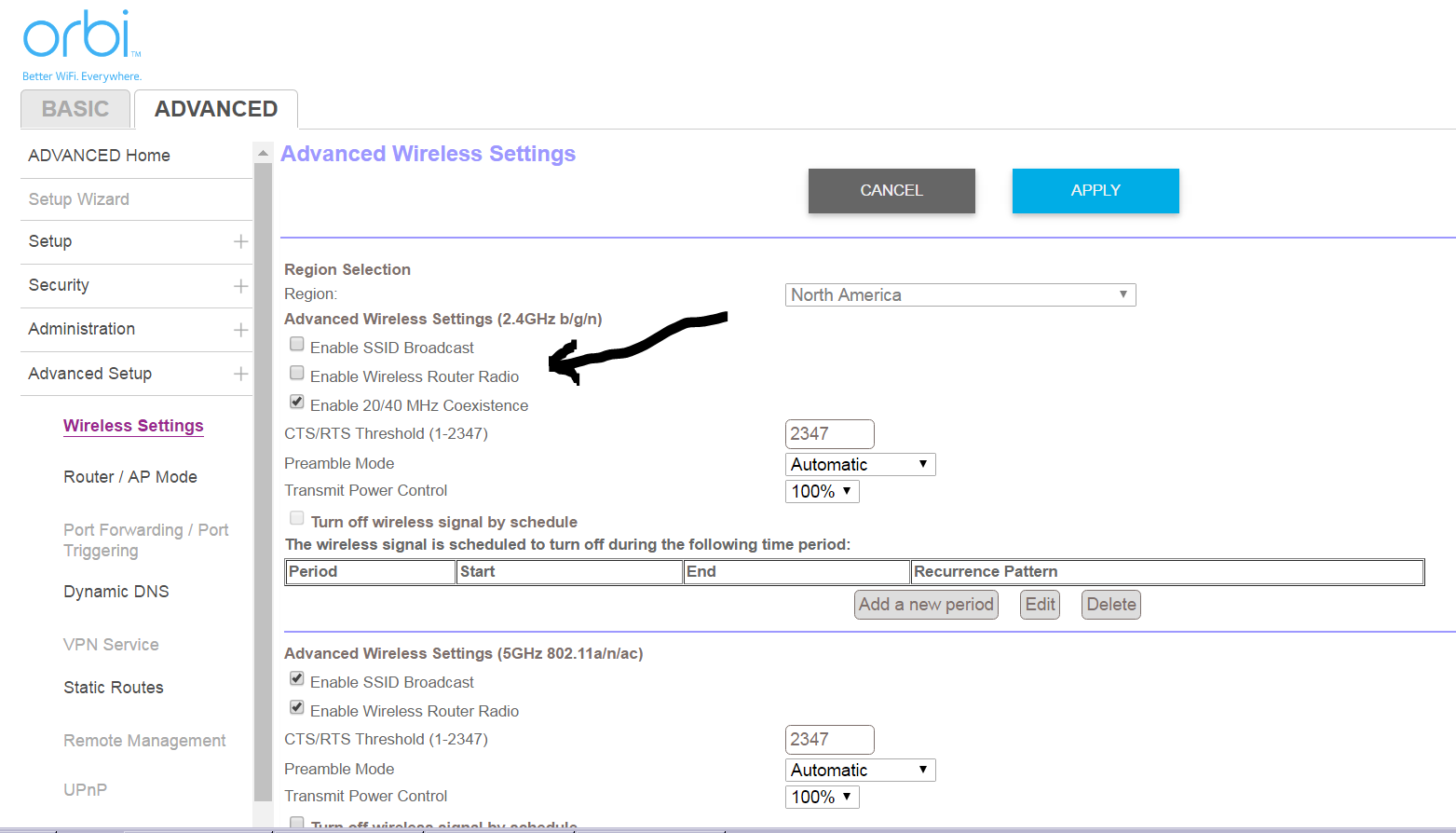
I setup the Orbi in AP mode with only the 5ghz radio turned on. The 2.4ghz wifi radio is turned off on the Orbi. I use my main router with only the 2.4ghz on. This allows me to maintain 2 separate wifi networks for 2.4ghz and 5ghz.
This sounds like it will work in your configuration with the Asus router you mentioned.
- ThemooingmanMar 12, 2017Tutor
Mikey thanks but my right hand column just shows wireless. Not mention of 5 ot 2.4 ghz ? Confused
- Butch1326Mar 12, 2017Star
On the Orbi router uncheck go to Advanced Setup - Wireless Settings and uncheck both Enable SSID Broadcast and Enable Wireless Router Radio under the 2.4ghz section