NETGEAR is aware of a growing number of phone and online scams. To learn how to stay safe click here.
Forum Discussion

WaldS
Feb 20, 2021Initiate
Orbi WiFi SSID now always on?
Hello and thank you for reading this. I have recently updated my Orbi RBR20 router to the latest firmware version (2.6.2.104). I noted that now the main WiFi network SSID can no longer be hidden...

CrimpOn
Feb 23, 2021Guru - Experienced User
WaldS wrote:I have recently updated my Orbi RBR20 router to the latest firmware version (2.6.2.104). I noted that now the main WiFi network SSID can no longer be hidden. Such option does not exist! I used to have it checked off. Only my Guest WiFi was adertised. Netgear did not include such change in their release notes... so? A bug?
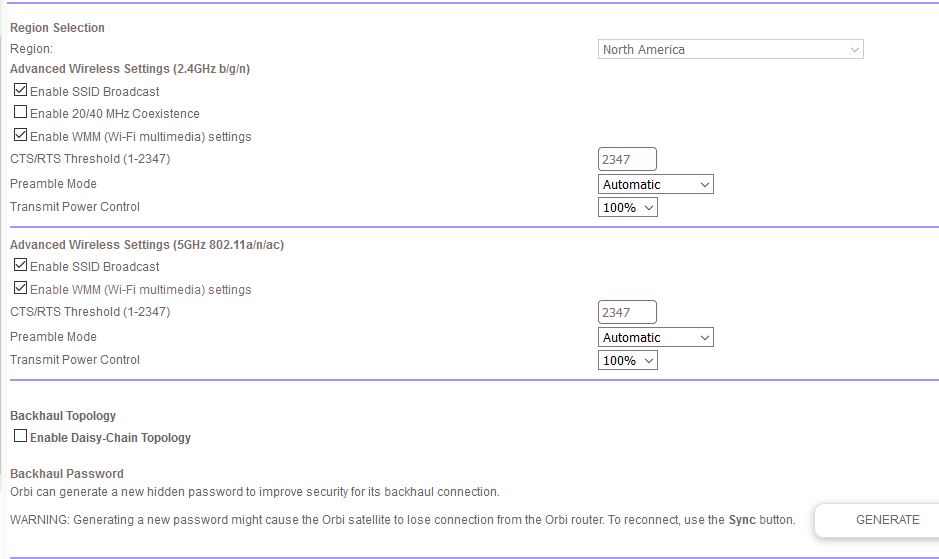
Amazing. My RBR50 is running the latest firmware, 2.7.2.104, and it still shows the check box for broadcast SSID on both 2.4G and 5G.
(see attached image). Who would have thought that Netgear would change an option such as this on some Orbi models and not on others?
- NikitaFeb 24, 2021Aspirant
And I also miss extended Wi-Fi settings, since this is all that's accessible right now, see screenshot. This is advanced tab, not basic. Soundn't there be anything more?
- FURRYe38Feb 24, 2021Guru - Experienced User
Has a factory reset and setup from scratch been performed since last update?
If you unchecked Enable Guest Network and unchecked Enable SSID broadcast from the guest network menu, then no signal of the guest network will be broadcast or hidden.
Nikita wrote:And I also miss extended Wi-Fi settings, since this is all that's accessible right now, see screenshot. This is advanced tab, not basic. Soundn't there be anything more?
 vajimFeb 24, 2021Master
No
You can post any message or question you like.
I was only asking if you felt the problem you're having was caused by your recent firmware update?
- CrimpOnFeb 24, 2021Guru - Experienced User
Nikita wrote:And I also miss extended Wi-Fi settings, since this is all that's accessible right now, see screenshot. This is advanced tab, not basic. Soundn't there be anything more?
The extended WiFi settings are under the Advanced Setup menu (at the bottom), not the Setup menu.
- NikitaFeb 24, 2021Aspirant
Great! Now I see)). Thank you!