NETGEAR is aware of a growing number of phone and online scams. To learn how to stay safe click here.
Forum Discussion

PyroDog
Jan 05, 2018Apprentice
Packet loss pattern
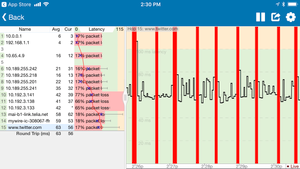
My Orbi satellite and router are running on firmware 2.1.1.16 Today I noticed that my VoIP calls, web browsing and online gaming all hang at the same time. This prompted me to monitor the stability ...
- Jan 06, 2018
After a few hours, the packet loss came back even after the change I made. Long story short: I ended up downgrading back to V2.0.0.74 where the issues is gone entirely. Beamforming and Fast Roaming are enabled in my configuration without issues. I hope this helps somebody.

_Mac
Jan 05, 2018Tutor
Hi PyroDog
Good bug-hinting! I have the Orbi Pro to (router SRR60 + satellite SRS60). Got same issues with my Orbi Pro (my second one, already replace one set). Will try to only run on the Router and turn off the sattelite.
Netgear support have also suggested that the units are to close to each other and therefore block each other out. Will try this and get back to you here w the result...
ALSO,
Regarding your streaming issues, have you read this thread? There is a another possible solution.
But to do the above solution, you need to downgrade your Orbi pro's to the older FW v1.11.0.20. Other users w Orbi 40 & Orbi 50 have resolved there streaming issues this way.
I tried to do this downgrade today, but I couldn't find the old FW version 1.11.0.20 for Orbi Pro anywhere, only newer version and no legacy FW. Maybe you know where to find it? (Read my replies on the above post before answering pls).
PyroDog
Jan 06, 2018Apprentice
Whoa, I wish some day I can have a 1Gb fiber connection to my home.
Here is the gist of it: You won't be able to get the full 1Gb speed on WiFi. This is because current WiFi technology is limited to sub 1Gb speeds.
If your network gets better with the satellite unit off; it would be a strong indicator that the Orbi units are interfering with each other. Orbi units are designed to be quite far appart but not too far apart as to weaken the communication between the units. On the other hand, they can't be too close either because they will interfere with each other. Finding this sweet spot could be challenging.
I would suggest you move the units farther apart. In my case, this is not an option as the units are already where I absolutely need them to be. What I did instead is to turn the Transmit Power Control of the 2.4Ghz and 5Ghz signals down to 50%. This is equivalent to moving the units farther away from each other without reducing the back-haul connection strength between the Orbi units. You might need to experiment with the percentages depending on your setup. This single change alone has cleared all my packet loss over WiFI with both units powered on. In theory, my total WiFi range has diminished but apparently not enough for me to notice it.