NETGEAR is aware of a growing number of phone and online scams. To learn how to stay safe click here.
Forum Discussion

dl42
Apr 22, 2022Aspirant
RBK13 Guest Network
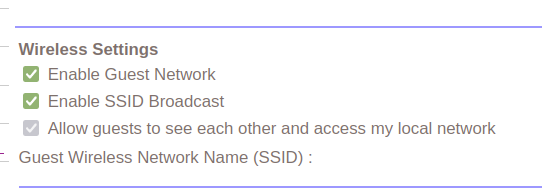
Hi I had not logged into the orbi app for a while as everything seems to have been working fine and there have not been any recent updates to the firmware. When I logged in today I noted that the "...


KevinLiT
Apr 25, 2022NETGEAR Moderator
Hello dl42,
Please ensure that the device you are accessing the GUI from is on your main network. The "Allow guests to see each other" should not be greyed out. From the main network, you should be able to toggle this setting.
Best,
Kevin
Community Team
dl42
Apr 30, 2022Aspirant
I am accessing the router from the wired network.
Please see picture attached to original post.
The option is greyed out and cannot be toggled.
- KevinLiTMay 02, 2022NETGEAR Moderator
Hi dl42,
I was unable to recreate the greyed-out "Allow guests to see each other and access my local network" option that you are experiencing with your RBK13 system. Please try factory resetting your RBK13.
For information on factory resetting your device please navigate to the link below:
https://kb.netgear.com/000034592/How-do-I-reset-my-Orbi-system-to-factory-default-settings
Best,
Kevin
Community Team
- dl42Jun 03, 2022Aspirant
Neither upgrade to 2.7.4.24 nor full factory reset change anything.
- dl42Jun 03, 2022Aspirant
Ok this is now far more serious...Just tested my guest network at it has access to everything on the network, NAS, printer etc.
So the upgrade to 2.7.4.24 breaks the guest networking completely and there is no option to be able to stop seeing other devices on the network when on the guest network - so what is the point of the guest network?
See attached image.