NETGEAR is aware of a growing number of phone and online scams. To learn how to stay safe click here.
Forum Discussion

shobuddy
Feb 28, 2021Aspirant
RBK50 - two firmware versions?
Why are there two firmware versions for the RBK50 and which one should be used? Edit: screenshot doesn't seem to be working but the versions are 2.7.1.104 and 2.6.1.40.
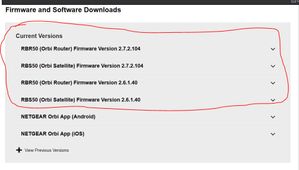
- Feb 28, 2021
Yes, two versions, and no explanation why. Isn't it a hoot!
There is an urban legend that the 2.6 firmware might be intended (a) for world wide rather than US, or (b) for customers who prefer to remain with Disney Circle rather than migrate to the new Netgear Patental Controls. At one point, one of the versrions was labelled "U.S. Only", but that comment has disappeared. Netgear provides NO EXPLANATION.
So, what are customers supposed to do?
- One school of thought is, "if it ain't broke, don't fix it." We see posts every day that start off with, "updated Orbi firmware and now....(something horrible happened)." All these "security fixes" seem focussed on the LAN side of the Orbi, not on security breaches from the Internet.
- Another school of thought is, "If a security fix is serious, Netgear will push new firmware." During the origiinal setup, users have to click "ok" to the statement, "i realize that Netgear may push firmware updates to my system." Then let Netgear do what they said they'd do.
- There are some of us who think, "what the heck, it new firmware does something bad, I will just reinstall the firmware I had before." No Biggie. I am on 2.7.2.104. Had some hiccups and did a factory reset. Now all good.
You wanted answers. Sorry.
p.s. images posted "in-line" using the Photo icon do not appear until a forum moderator approves them, which can take hours. Images attached with the "Browse" button appear immediately.

CrimpOn
Feb 28, 2021Guru - Experienced User
Yes, two versions, and no explanation why. Isn't it a hoot!
There is an urban legend that the 2.6 firmware might be intended (a) for world wide rather than US, or (b) for customers who prefer to remain with Disney Circle rather than migrate to the new Netgear Patental Controls. At one point, one of the versrions was labelled "U.S. Only", but that comment has disappeared. Netgear provides NO EXPLANATION.
So, what are customers supposed to do?
- One school of thought is, "if it ain't broke, don't fix it." We see posts every day that start off with, "updated Orbi firmware and now....(something horrible happened)." All these "security fixes" seem focussed on the LAN side of the Orbi, not on security breaches from the Internet.
- Another school of thought is, "If a security fix is serious, Netgear will push new firmware." During the origiinal setup, users have to click "ok" to the statement, "i realize that Netgear may push firmware updates to my system." Then let Netgear do what they said they'd do.
- There are some of us who think, "what the heck, it new firmware does something bad, I will just reinstall the firmware I had before." No Biggie. I am on 2.7.2.104. Had some hiccups and did a factory reset. Now all good.
You wanted answers. Sorry.
p.s. images posted "in-line" using the Photo icon do not appear until a forum moderator approves them, which can take hours. Images attached with the "Browse" button appear immediately.
- shobuddyFeb 28, 2021Aspirant
CrimpOn, yet you love your Orbi? j/k
Thanks for the response. I just upgraded to v.104 and am having issues. Went back to v.102 and having the same issues. Going to go to v.104 and do a factory reset *fingers crossed*.
- CrimpOnFeb 28, 2021Guru - Experienced User
shobuddy wrote:CrimpOn, yet you love your Orbi? j/k
Back in 2016, I got tired of complaints, "WiFi sucks when I sit here." Tried saying, "Then, don't sit there." Not my best move.
Bought the Orbi and have strong WiFi everywhere, including three patios. Never goes down. Eventually I will have devices that are compatible with WiFi6 or WiFi6E and will have to consider if the cost of replacing the Orbi is worth it.
Factory Reset has the benefit of clearing out the cobwebs. Orbi remembers every device that has ever connected. When I updated to 2.7.2.104 sort of by accident, some devices worked, but did not show up in Attached Devices. Orbi stubbornly reported tham as "Allowed devices that are not connected." After a save configuration, factory reset, and reload configuration, they all appear correctly. A Factory Reset plus manual reconfiguration would have cleared out all those previous devices and God knows what other junk is hanging around in the Orbi firmware. I would have done the complete "clean house" if those devices had remained "unattached."
p.s. That "accident" was mefooling around inside the Orbi directories with telnet and erasing some key parts of the web interface. I had to manually load firmware, so I thought, "what the heck. Let's give 2.7.2.104 a try."
- shobuddyMar 02, 2021Aspirant
This is my first Netgear device in long long time and I agree that when it works, it works. That said, I find the app and web interface to be slow, clunky and leaves something to be desired. I've only had the RBK50 for a few months now and while its nice that it receives consistent updates, I've never had a smooth update process. To me it seems that the hardware is good but the software is average at best.