NETGEAR is aware of a growing number of phone and online scams. To learn how to stay safe click here.
Forum Discussion

shobuddy
Feb 28, 2021Aspirant
RBK50 - two firmware versions?
Why are there two firmware versions for the RBK50 and which one should be used? Edit: screenshot doesn't seem to be working but the versions are 2.7.1.104 and 2.6.1.40.
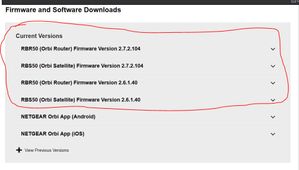
- Feb 28, 2021
Yes, two versions, and no explanation why. Isn't it a hoot!
There is an urban legend that the 2.6 firmware might be intended (a) for world wide rather than US, or (b) for customers who prefer to remain with Disney Circle rather than migrate to the new Netgear Patental Controls. At one point, one of the versrions was labelled "U.S. Only", but that comment has disappeared. Netgear provides NO EXPLANATION.
So, what are customers supposed to do?
- One school of thought is, "if it ain't broke, don't fix it." We see posts every day that start off with, "updated Orbi firmware and now....(something horrible happened)." All these "security fixes" seem focussed on the LAN side of the Orbi, not on security breaches from the Internet.
- Another school of thought is, "If a security fix is serious, Netgear will push new firmware." During the origiinal setup, users have to click "ok" to the statement, "i realize that Netgear may push firmware updates to my system." Then let Netgear do what they said they'd do.
- There are some of us who think, "what the heck, it new firmware does something bad, I will just reinstall the firmware I had before." No Biggie. I am on 2.7.2.104. Had some hiccups and did a factory reset. Now all good.
You wanted answers. Sorry.
p.s. images posted "in-line" using the Photo icon do not appear until a forum moderator approves them, which can take hours. Images attached with the "Browse" button appear immediately.
Shadowchasr
Mar 02, 2021Initiate
Two versions of each - one is for the router and the other is for the paired satellite.
Some firmware versions do not work/are incompatible with certain ISP systems.
For example: If you purchased your Orbi system from an ISP, they will have their own choice in which firmware to run on the system and will remote update for you. This is common in the cable modem systems; the Orbi environment can be created in a similar fashion.

CrimpOn
Mar 02, 2021Guru - Experienced User
Shadowchasr wrote:Some firmware versions do not work/are incompatible with certain ISP systems.
There is no evidence of Orbi firmware being incompatible with certain ISP systems. The release notes contain no mention of this. The original post was asking about why Netgear posts two different firmware releases for the Orbi and gives no indication how a user should decide which to install.
Shadowchasr wrote:For example: If you purchased your Orbi system from an ISP, they will have their own choice in which firmware to run on the system and will remote update for you. This is common in the cable modem systems; the Orbi environment can be created in a similar fashion.
This is totally incorrect. For cable modems, this is an inherent part of the design. ISP's totally control the firmware on cable modems.
But not on routers, and certainly not on the Orbi product.
There is one glaring anomoly: the Verizon branded Orbi. Some years ago, Verizon offered customers "a great deal" on Orbi WiFi, with a promise to keep the firmware up-to-date, and has never issued a firmware update. Not only that, but the firmware is "locked" and cannot be converted to Netgear firmware. People who got suckered by Verizon are stuck.