Forum Discussion

OzGobo
Aug 11, 2023Aspirant
RBK50 Speed Tests don't match wired device throughput
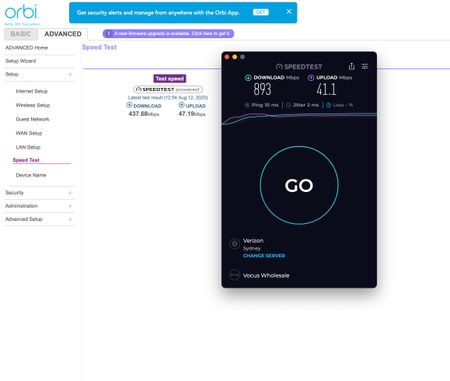
Attached is an image of my Orbi Speedtest taken seconds before the same test on a Mac that is wired into the back of the RBK50. Should I expect these to be in the same ballpark? They are WAY off. I'...
- Aug 12, 2023
.
OzGobo wrote:
The Orbi is reporting 437 down, the macOS app on the device that is wired into it is reporting 893. This seems odd.🙂
Odd is correct. One would expect that the router itself and a device wired directly to the router would report the same speed. With a gigabit ISP connection, that is normally in the 800-900Mbps range. It is a bit irritating that the router Speed Test function does not report which Speed Test server was used to perform the test. (Notice that the Mac reported using Verizon and offers an option to select a different server.) In my case, I have noticed that Speed Test reports can vary significantly.
It might be worth running Speed Test on the Orbi several times to see if the reports are consistent over time.
WiFi device speed is definitely a function of the WiFi network and specific device capabilities. The RBK50 ("K" for "Kit", consisting of one RBR50 Router ("R") and one or more RBS50 Satellites ("S") is built on 802.11ac technology with two antennas (2x2 MIMO). A WiFi device with two antennas can theoretically achieve a Link Rate of 867Mbps when placed very close to an access point. Internet searches for "what speed can I expect to get?" turn up all sorts of information.
I do not find it surprising that WiFi devices connected to this 802.11ac system continue to report Speed Tests in the 400Mbps range even with the higher ISP connection.
p.s. On the matter of firmware. I am pretty confident that updating the firmware will have little or no impact on this specific issue. I, myself, updated to the current V2.7.5.4 in the spring and have found nothing amiss.


michaelkenward
Aug 12, 2023Guru - Experienced User
OzGobo wrote:
Attached is an image of my Orbi Speedtest taken seconds before the same test on a Mac that is wired into the back of the RBK50.
The speedtest on the app measures the throughout between the router and the modem. In other words, while it uses wifi, that is just to control the test. It effectively measures the speed of your internet connection.
Anything else has to navigate whatever else is on your network.
Your wifi speeds will never match your wired speeds. They depend on the technology on your wifi clients.
If your ethernet wired Mac has the same speeds as your wifi clients, then something odd is happening.
Are you deliberately ignoring the advice to get new firmware for your router?
- OzGoboAug 12, 2023Aspirant
Hi there,
Thanks for the reply.
>>The speedtest on the app measures the throughout between the router and the modem.
Perhaps I'm not understanding you. That webpage from the Orbi is loaded on the wired Mac, as is the app. its a screenshot from the same device. The Orbi is reporting 437 down, the macOS app on the device that is wired into it is reporting 893. This seems odd. The only reason I'm concerned is that wireless devices don't seem to get above about 420 anywhere on my network, and I'm wondering if this test result is any in anyway impacting that performance. I don't expect to get 893 from a wired device on this network, but I'm thinking with 890+ coming in the front door it could potentially be better for the wireless devices?
As a bit of history, the speed of the internet connection was recently increased from 250MBPS to 1000. While it was set at 250, the Orbi app consistently reported 256MBSP down, and 24 Up. Supposedly its now 1000 down and 50 up. Since that, all Orbi devices have been restarted, as have many of the devices in the network. Both backhauls are ethernet.
>>Are you deliberately ignoring the advice to get new firmware for your router?
The fam-bam do not like me taking down the connection to install new firmware, and being old I spend a lot more time in bed than they do. Not so much ignoring it, as just old and sleepy at the times I could do it without risking someone hacking off a limb 🙂
- michaelkenwardAug 12, 2023Guru - Experienced User
OzGobo wrote:
The Orbi is reporting 437 down, the macOS app on the device that is wired into it is reporting 893. This seems odd.
As I tried to explain, those two measurements are from different places and along different paths.
Just because they both use Speedtest does not mean that they are measuring the same thing.
My Windows PC also has a speedtest App. In that case it is not measuring the same thing as the Mobile (Android) app.
The app measures the speed between the router and the Internet.
The measurement using the browser graphical user interface (GUI) is done through whatever network hardware connects the Mac to the router. (You sad the Mac us connected to the RBK50, which doesn't exist as a model number – it is a bundle of router and satellites – so I assume that you mean the RBR50 router.
You said that the Mac was wired to the router. So it is navigating its way through your Mac's LAN drivers and on through the router out to the Internet.
The only reason I'm concerned is that wireless devices don't seem to get above about 420 anywhere on my network, and I'm wondering if this test result is any in anyway impacting that performance.This may well be as fast as your wifi clients can go. (Thanks to their wifi chips that is the top speed for many 5 GHz devices.) Your Internet connection could by 10 Gbps, but if your wifi clients have technology that hits the ceiling at ~400 Mbps, that's it.
Do these wifi client give better speeds when tested somewhere else?
It might be worth a bit of background reading.
Understand Wi-Fi 4/5/6 (802.11 n/ac/ad/ax)
@duckware knows their stuff and can bust a few myths and cut through marketing hype.
I don't expect to get 893 from a wired device on this network, but I'm thinking with 890+ coming in the front door it could potentially be better for the wireless devices?I would expect to get something near ~890 Mbps on the local wired network. Your wiring and your network hardware must be pretty poor to throw away half the speed.
Perhaps this is the clue:
As a bit of history, the speed of the internet connection was recently increased from 250MBPS to 1000.When the speed went up, did you reconfigure the router for the newer Internet connection? As it was with the old service, the router will have set itself for the 250 Mbps connection. If those settings are still in there, that could slow things down.
The usual advice when changing the Internet service, even with the same ISP, is to reset and reconfigure the router for the new service. The least you should do it so take the router through its Internet setup process.
Another recommendation for anyone with queries about their router and its speeds, even before the reset, is to advise them to update to the latest firmware.
That you don't want to do that means that you are effectively stuffed. You will just have to live with the decisions you made to have a quiet life.
- CrimpOnAug 12, 2023Guru - Experienced User
.
OzGobo wrote:
The Orbi is reporting 437 down, the macOS app on the device that is wired into it is reporting 893. This seems odd.🙂
Odd is correct. One would expect that the router itself and a device wired directly to the router would report the same speed. With a gigabit ISP connection, that is normally in the 800-900Mbps range. It is a bit irritating that the router Speed Test function does not report which Speed Test server was used to perform the test. (Notice that the Mac reported using Verizon and offers an option to select a different server.) In my case, I have noticed that Speed Test reports can vary significantly.
It might be worth running Speed Test on the Orbi several times to see if the reports are consistent over time.
WiFi device speed is definitely a function of the WiFi network and specific device capabilities. The RBK50 ("K" for "Kit", consisting of one RBR50 Router ("R") and one or more RBS50 Satellites ("S") is built on 802.11ac technology with two antennas (2x2 MIMO). A WiFi device with two antennas can theoretically achieve a Link Rate of 867Mbps when placed very close to an access point. Internet searches for "what speed can I expect to get?" turn up all sorts of information.
I do not find it surprising that WiFi devices connected to this 802.11ac system continue to report Speed Tests in the 400Mbps range even with the higher ISP connection.
p.s. On the matter of firmware. I am pretty confident that updating the firmware will have little or no impact on this specific issue. I, myself, updated to the current V2.7.5.4 in the spring and have found nothing amiss.
- OzGoboAug 12, 2023Aspirant
Hi there CrimpOn,
Thank you for your very kind reply, I really appreciate it. Yes it is vexing the orbi doesn't display the speedtest server its using. I hadn't actually considered that. It could be using something in Iceland via the moon for all I know 🙂 The wireless clients I'm using to test are all iPhone 14 Pros and M1 MacBook variants, so all capable for more than 400ish, and have done so on other networks - particularly at work, but your point is well taken about the a/c network limitations and I really appreciate your input on that 🙂
I had tried the speed tests at various times over the last couple of weeks, but the Orbi result remained constant - UNTIL this morning when I tested it again. It's creeped to 539/47 consistently this morning and the wired Mac is reporting 904/46.
The point made by the other person commenting that I should rerun the setup wizard isn't a bad idea. I didn't need to do this when we went from 100/25 to 250/25 on the plan, but it can't hurt so I'll try that when I get a chance. In the end though, I now suspect it's just an interesting quirk, as wired devices on network are getting the higher speeds. I have a TV, Playstation and a Sonos network cabled into the back of one of the wired satellites, and the TV and PS are both reporting a good speed of over 850/40 when using Aus speed test servers. I suspect I'll need to go to WiFi 6 to get higher speeds for the wireless devices, and that's just too cost prohibitive at the moment given it won't really improve the experience much and many of the other devices in the house don't even support it.
I will get around to upgrading the firmware, but it can be really disruptive if it doesn't go well, and I've not done it since getting the 2nd satellite. Thank you for your experience here, its really good information to have 🙂