Forum Discussion

OzGobo
Aug 11, 2023Aspirant
RBK50 Speed Tests don't match wired device throughput
Attached is an image of my Orbi Speedtest taken seconds before the same test on a Mac that is wired into the back of the RBK50. Should I expect these to be in the same ballpark? They are WAY off. I'...
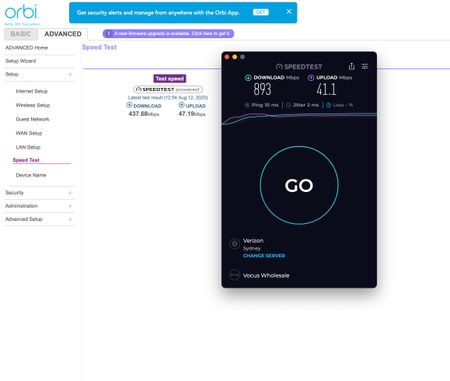
- Aug 12, 2023
.
OzGobo wrote:
The Orbi is reporting 437 down, the macOS app on the device that is wired into it is reporting 893. This seems odd.🙂
Odd is correct. One would expect that the router itself and a device wired directly to the router would report the same speed. With a gigabit ISP connection, that is normally in the 800-900Mbps range. It is a bit irritating that the router Speed Test function does not report which Speed Test server was used to perform the test. (Notice that the Mac reported using Verizon and offers an option to select a different server.) In my case, I have noticed that Speed Test reports can vary significantly.
It might be worth running Speed Test on the Orbi several times to see if the reports are consistent over time.
WiFi device speed is definitely a function of the WiFi network and specific device capabilities. The RBK50 ("K" for "Kit", consisting of one RBR50 Router ("R") and one or more RBS50 Satellites ("S") is built on 802.11ac technology with two antennas (2x2 MIMO). A WiFi device with two antennas can theoretically achieve a Link Rate of 867Mbps when placed very close to an access point. Internet searches for "what speed can I expect to get?" turn up all sorts of information.
I do not find it surprising that WiFi devices connected to this 802.11ac system continue to report Speed Tests in the 400Mbps range even with the higher ISP connection.
p.s. On the matter of firmware. I am pretty confident that updating the firmware will have little or no impact on this specific issue. I, myself, updated to the current V2.7.5.4 in the spring and have found nothing amiss.
OzGobo
Aug 12, 2023Aspirant
Hi there,
Thanks for the reply.
>>The speedtest on the app measures the throughout between the router and the modem.
Perhaps I'm not understanding you. That webpage from the Orbi is loaded on the wired Mac, as is the app. its a screenshot from the same device. The Orbi is reporting 437 down, the macOS app on the device that is wired into it is reporting 893. This seems odd. The only reason I'm concerned is that wireless devices don't seem to get above about 420 anywhere on my network, and I'm wondering if this test result is any in anyway impacting that performance. I don't expect to get 893 from a wired device on this network, but I'm thinking with 890+ coming in the front door it could potentially be better for the wireless devices?
As a bit of history, the speed of the internet connection was recently increased from 250MBPS to 1000. While it was set at 250, the Orbi app consistently reported 256MBSP down, and 24 Up. Supposedly its now 1000 down and 50 up. Since that, all Orbi devices have been restarted, as have many of the devices in the network. Both backhauls are ethernet.
>>Are you deliberately ignoring the advice to get new firmware for your router?
The fam-bam do not like me taking down the connection to install new firmware, and being old I spend a lot more time in bed than they do. Not so much ignoring it, as just old and sleepy at the times I could do it without risking someone hacking off a limb 🙂

CrimpOn
Aug 12, 2023Guru - Experienced User
.
OzGobo wrote:
The Orbi is reporting 437 down, the macOS app on the device that is wired into it is reporting 893. This seems odd.🙂
Odd is correct. One would expect that the router itself and a device wired directly to the router would report the same speed. With a gigabit ISP connection, that is normally in the 800-900Mbps range. It is a bit irritating that the router Speed Test function does not report which Speed Test server was used to perform the test. (Notice that the Mac reported using Verizon and offers an option to select a different server.) In my case, I have noticed that Speed Test reports can vary significantly.
It might be worth running Speed Test on the Orbi several times to see if the reports are consistent over time.
WiFi device speed is definitely a function of the WiFi network and specific device capabilities. The RBK50 ("K" for "Kit", consisting of one RBR50 Router ("R") and one or more RBS50 Satellites ("S") is built on 802.11ac technology with two antennas (2x2 MIMO). A WiFi device with two antennas can theoretically achieve a Link Rate of 867Mbps when placed very close to an access point. Internet searches for "what speed can I expect to get?" turn up all sorts of information.
I do not find it surprising that WiFi devices connected to this 802.11ac system continue to report Speed Tests in the 400Mbps range even with the higher ISP connection.
p.s. On the matter of firmware. I am pretty confident that updating the firmware will have little or no impact on this specific issue. I, myself, updated to the current V2.7.5.4 in the spring and have found nothing amiss.
- OzGoboAug 12, 2023Aspirant
Hi there CrimpOn,
Thank you for your very kind reply, I really appreciate it. Yes it is vexing the orbi doesn't display the speedtest server its using. I hadn't actually considered that. It could be using something in Iceland via the moon for all I know 🙂 The wireless clients I'm using to test are all iPhone 14 Pros and M1 MacBook variants, so all capable for more than 400ish, and have done so on other networks - particularly at work, but your point is well taken about the a/c network limitations and I really appreciate your input on that 🙂
I had tried the speed tests at various times over the last couple of weeks, but the Orbi result remained constant - UNTIL this morning when I tested it again. It's creeped to 539/47 consistently this morning and the wired Mac is reporting 904/46.
The point made by the other person commenting that I should rerun the setup wizard isn't a bad idea. I didn't need to do this when we went from 100/25 to 250/25 on the plan, but it can't hurt so I'll try that when I get a chance. In the end though, I now suspect it's just an interesting quirk, as wired devices on network are getting the higher speeds. I have a TV, Playstation and a Sonos network cabled into the back of one of the wired satellites, and the TV and PS are both reporting a good speed of over 850/40 when using Aus speed test servers. I suspect I'll need to go to WiFi 6 to get higher speeds for the wireless devices, and that's just too cost prohibitive at the moment given it won't really improve the experience much and many of the other devices in the house don't even support it.
I will get around to upgrading the firmware, but it can be really disruptive if it doesn't go well, and I've not done it since getting the 2nd satellite. Thank you for your experience here, its really good information to have 🙂
- michaelkenwardAug 13, 2023Guru - Experienced User
OzGobo wrote:
Yes it is vexing the orbi doesn't display the speedtest server its using. I hadn't actually considered that.
You showed two very different tests in your first message. I am getting confused as to which is which.
The one on the left (437.68 Mbps) seems to be through the browser graphical user interface (GUI) on your Mac. This is widely seen as the least reliable way of testing speeds, mostly because we have no idea how it is running the test, especially the server it uses.
Your other test (893 Mbps) – the one you call the Orbi Speedtest – looks like it is run using the Speedtest app on a mobile device. (I confess that I no longer have Orbi kit on my network and am comparing it with Netgear's MK mesh.)
That these two measurements are very different is where the puzzle arises.
The 437.68 Mbps GUI test looks more like a wifi speed than the wired Mac test that you describe.
A more reliable speedtest would be on the Mac but outside the Orbi environment.
Just open a browser, any browser, on your Mac and aim it at this:
This will show you which server it uses, along with other useful details.
Run that test and see what speed it delivers. It should be as near as dammit to the ISP's speed.
This bit does not make sense to me:
It's creeped to 539/47 consistently this morning and the wired Mac is reporting 904/46.The "wired Mac" is the one that showed 437.68 Mbps in your first message. Now you say it is 904?
But that looks more like the test on the mobile app.
This bit is interesting:
I have a TV, Playstation and a Sonos network cabled into the back of one of the wired satellites, and the TV and PS are both reporting a good speed of over 850/40 when using Aus speed test servers.To me this says that your network traffic is running at around 850 Mbps. Pretty good all round. I wouldn't bother with messing around with the Internet settings.
This takes us back to the odd 437.68 Mbps result.
Either your Mac is doing something strange and throttling the wired speed, or the test is really happening over the wifi connection. Running the browser speedtest that I suggested should home in on the answer.
Finally there is this comment:
I suspect I'll need to go to WiFi 6 to get higher speeds for the wireless devices, and that's just too cost prohibitive at the moment given it won't really improve the experience much and many of the other devices in the house don't even support it.You are spot on there. WiFi 6 (not to be confused with 6 GHz wifi which is, get this, Wi-Fi 6E) will get you nowhere on clients that don't support it.
All in all, your network seems to be in pretty good health, with the exception of that wonky wired Mac result.
